

Azure Blobs
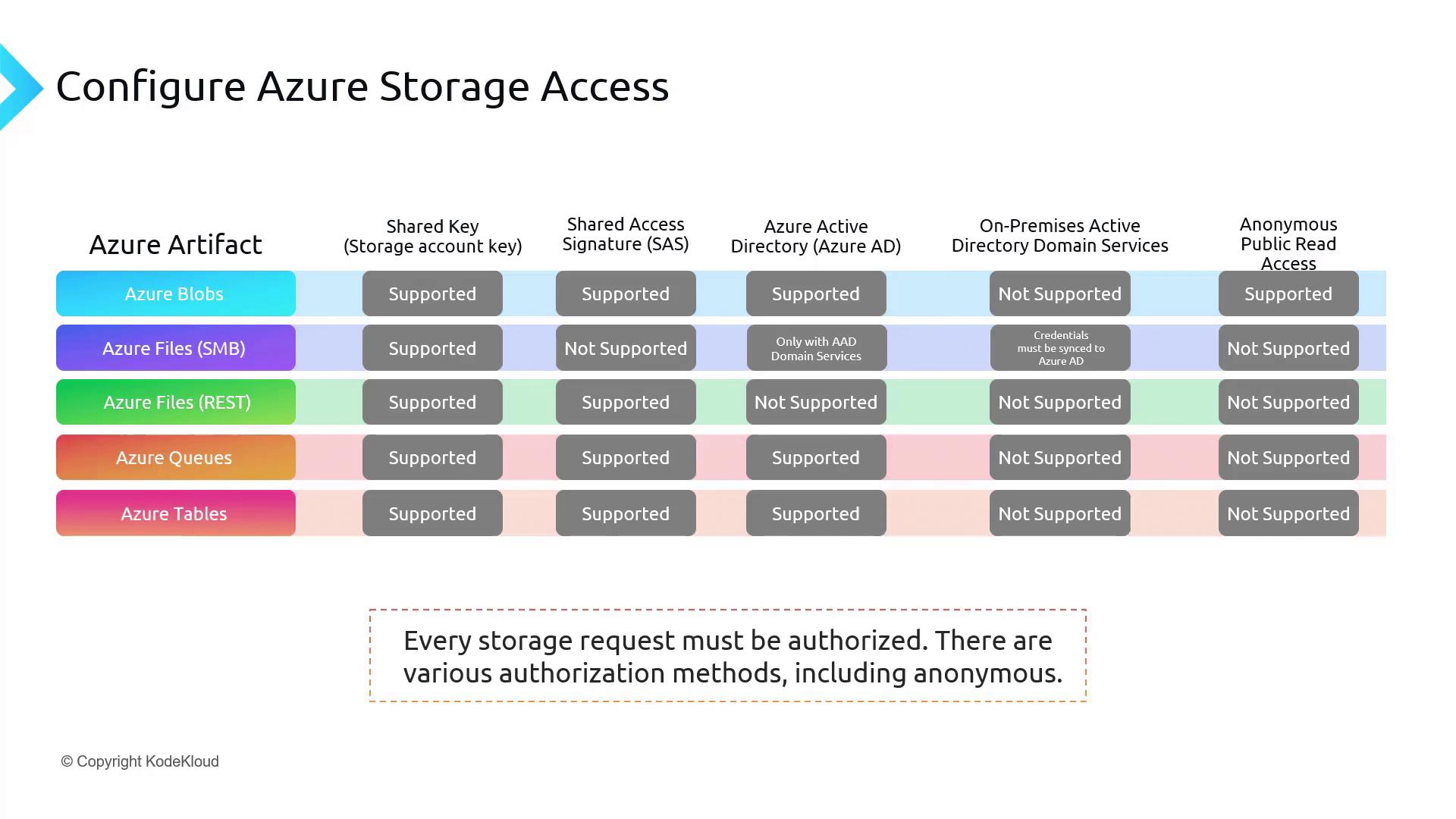
Azure Blob Storage is a highly scalable object storage solution for both text and binary data. It supports several authentication methods:- Shared Key (Storage Account Key)
- Shared Access Signature (SAS): Secure, delegated access to resources within your storage account.
- Azure Active Directory (Azure AD): Leverages your Azure AD account for accessing blob content.
- Anonymous Public Read Access: Ideal for distributing read-only data (e.g., images or documents) on a public website.
On-premises Active Directory Domain Services is not supported for Azure Blob access.
Azure Files
Azure Files is a fully managed file storage service accessed using the SMB protocol. The authentication methods for Azure Files vary based on the access method:- Shared Key: Supported.
- Shared Access Signature (SAS): Not supported for SMB access; however, it can be used when accessing Azure Files via RESTful APIs.
- Azure Active Directory (Azure AD): Not supported for SMB access, but available if integrated with Azure AD Domain Services.
- On-premises Active Directory Domain Services: Supported when you sync your credentials with Azure AD.
- Anonymous Public Read Access: Not available.
For RESTful access to Azure Files, only Shared Key and SAS are supported. Azure AD and on-premises Active Directory Domain Services authentication methods are not available in this scenario.
Azure Queues
Azure Queues facilitate messaging between application components. They support the following authentication methods:- Shared Key
- Shared Access Signature (SAS)
- Azure Active Directory (Azure AD)
On-premises Active Directory Domain Services and anonymous access are not supported for Azure Queues.
Azure Tables
Azure Tables provide a NoSQL data store for semi-structured data in Azure Storage. The supported authentication methods include:- Shared Key
- Shared Access Signature (SAS)
- Azure Active Directory (Azure AD)
Choosing the Right Storage Solution
Selecting the optimal storage solution depends on your data type, security requirements, and application accessibility. For instance:- If you need to store public-facing images or documents, Azure Blobs are a suitable option because they support anonymous public read access.
- For more secure file storage that may integrate with on-premises credentials, Azure Files offers robust authentication options.
Conclusion
When configuring an Azure storage solution and its access method, it is essential to consider your data’s characteristics, the required security level, and the application’s accessibility needs. Each storage solution mandates proper authorization protocols. Although several authorization methods exist, remember that anonymous access is exclusively available for Azure Blobs. During the setup process of a storage account, you will encounter options such as Azure Active Directory, Shared Access Signatures, and account keys. Stay tuned for more detailed insights on configuring secure access to Azure storage solutions.Additional Resources
- Azure Storage Documentation
- Azure Active Directory Overview
- Azure File Storage Documentation
- Azure Queues and Tables Documentation