Hello and welcome back. If you followed the previous lessons, you already know about different embedding model families — word-level, sentence-level, and multimodal. The practical next steps are: how to pick the right embedding model for your use case, and how to optimize it for production. This article walks through that process end-to-end, focusing on practical decisions and evaluation steps you can implement today. We’ll split the workflow into two phases:
  1. Model selection — choose the best prebuilt model for your data and task.
  2. Model optimization — adapt and tune that model to meet production SLOs.
Below is a concise, actionable guide through both phases.

1. Model selection

Model selection starts when you decide to use embeddings for a task: semantic search, recommendations, RAG (retrieval-augmented generation), clustering, etc. The aim is to filter candidate models based on characteristics that matter for your data and task. Key factors to evaluate
FactorCore questionWhy it matters
Data modalityIs your input plain text, code, images, audio, or tabular?Models trained on a modality different from your data will produce noisy or misleading vectors.
DimensionalityWhat vector length do you need? (128, 256, 512, 768, …)Higher-dimension vectors often encode more nuance but increase storage, ANN cost, and latency. Choose the smallest dimension that preserves performance.
Model complexity & latencyIs low-latency inference required?Large transformer encoders give better semantic fidelity but increase latency and cost. For real-time systems, distilled/lightweight encoders may be necessary.
Training data & domain matchWas the model trained on data similar to yours?Domain mismatch (e.g., Wikipedia-trained model used on legal/clinical text) reduces embedding relevance. Check vendor docs for training domains.
Task requirementsAre you optimizing for recall, clustering tightness, or passage-level semantics?Different tasks prioritize different embedding properties — match model strengths to the task.
Evaluation & human validationHow will you benchmark models?Use quantitative metrics and human-in-the-loop checks on a holdout dataset representative of production data.
Task-to-model mapping (high level)
  • Semantic search: prioritize high recall and good separation of near-duplicates.
  • Clustering: prefer compact, well-separated clusters in vector space.
  • RAG: embeddings must capture passage-level context and be robust across longer texts.
  • Recommendations: may require multimodal or hybrid embeddings that blend behavior and content signals.
Evaluation suggestions
  • Use metrics suited to the task: recall@K, precision@K, MRR, NDCG for retrieval; silhouette score or adjusted Rand index for clustering.
  • Create a holdout dataset that closely resembles production inputs and user queries.
  • Add human validation for semantic judgments (e.g., similarity labeling of pairs).
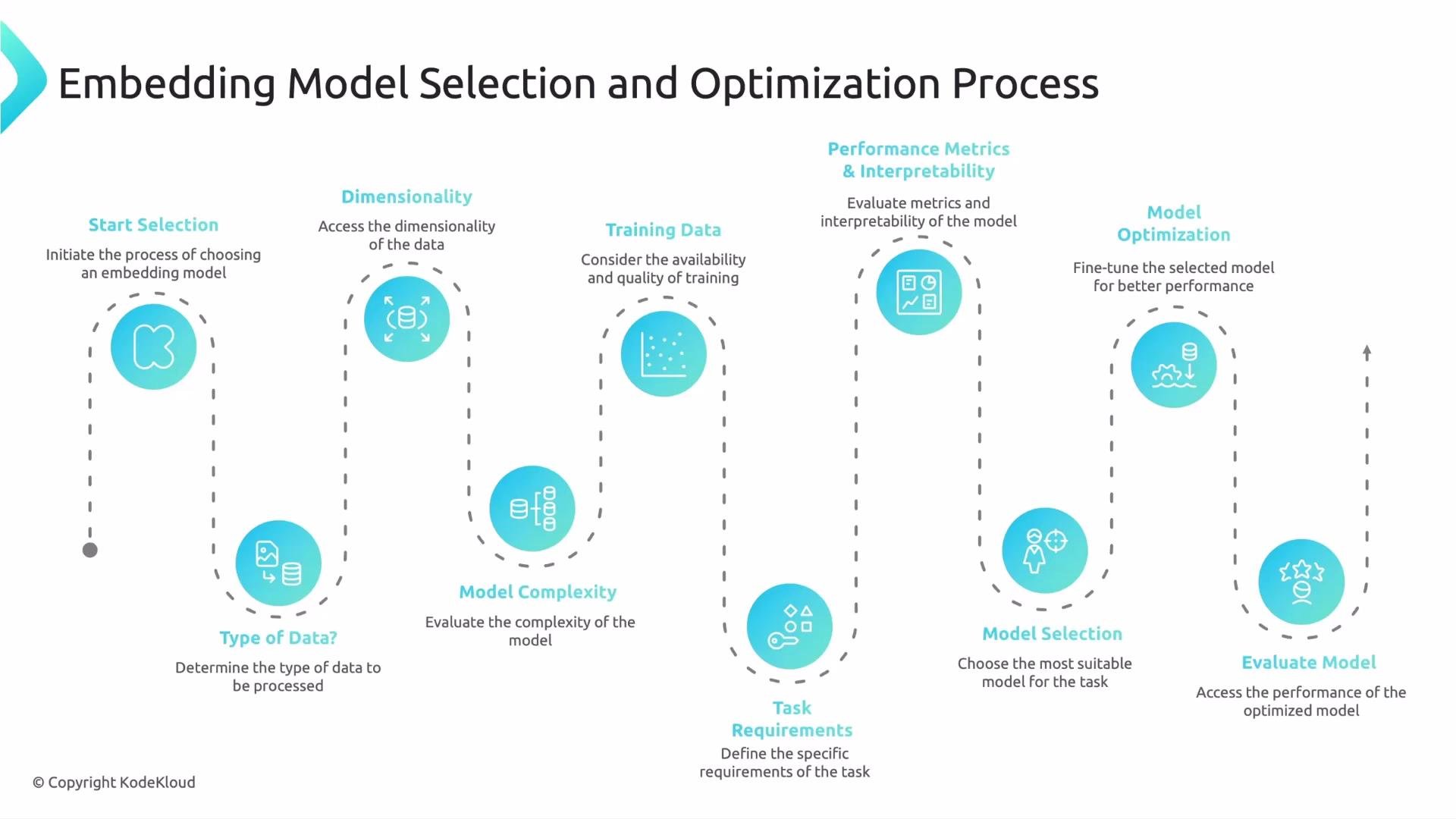
Selecting a winner usually takes careful benchmarking and often one to three weeks at many organizations. The chosen model should balance modality match, dimensionality, latency, and empirical performance for your task.
The image is a flowchart describing the "Embedding Model Selection and Optimization Process," detailing steps such as start selection, dimensionality, training data, model complexity, task requirements, and various evaluations and optimizations.

2. Model optimization

After selecting a base model, optimization focuses on adapting it to production constraints. Optimization is iterative: fine-tune or transform, re-evaluate, and deploy with monitoring. Common optimization techniques
TechniqueWhat it doesTrade-offs / Notes
Domain fine-tuningContinue training on domain-specific examples (e.g., legal, clinical, code)Improves semantic alignment with your corpus; requires labeled or pseudo-labeled data and compute.
Dimensionality reductionApply PCA or a learned linear projection to reduce dimension (e.g., 768256)Saves storage and speeds up ANN; may lose some nuance — benchmark to measure impact.
DistillationTrain a smaller “student” model to mimic a larger “teacher”Reduces inference latency while retaining much of the teacher’s performance.
QuantizationStore vectors or model weights at lower precision (e.g., 8-bit)Saves memory and increases throughput; small accuracy loss possible.
Pruning / compressionRemove redundant parameters or use sparse representationsCan reduce model size; effectiveness depends on architecture and tooling.
Index & retrieval tuningTune ANN (HNSW M, efConstruction/efSearch; IVF clusters; PQ settings)Critical for balancing recall vs latency; benchmark using your query workload.
Sharding & cachingPartition the index and add caching for hot queriesImproves throughput and availability at scale; increases operational complexity.
Hybrid retrievalCombine sparse (BM25) + dense retrievalOften improves precision/recall for retrieval-heavy systems — useful as a first-pass filter.
Optimization workflow
  1. Benchmark baseline (selected model + default indexing).
  2. Apply one optimization at a time (e.g., quantize, then reduce dimension).
  3. Re-run benchmarks and human validation after each change.
  4. Tune ANN index parameters to achieve target recall/latency trade-offs.
  5. Deploy with monitoring and drift detection.
Remember: higher-dimensional or more complex embeddings can improve accuracy but increase storage, memory bandwidth, and search latency. Optimize for the smallest representation that meets your quality SLOs.
Warning: using a model trained on a different domain or modality without adaptation often produces misleading similarity scores. Always validate embeddings on representative samples before productionizing them.

Practical checklist — from selection to production

  1. Define the task and SLOs (latency, recall, cost).
  2. Characterize your data modality and domain.
  3. Shortlist candidate models by modality, dimension, and complexity.
  4. Benchmark candidates on a holdout dataset and include human validation where needed.
  5. Select the best base model.
  6. Optimize: fine-tune, compress, reduce dimensionality if possible, and tune the vector index.
  7. Deploy, monitor, and iterate; add drift detection and alerting for representation degradation.
Common monitoring signals
  • Query latency and p95/p99.
  • Recall@K or NDCG on a production-like query stream.
  • Index size, memory pressure, and throughput.
  • Concept drift indicators (e.g., distributional changes in query embeddings).
Further reading and references That wraps up this lesson. Follow this selection + optimization loop to build scalable, accurate embedding-based systems — and iterate early and often as data and user behavior evolve. Speak with you in the next one.

Watch Video