

Start by answering one simple question: do you want to manage the database infrastructure yourself, or would you rather use a hosted/fully-managed service?
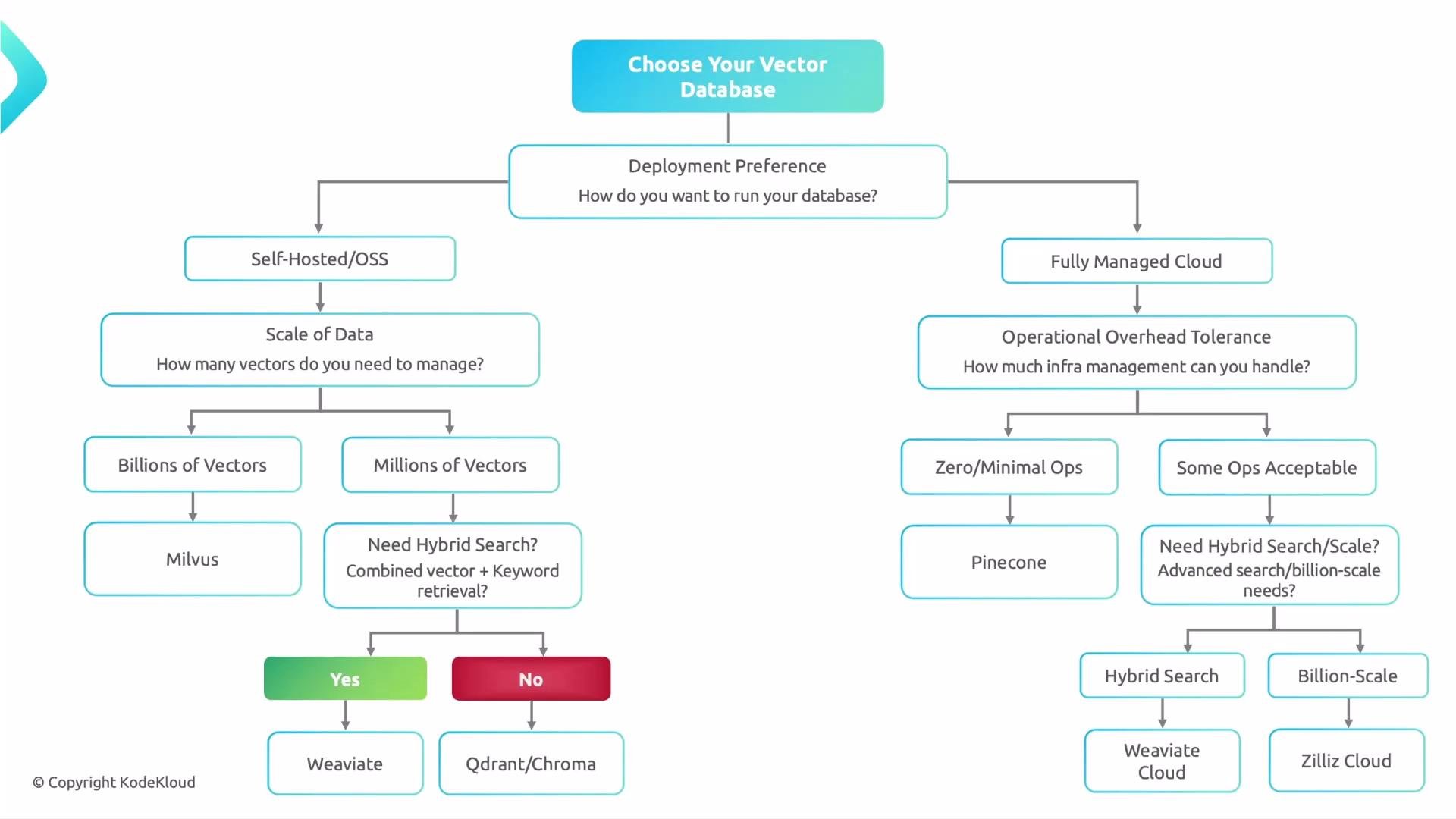
Decision flow (high level)
- Deployment model: self-hosted vs fully managed.
- Data scale: millions vs billions of vectors.
- Feature needs: hybrid search, filtering/metadata, custom distance metrics, and indexing options.
- Operational tolerance: zero-ops, minimal ops, or full control.
Self-hosted / Open-source (full control)
Choose this when you want full control over infrastructure, networking, compliance, and custom integrations.- If you expect billion-scale workloads:
- Milvus — a distributed, cloud-native vector database built for scale and sustained throughput. See Milvus (Zilliz).
- If you expect millions of vectors:
- Need built-in hybrid search (vector + keyword/semantic filtering)? Consider Weaviate.
- Prefer lightweight and simple to operate? Consider Qdrant or Chroma.
- Weaviate — strong built-in hybrid capabilities.
- Qdrant — performant, lightweight vector DB.
- Chroma — easy local/self-hosted option for smaller setups.
Fully managed / Cloud (reduced ops)
Choose a hosted service when you want to focus on embeddings, models, and product features rather than running infrastructure.- Minimal ops acceptable:
- Pinecone — a fully managed vector database that minimizes operational overhead and abstracts infrastructure.
- Zero-ops desired or need managed hybrid search:
- Managed Weaviate Cloud for hybrid search in a hosted model.
- Zilliz Cloud or other managed providers if you want a hosted Milvus-style solution.
Quick comparison
Why this choice matters
- Performance and latency: index structure, sharding, and distribution affect query latency.
- Scalability: design for expected vector cardinality (millions vs billions).
- Features: hybrid search, filtering, metadata indexing, and custom distance metrics vary between systems.
- Cost and ops: managed services reduce ops but may increase recurring costs; self-hosted gives control but requires maintenance.
- Migration risk: changing vector databases later can mean exporting, re-indexing, and adapting application code.
Migration between vector databases can be costly and time-consuming. Favor a choice aligned to your expected scale and feature needs to avoid long migrations.
Practical checklist before choosing
- Decide deployment model:
self-hostedvsfully managed. - Estimate data scale: millions vs billions of vectors.
- Identify required features:
- Do you need hybrid search (vector + keyword/semantic)?
- Filtering and metadata indexing?
- Custom distance metrics or scoring functions?
- Evaluate operational tolerance:
zero-ops,minimal ops, orfull control. - Match the database to your requirements:
- Milvus: choose for distributed, billion-scale workloads.
- Weaviate: choose when hybrid search is critical.
- Pinecone: choose to minimize ops and get a managed, production-ready service.
- Qdrant / Chroma: good for lightweight or smaller self-hosted deployments.
- Zilliz Cloud / other providers: managed alternatives for zero-ops or Milvus-compatible hosting.