

- Primary model — managed SaaS vs. self-hosted open source.
- Core strengths — architectural trade-offs such as simplicity, modularity, or advanced indexing.
- Scalability — target vector counts, distributed architecture, and GPU support.
- Primary usage — the workload the database optimizes for: semantic search, RAG (retrieval-augmented generation), recommendations, or experiments.
Four practical pillars to evaluate vector databases
Primary model: managed vs. self-hosted
Choosing a managed cloud service versus an open-source, self-hosted system is primarily an operational decision about how much infrastructure your team will own.
Key trade-off: convenience versus control. For many teams, managed services accelerate time-to-value; for others, open-source gives flexibility for custom pipelines or tighter cost control.
Core strengths: engineering philosophies
Each database emphasizes a different set of features and trade-offs:- Simplicity and fast iteration — ideal for prototyping and local development (Chroma is commonly chosen for developer experience).
- Modularity and integrated features — flexible APIs, GraphQL, and rich metadata filtering (Weaviate excels here).
- Real-time updates and low-latency filtering — important for recommendation systems and streaming pipelines.
- Advanced indexing and query features — optimized for strict latency and recall at large scale.
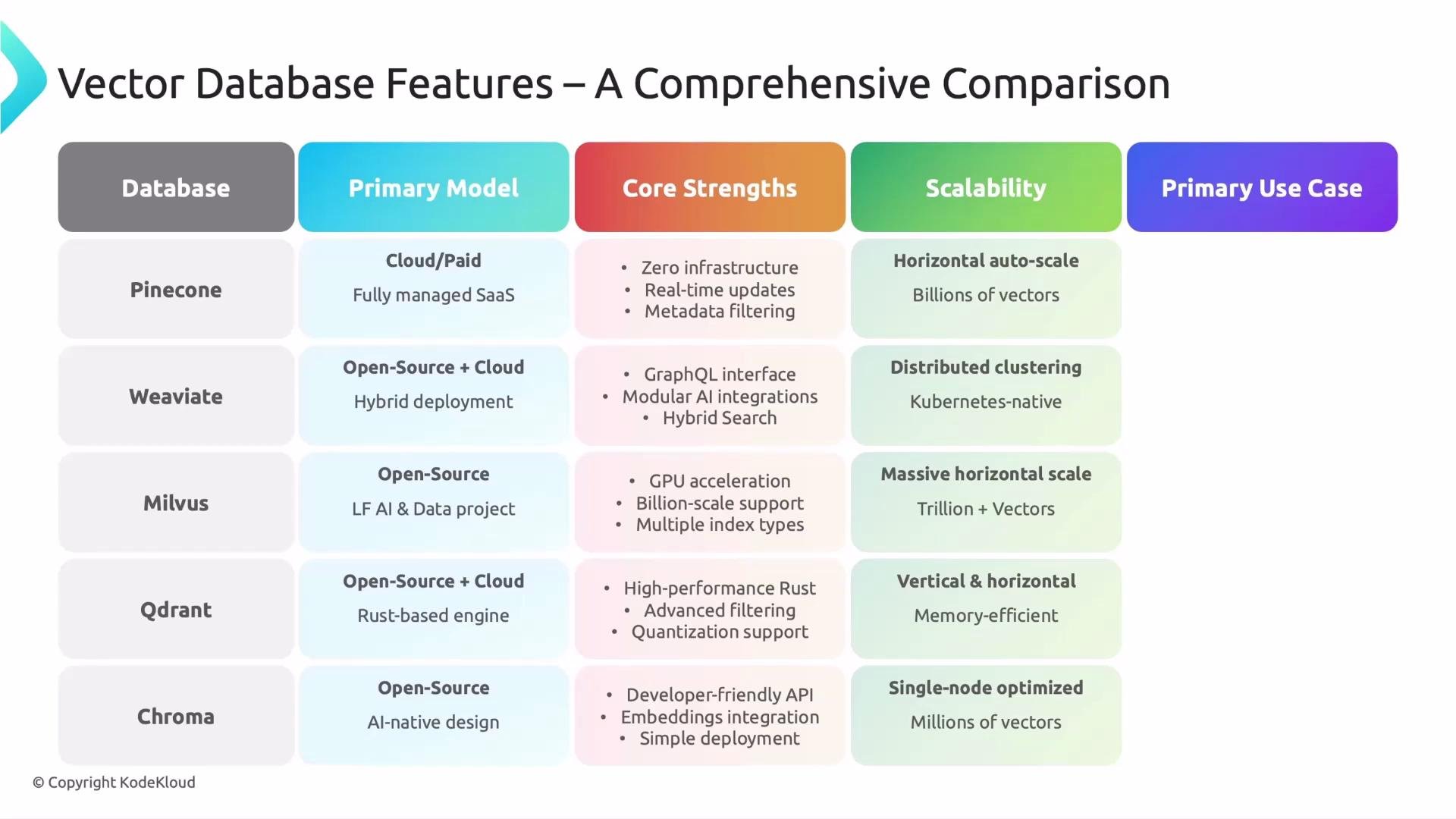
Scalability: match the database to your dataset size
Vector databases differ in target scale and hardware assumptions:- Small-scale / local: best for rapid prototyping and low-cost experimentation.
- Mid-scale: supports millions of vectors using efficient CPU-based indexes.
- Large-scale / massive: built for billions+ vectors with distributed storage and optional GPU acceleration (Milvus is notable for GPU support and large collections).
Primary usage patterns
Different databases are optimized for distinct application patterns:- Enterprise search & RAG: prioritize high-quality semantic retrieval across documents.
- Real-time recommendations & high-throughput filtering: require low-latency similarity search and robust filtering (Qdrant is commonly used here).
- Experimentation and prototyping: prefer simple APIs and quick onboarding (Chroma is frequently used during early LLM development).
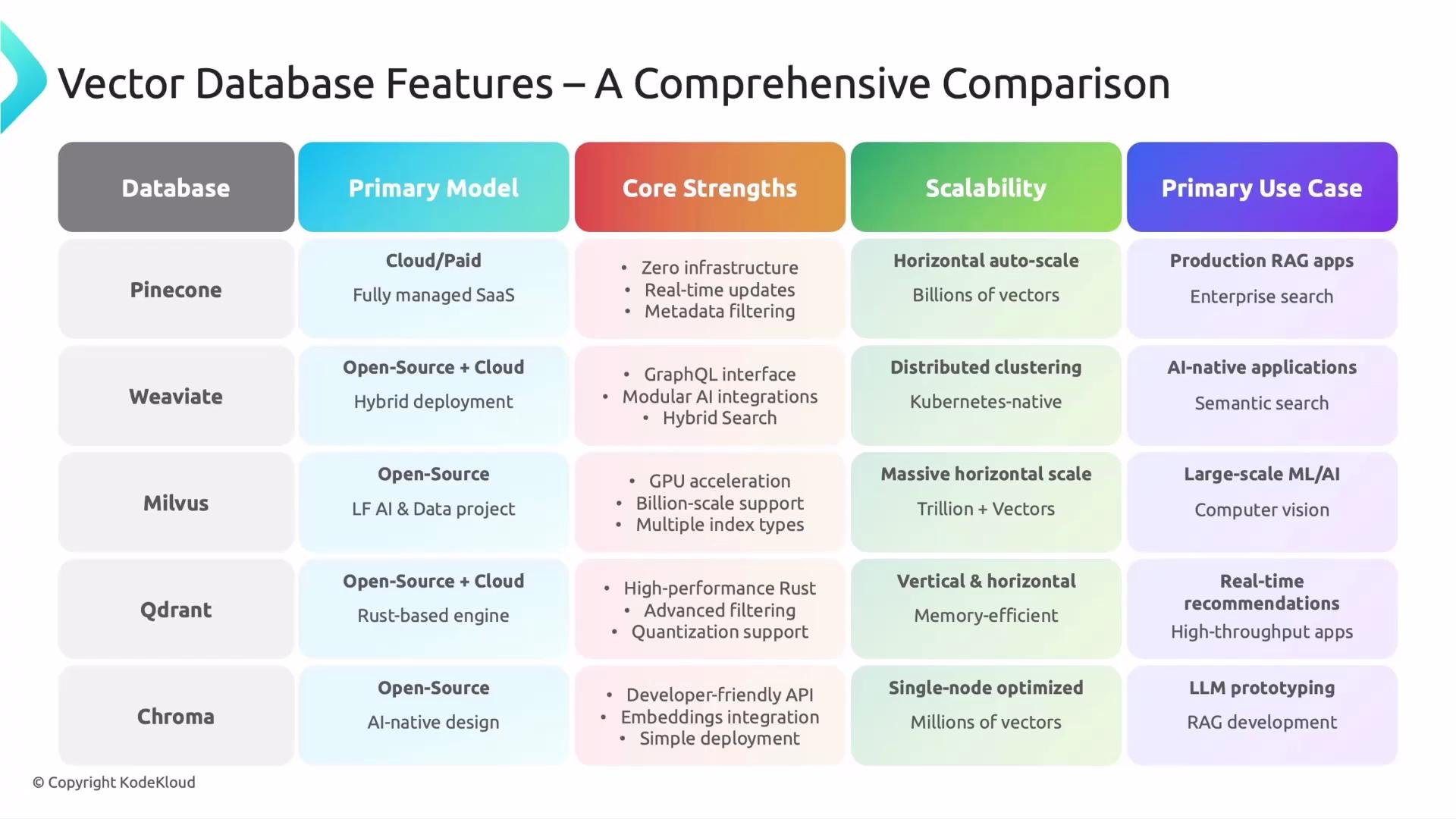
Quick reference: how popular options map to the pillars
Key takeaway
There is no universally “best” vector database. Choose the one whose operational model, core strengths, and scalability align with your product requirements—whether that’s high-recall enterprise search, low-latency recommendations, or rapid prototyping.Choose a vector database based on your team’s tolerance for operational complexity, your target dataset size, and the application workload (semantic search, recommendations, RAG, or experimentation).
Next steps
In the next lesson we’ll dig into benchmarking: how engineers measure throughput, latency, recall, and cost across vector databases so you can make evidence-based choices.Links and further reading
- Pinecone — managed vector database
- Weaviate — modular open-source vector search with GraphQL
- Milvus — high-performance vector database with GPU support
- Qdrant — real-time vector search and filtering
- Chroma — developer-friendly vector store for experimentation