

curl. That confirms the services are running from the server/engineer perspective, but it doesn’t prove the same results from the client/browser perspective.
Below are the two checks we ran locally on the host to confirm both NGINX and the Flask app were responding:
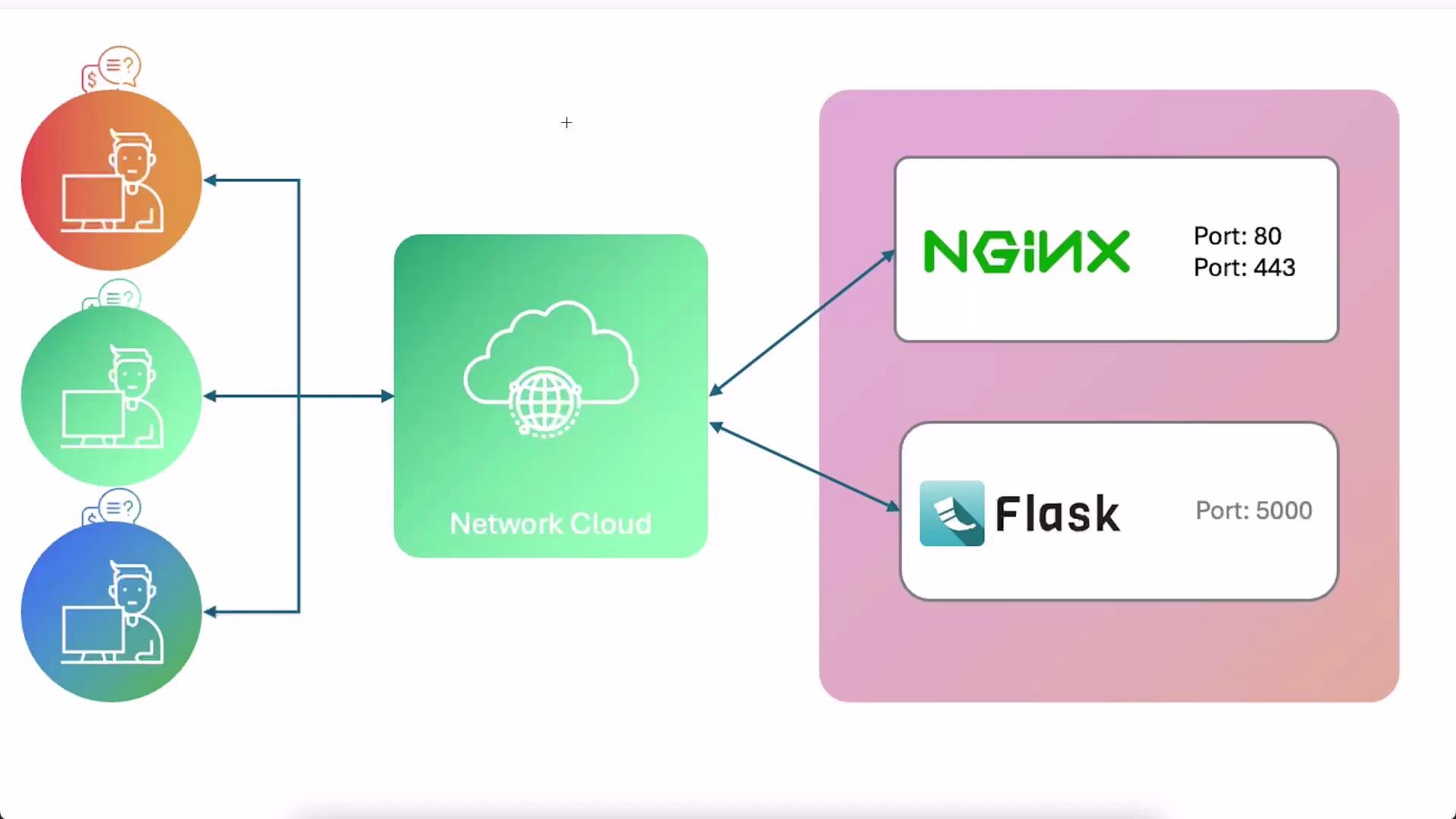
- Users (left) reach services over the Internet (network cloud).
- Services (right):
- NGINX serves the default page on port
80(HTTP). - A small Flask application listens on port
5000.
- NGINX serves the default page on port
80 or 5000 in a browser tab from the UI). This setup is convenient for learning but not representative of a secure production environment.
UFW (Uncomplicated Firewall) is a simple frontend to manage Linux iptables rules. See the official UFW documentation for details: https://help.ubuntu.com/community/UFW. The recommended workflow is to enable UFW and explicitly allow only the ports your system needs.
Before enabling the firewall, always make sure you allow SSH access (for example
sudo ufw allow OpenSSH or sudo ufw allow 22/tcp) so you don’t lock yourself out of the server.Typical UFW workflow
Below is a step-by-step example showing how to check UFW status, allow SSH, enable the firewall, add web ports, and verify the rules:Port summary and recommended exposure
Best practices and notes
- UFW adds both IPv4 and IPv6 rules. You will typically see
Rule added (v6)in the command output. If your environment supports IPv6 (mobile networks frequently do), those rules are relevant. - Always permit SSH (
22/tcporOpenSSH) before enabling UFW to prevent locking yourself out. - For public-facing services, prefer exposing only
80and443. Avoid opening non-standard ports (like5000) to reduce your attack surface and avoid confusion for end users who normally do not append ports to URLs. - To expose internal apps on standard web ports, use NGINX as a reverse proxy (or a load balancer) to accept traffic on
80/443and forward requests internally to your application on5000. Reverse proxying and load balancing deserve their own dedicated guides.
- UFW documentation: https://help.ubuntu.com/community/UFW
- NGINX documentation: https://nginx.org/en/docs/
80/443) instead of opening many arbitrary ports.