

- Configure NGINX to redirect all HTTP traffic to HTTPS and serve a simple HTTPS site using locally generated SSL certificates (for testing).
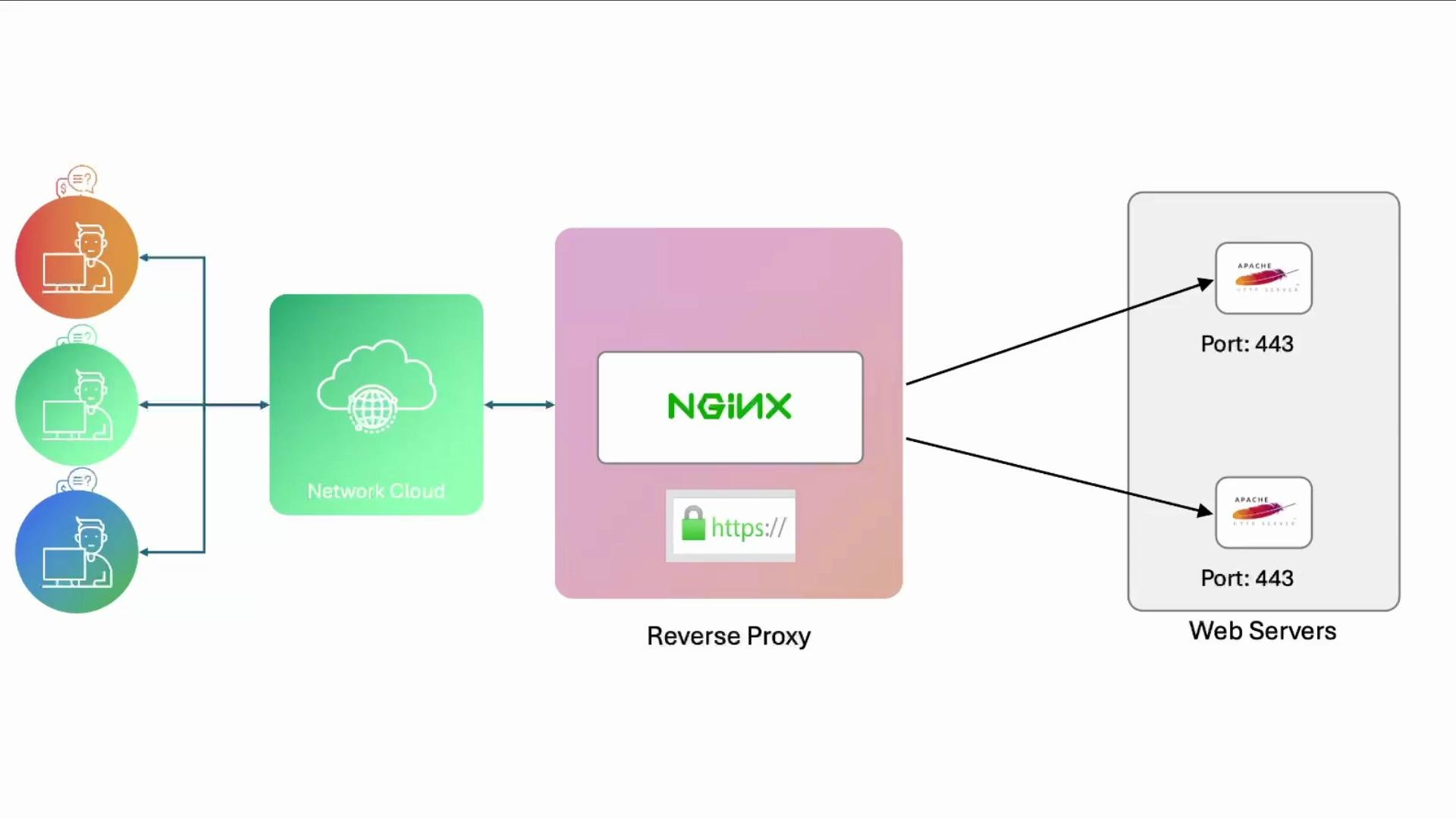
- Configure NGINX as an HTTPS reverse proxy that accepts TLS on the frontend and forwards encrypted HTTPS traffic to backend Apache servers.
- For local test certificates use mkcert: https://mkcert.dev. For production issue certificates from a trusted CA such as Let’s Encrypt: https://letsencrypt.org.
- Ensure OS firewall (e.g.,
ufw) allows443/tcpon all servers that should accept HTTPS traffic. - If NGINX will proxy over HTTPS to backends, the backends must present valid certificates, or you must explicitly configure NGINX to skip verification (not recommended for production).
For local development use
mkcert to create locally-trusted certs quickly. For production, automate certificate issuance and renewal with Let’s Encrypt or another trusted CA.- Simple HTTP → HTTPS redirect and an HTTPS site on NGINX
/etc/nginx/sites-available/example-https:
nginx -t will fail if the certificate files referenced above do not exist. For testing you can generate a cert and key with mkcert.
Generate test certificates using mkcert:
mkcert creates example.com.pem (certificate) and example.com-key.pem (private key) by default in the current directory. mkcert also supports -cert-file and -key-file flags to write directly to target locations.
After placing the certificate and key, test and reload NGINX:
--insecure only for local testing where the mkcert CA may not be trusted by the client. Do not use --insecure in production.
- Reverse proxy: NGINX front-end (HTTPS) → Apache backends (HTTPS)
/etc/nginx/sites-available/example-https:
- Because the upstream servers are HTTPS endpoints, NGINX will initiate TLS when contacting them.
proxy_ssl_server_name on;ensures the Server Name Indication (SNI) extension is sent so backends can present the correct certificate. - In production you should enable upstream certificate validation. Depending on your environment you may need to provide a CA bundle or configure
proxy_ssl_trusted_certificateandproxy_ssl_verifyoptions (see NGINX docs). - For internal environments using self-signed certificates you can disable verification during testing, but this is a security risk in production.
Do NOT disable TLS verification (
proxy_ssl_verify off) in production. If using self-signed certs for internal services, add the CA to the NGINX host trust store instead of skipping verification./etc/apache2/sites-available/example.conf):
- Make sure each backend allows incoming
443/tcp:
- Place the corresponding certificates on each backend (they can use the same certificate if the domain and CA match).
- Restart/reload services after configuration changes:
- To validate load balancing and which backend handled a request, add a unique identifier to each backend’s
index.html(for example “NODE01” on192.230.210.3and “NODE02” on192.230.210.6) and issue multiple requests. Responses should alternate according to upstream load balancing.
/var/www/html/index.html on a backend:
- We configured NGINX to redirect HTTP → HTTPS and serve TLS using locally generated certs for testing.
- We extended NGINX to act as an HTTPS reverse proxy, forwarding requests to HTTPS backends with SNI support.
- For production use:
- Obtain certificates from a trusted CA (e.g., Let’s Encrypt).
- Ensure proper certificate verification between proxy and backends (add CA bundles or enable
proxy_ssl_verify). - Avoid disabling TLS verification on the proxy.
- Consider monitoring, access and error logging, and automated certificate renewal.
- mkcert — https://mkcert.dev
- Let’s Encrypt — https://letsencrypt.org
- NGINX proxying to HTTPS backends — https://nginx.org/en/docs/http/ngx_http_proxy_module.html
- Apache mod_ssl / VirtualHost examples — https://httpd.apache.org/docs/2.4/ssl/ssl_howto.html
- UFW (Uncomplicated Firewall) — https://help.ubuntu.com/community/UFW