

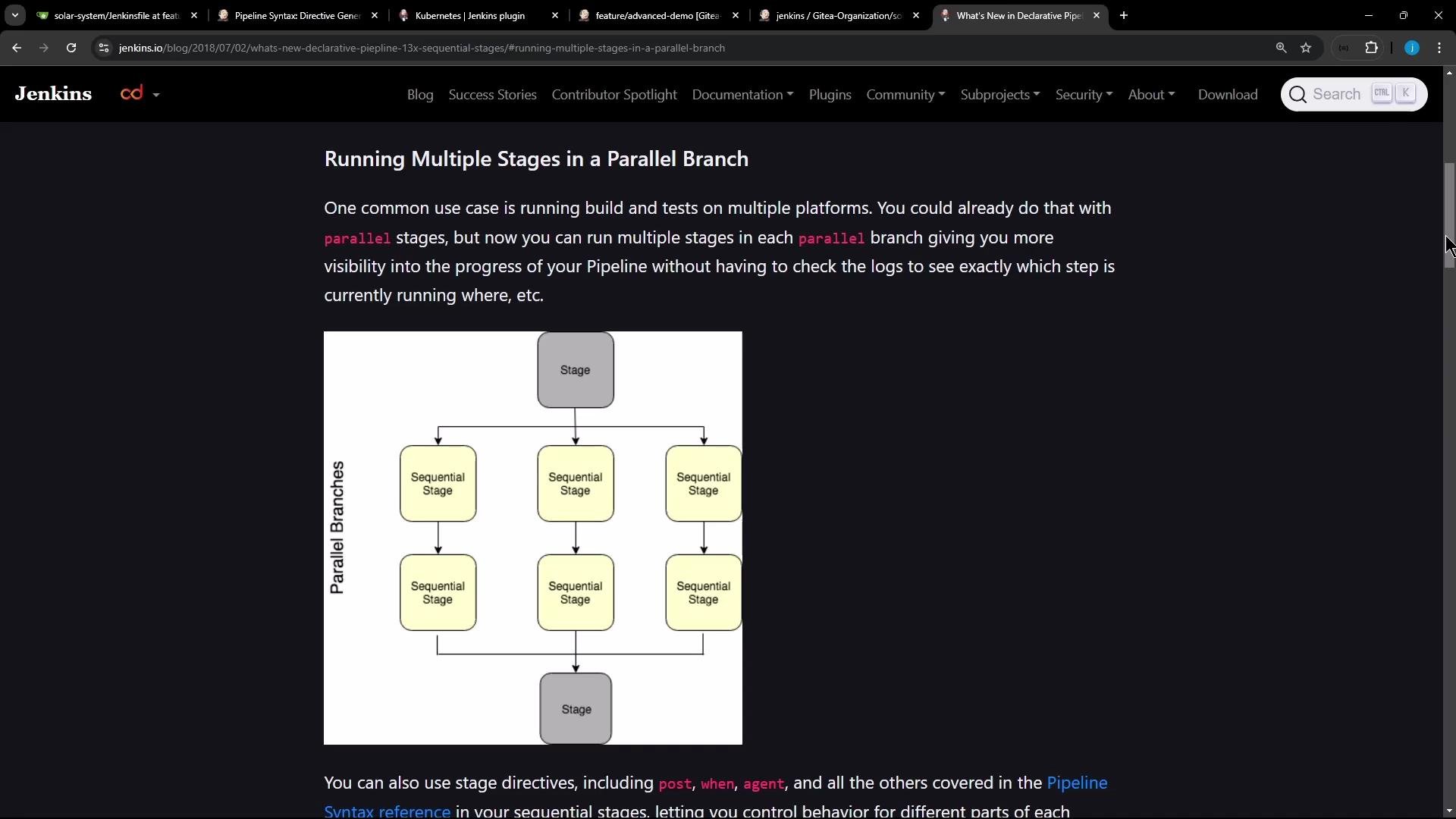
- Better visibility: the Jenkins UI shows each nested stage, making it clear which step is running or failing inside a parallel branch.
- Ordered work: tasks that must run in sequence (like install → test → package) can be expressed cleanly within each parallel branch.
- Isolation of flow: a failure in one stage only affects the remaining inner stages of that branch; other parallel branches continue.
stages block inside that branch’s stage. The following Declarative Pipeline snippet demonstrates this pattern:
stage may contain a stages block, and those inner stage declarations execute sequentially inside that branch while sibling branches run in parallel.
Common failure modes and debugging tips
- npm cache / permission problems (EACCES)
If agents have a root-owned global npm cache or restricted filesystem permissions,
npm installmay fail with EACCES errors (attempting to create directories under root-owned locations). Example excerpt:
- Use an agent-writable cache directory (example in the snippet above):
npm install --no-audit --cache . - Or ensure the agent user owns the global cache:
sudo chown -R $(id -u):$(id -g) ~/.npmon the agent (if you control it). - Alternatively, run builds inside containers or ephemeral workspaces where cache and ownership are predictable.
- ENOTEMPTY / rename errors (workspace state)
Even after switching cache directories, npm may fail with
ENOTEMPTYwhen renaming subfolders innode_modules. That indicates leftover files or race conditions in the workspace rather than a Jenkins pipeline bug:
- Clean the workspace between runs (
deleteDir()in a Declarativepoststep or use the Workspace Cleanup plugin). - Use isolated build containers or workspaces per job/branch to avoid leftover node_modules interference.
- Consider caching strategies that store prebuilt artifacts instead of
node_moduleswhere feasible.
When using nested
stages inside a parallel branch:- Put the inner
stagesblock directly inside the branch’sstage. - Each inner
stageruns in order; if one fails, following stages in that branch are skipped. - Other parallel branches are unaffected and continue to run concurrently.
Best practices and recommendations
- Prefer containerized or ephemeral agents for reproducible Node builds.
- Use
--cache .or explicitly configured cache directories to avoid global cache ownership issues. - Clean workspaces or use new workspaces for each build to avoid ENOTEMPTY and rename races.
- Use stage-level
options { retry(n) }for transient failures, especially around networked installs.
- Jenkins Declarative Pipeline: https://www.jenkins.io/doc/book/pipeline/syntax/#stages
- Jenkins: Running multiple stages in a parallel branch (diagram reference) — see Jenkins docs/webpages for visuals and examples
- npm troubleshooting: https://docs.npmjs.com/cli/v9/commands/npm-install#troubleshooting
- Sequential stages inside parallel branches give you ordered steps per branch with clear UI visibility.
- Define them by nesting a
stagesblock inside a branchstage. - Fix npm cache/permission issues by using a writable cache path or fixing ownership; resolve workspace errors by cleaning or isolating builds.
- Remember: a failed inner stage prevents subsequent inner stages from running in that branch, but does not stop other parallel branches.