

emptyDir volume). This article demonstrates that behavior by showing a Jenkins pipeline (using the Kubernetes plugin) that creates a file in one container and reads it from another container running in the same Pod.
Below is a compact, corrected Jenkinsfile that uses inline Pod YAML to launch two containers in the same Pod: ubuntu-container (the default) and node-container. The pipeline creates a file from the Ubuntu container in one stage and reads the same file from the Node container in a later stage.
- agent.kubernetes: Declares a Kubernetes agent and provides an inline Pod manifest (you can also reference a YAML file via
yamlFile). - Pod spec: Defines two containers in the same Pod:
node-container(image:node:18-alpine) — used to read the file in the second stage.ubuntu-container(image:ubuntu) — set to runsleep infinityand designated as thedefaultContainer.
defaultContainer 'ubuntu-container': Ensures the first stage runs inside the Ubuntu container without an explicitcontainer(...)block.- Workspace sharing: The file created in the Ubuntu stage is written to the Pod workspace. Because both containers run inside the same Pod and share the Pod’s workspace (backed by a volume such as
emptyDirin many setups), the Node container can list and read the same file in a later stage.
In typical Kubernetes setups the workspace is mounted into the Pod (for example using an
emptyDir volume) so files created by one container in the Pod are accessible to the other containers. Note that emptyDir is ephemeral and its lifetime is tied to the Pod lifecycle.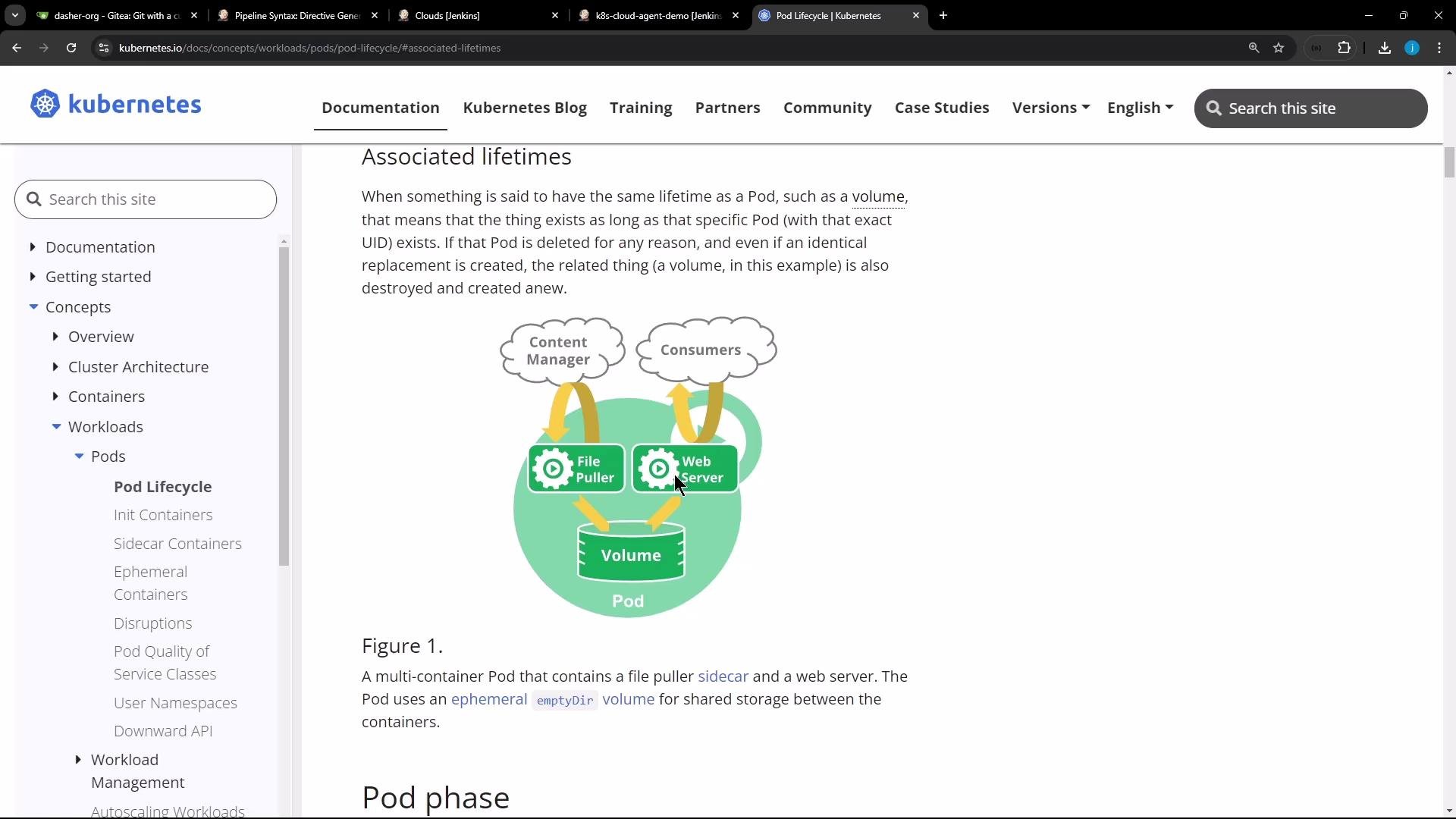
- Workspace persistence: The workspace is typically provided by the Jenkins agent configuration (often with an
emptyDirin Kubernetes-based agents).emptyDiris ephemeral — it exists only for the lifetime of the Pod. If you need persistence across Pods, use a persistent volume (e.g.,PersistentVolumeClaim). - Permissions: Ensure user permissions and owners inside each container allow reading/writing the workspace files.
- Tooling inside images: Bake required CLI tools into agent images when possible to reduce per-job setup overhead.
- Debugging: Use
sh 'ls -la'andsh 'id'in each container to inspect permissions and verify the shared directory.
Useful links and references
Summary
- Running multiple containers in the same Pod allows them to share files through a mounted workspace (commonly via
emptyDir). - The example Jenkinsfile demonstrates creating a file in one container and reading it from another within the same Pod.
- Choose static nodes for specialized persistent needs; prefer container-based or Kubernetes agents for ephemeral, reproducible builds and reduced maintenance.