

- Conditionals let a script choose between actions (do X if a condition is true, otherwise do Y).
- Loops let a script repeat actions over collections of items without duplicating commands.
for loop and an if conditional. These illustrate how you can iterate over items and branch logic for each item.
- The
forloop repeats the commands in its body for each value in the list (user1,user2,user3), avoiding repeated manual commands. - The
ifstatement evaluates the test expression and executes the appropriate branch. - Always quote variables (for example,
"$user") to avoid word-splitting and unexpected glob expansion.
Always include spaces around the brackets and operators in conditional expressions (for example:
if [[ $a -eq 1 ]]; then), and quote variables when you expect string values (for example: echo "$var").[ ] or [[ ]]:
- In
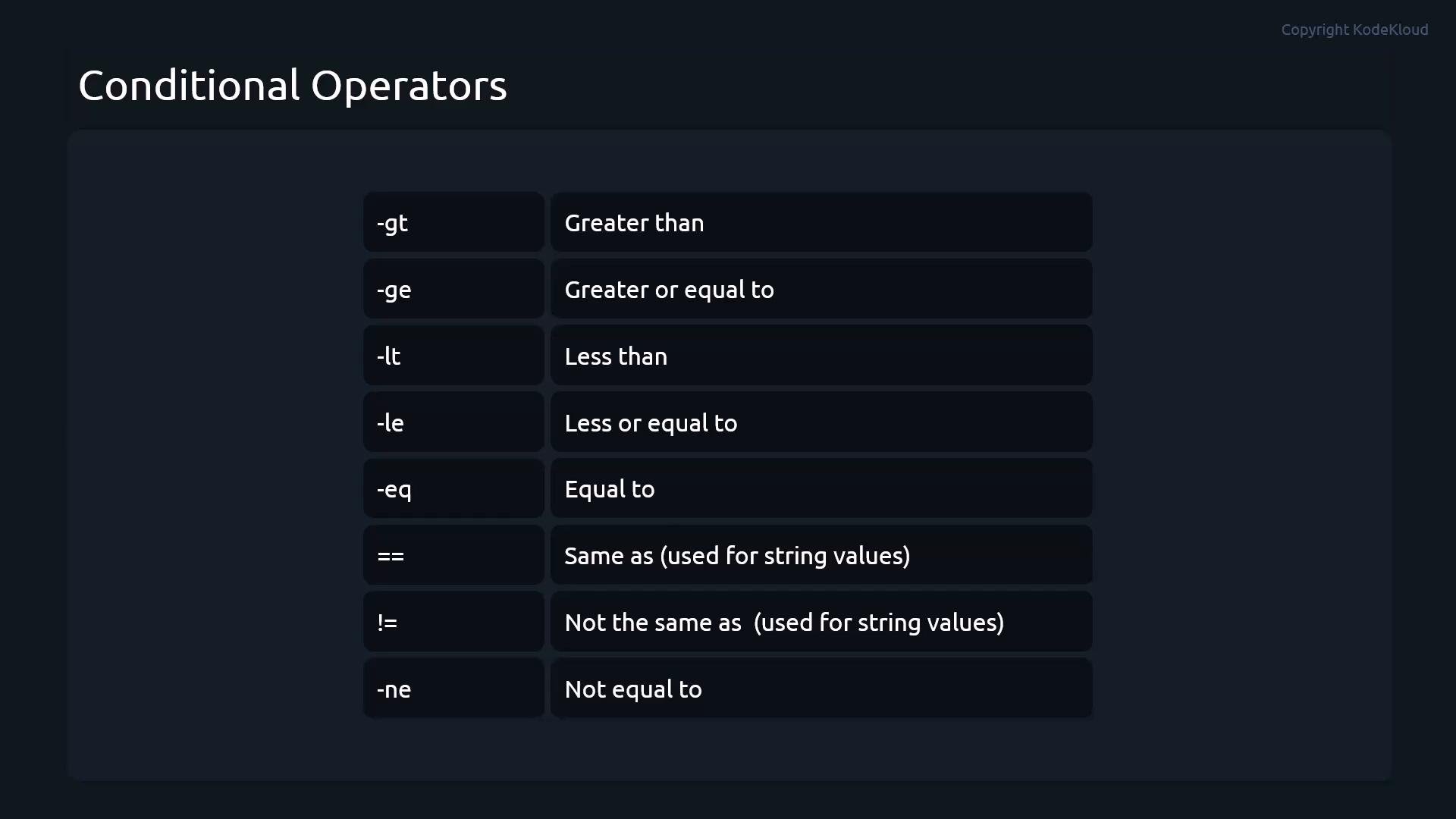
[[ ... ]]you may use==(or=) for equality and!=for inequality.[[supports glob-style pattern matching on the right-hand side of==:
- In POSIX
[...]form, prefer=for equality to stay portable (==is supported by many shells but not universally portable).
- The arithmetic evaluation form
(( ... ))lets you use familiar C-like operators:==,!=,<,>,<=,>=. It treats variables as arithmetic values and is convenient for numeric logic:
- Quote variables when expanding strings:
"$var". - Always put spaces around brackets and operators:
if [[ $x -eq 1 ]]; then. - Prefer
[[ ... ]]in Bash for safer and more flexible tests (pattern matches, no pathname expansion, logical operators within). - Use
(( ... ))for arithmetic: clearer and more concise for numeric comparisons.
Be careful with portability:
[[ ... ]] and (( ... )) are Bash extensions. Scripts intended for POSIX sh should use [...] and expr/awk or POSIX-compliant arithmetic expansion.- The real power of shell scripting comes from combining loops with conditionals to process lists of files, users, or other resources and make decisions per-item:
- Bash Reference Manual: https://www.gnu.org/software/bash/manual/
- ShellCheck (static analysis and style): https://www.shellcheck.net/
- Advanced Bash-Scripting Guide: https://tldp.org/LDP/abs/html/