

README.md (or any documentation page) helps contributors and visitors instantly see if your CI/CD pipelines are passing or failing.
Benefits of Workflow Badges
- Improves transparency on build health
- Boosts contributor confidence
- Encourages proactive maintenance
Badges are dynamic images that update automatically each time your workflow runs. You can filter by branch or event to display the status you care about.
Steps to Generate a Status Badge
- Open the Actions tab in your GitHub repository.
- Select the workflow you want to badge.
- Click Create status badge (under More or directly on the workflow page).
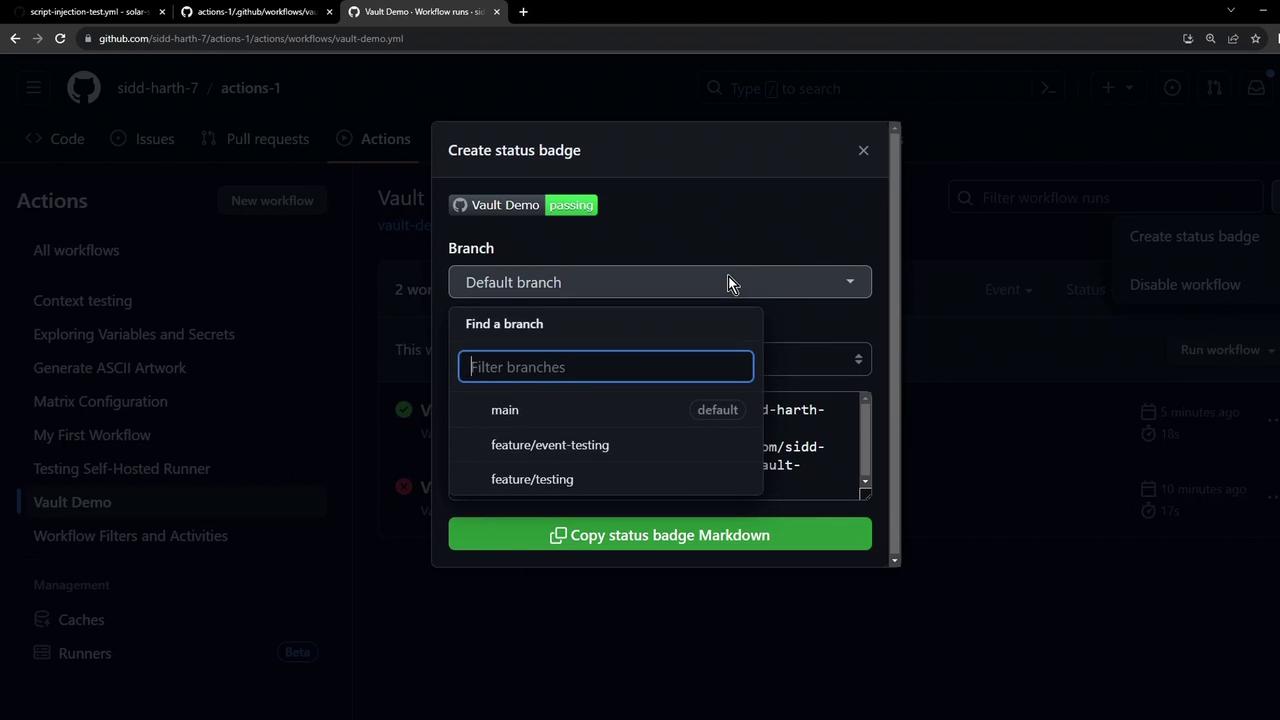
- In the pop-up, choose your target branch (e.g.,
mainordevelop) and any event filters. - Click Copy status badge Markdown to grab the snippet.
Badge Markdown Breakdown
Embedding the Badge in Your README
Paste the copied snippet at the top of yourREADME.md:
Too many badges can clutter your README. Group or reorder them logically to maintain readability.
Commit and Push
Commit your updates and push them to GitHub. To skip CI on this commit, include[skip ci]: