In this lesson we explore the remaining two Jenkins projects, run builds, and inspect the results. Both pipelines reference the same repository and Jenkinsfile; the only functional difference is that the CI Pipeline (poll SCM) has a cron trigger configured. Pipelines covered
  • Solar System CI Pipeline
  • CI Pipeline (poll SCM)
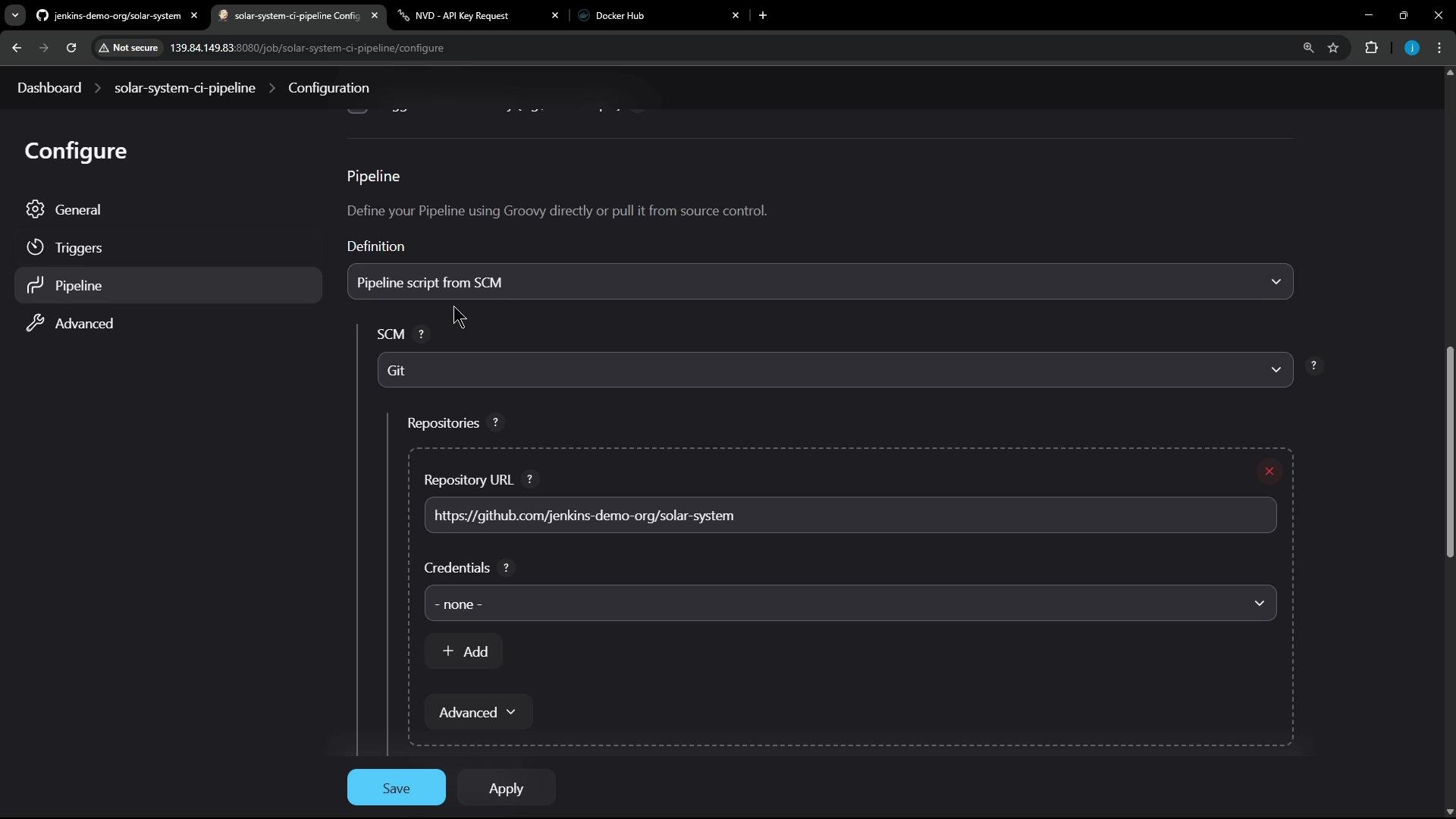
Both jobs use the same repository and pipeline script. The poll-SCM job adds a cron polling trigger to periodically check for changes. I’ll sign in to Jenkins and show the pipeline configuration. The Solar System job is configured to obtain its Pipeline script from SCM (Git). The repository and branch are set in the Pipeline configuration:
A dark-themed screenshot of a Jenkins job "Configure" page showing the Pipeline section set to "Pipeline script from SCM" with Git selected and the repository URL filled as "https://github.com/jenkins-demo-org/solar-system". The left sidebar shows configuration tabs (General, Triggers, Pipeline, Advanced) and Save/Apply buttons are visible at the bottom.
Repository and branch settings (example):
https://github.com/jenkins-demo-org/solar-system
*/main
The CI Pipeline (poll SCM) is identical except for the trigger; it polls the repository on a cron schedule:
00 00 * * *
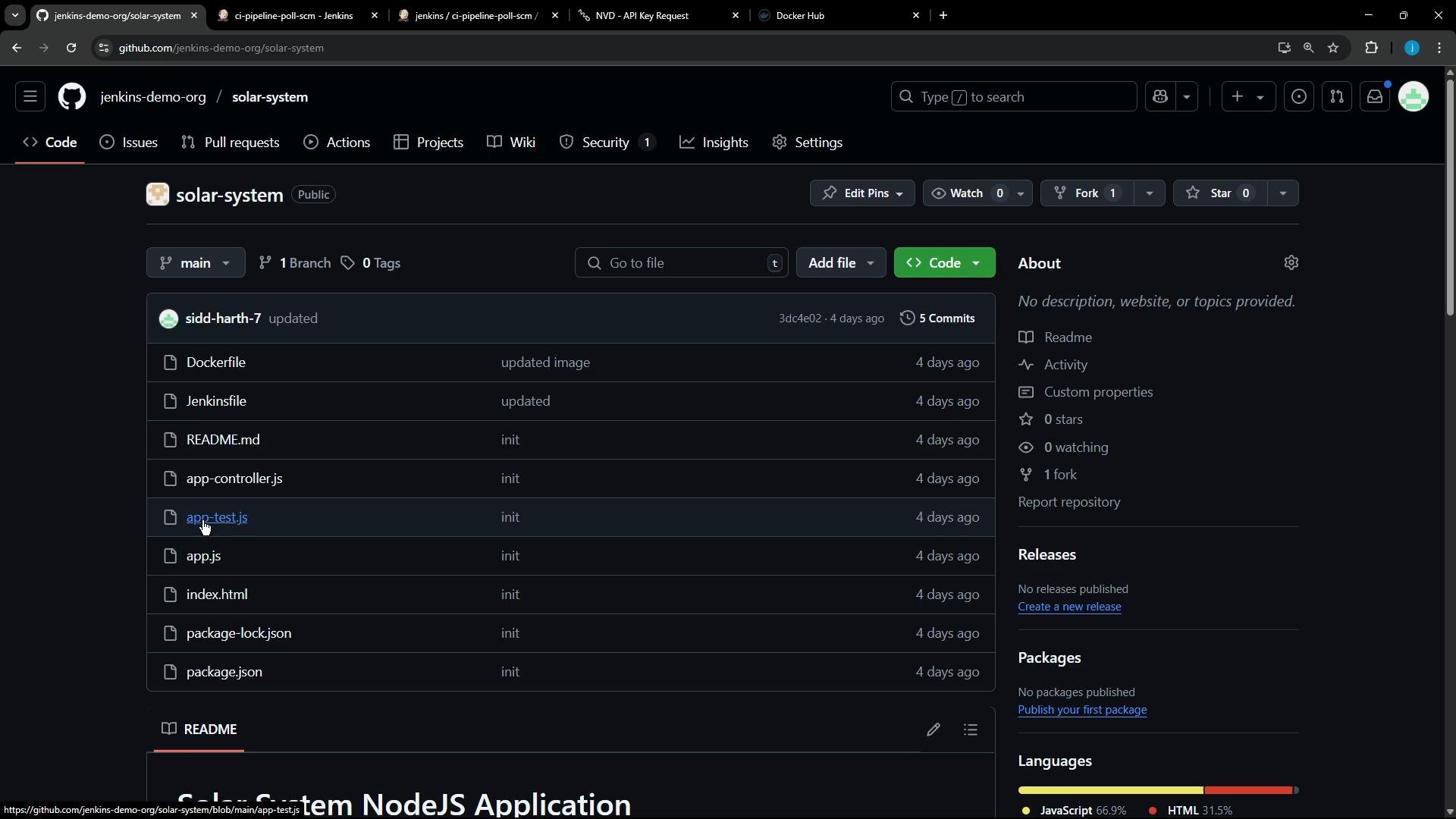
Open the GitHub repository referenced by the pipeline to review the project structure and pipeline code.
A dark-themed GitHub repository page for "jenkins-demo-org/solar-system" showing the file list (Dockerfile, Jenkinsfile, README.md, app.js, app-test.js, package.json, etc.) on the main branch. The right sidebar shows repo details like commits, forks, stars, and languages.
Repository overview
  • Small Node.js application.
  • Key files:
    • Dockerfile — image build
    • Jenkinsfile — declarative pipeline used by Jenkins
    • app.js, app-test.js — application and unit tests
    • package.json / package-lock.json — dependencies and scripts
Example Dockerfile from the repo:
FROM node:18-alpine3.17

WORKDIR /usr/app

COPY package*.json /usr/app/

RUN npm install

COPY . .

ENV MONGO_URI=uriPlaceholder
ENV MONGO_USERNAME=usernamePlaceholder
ENV MONGO_PASSWORD=passwordPlaceholder

EXPOSE 3000

CMD [ "npm", "start" ]
Avoid placing secrets in Dockerfile via ENV for production images. Store sensitive values in a secrets manager or inject them at runtime (e.g., via Jenkins credentials or container runtime secrets).
Jenkinsfile — pipeline summary The project’s declarative Jenkinsfile defines an end-to-end CI pipeline that runs inside Docker agents and uses Jenkins tools/credentials. Main stages include installing dependencies, dependency scanning, unit testing, code coverage, building & publishing a Docker image, and a Trivy image scan. Representative (cleaned) Jenkinsfile excerpt:
pipeline {
    agent { label 'us-west-1-ubuntu-22' }

    tools { nodejs 'nodejs-22-6-0' }

    environment {
        MONGO_URI      = "mongodb+srv://supercluster.d83jj.mongodb.net/superData"
        MONGO_DB_CREDS = credentials('mongo-db-credentials')
        MONGO_USERNAME = credentials('mongo-db-username')
        MONGO_PASSWORD = credentials('mongo-db-password')
    }

    stages {
        stage('Installing Dependencies') {
            agent {
                docker {
                    image 'node:24'
                    args '-u root:root'
                }
            }
            steps {
                sh 'npm install --no-audit'
            }
        }

        stage('Dependency Scanning') {
            parallel {
                stage('NPM Dependency Audit') {
                    steps {
                        sh '''
                        npm audit --audit-level=critical
                        echo $?
                        '''
                    }
                }

                stage('OWASP Dependency Check') {
                    steps {
                        dependencyCheck additionalArguments: """
                            --scan './'
                            --out './'
                            --format 'ALL'
                            --disableYarnAudit
                            --prettyPrint --failOnCVSS 9
                        """, nvdCredentialsId: 'owasp-dependency-check', odcInstallation: 'OWASP-DepCheck-10'

                        // Fail the build only for CRITICAL findings
                        dependencyCheckPublisher failedTotalCritical: 1, pattern: 'dependency-check-report.xml', stopBuild: true

                        // You can publish the HTML report using publishHTML once uncommented
                        // publishHTML([allowMissing: true, alwaysLinkToLastBuild: true, keepAll: true, reportDir: './', reportFiles: 'dependency-check-jenkins.html', reportName: 'Dependency-Check Report'])
                    }
                }
            }
        }

        stage('Unit Testing') {
            agent {
                docker {
                    image 'node:24'
                    args '-u root:root'
                }
            }
            options { retry(2) }
            steps {
                sh 'npm test'
                // junit allowEmptyResults: true, testResults: 'test-results.xml'
            }
        }

        stage('Code Coverage') {
            agent {
                docker {
                    image 'node:24'
                    args '-u root:root'
                }
            }
            steps {
                // If coverage fails, mark stage unstable but keep overall build SUCCESS
                catchError(buildResult: 'SUCCESS', stageResult: 'UNSTABLE', message: 'Coverage threshold not met') {
                    sh 'npm run coverage'
                }
                // publishHTML([...])  // optional HTML report publish
            }
        }

        stage('Build Publish Image') {
            steps {
                sh 'docker build -t siddharth67/solar-system:$GIT_COMMIT .'
                withDockerRegistry([credentialsId: 'docker-hub-credentials', url: ""]) {
                    sh 'docker push siddharth67/solar-system:$GIT_COMMIT'
                }
            }
        }

        stage('Trivy Vulnerability Scanner') {
            steps {
                sh '''
                trivy image siddharth67/solar-system:$GIT_COMMIT --severity CRITICAL --exit-code 1 --quiet --format json -o trivy-image-CRITICAL-results.json
                trivy convert --format template --template "@/usr/local/share/trivy/templates/html.tpl" --output trivy-image-CRITICAL-results.html trivy-image-CRITICAL-results.json
                '''
                // publishHTML(...) to show the Trivy HTML report in Jenkins
            }
        }
    }
}
Pipeline stages at a glance
StagePurposeKey commandsArtifacts
Installing DependenciesInstall project dependenciesnpm install --no-auditnode_modules/ (workspace)
NPM Dependency AuditQuick audit for npm vulnerabilitiesnpm audit --audit-level=criticalaudit output
OWASP Dependency-CheckComprehensive SBOM-based scandependencyCheck plugindependency-check-report.xml/html/json
Unit TestingRun unit testsnpm testJUnit XML (optional)
Code CoverageGenerate coverage metricsnpm run coveragecoverage reports (lcov, cobertura)
Build & Publish ImageBuild Docker image & push to registrydocker build, docker pushDocker image on Docker Hub
Trivy Vulnerability ScannerScan container image for vulnerabilitiestrivy image + trivy convertTrivy JSON/HTML
Notes:
  • Node.js tool is managed by Jenkins and the pipeline runs Node steps inside Docker agents.
  • Credentials for MongoDB, Docker Hub, and NVD API key are stored in Jenkins and referenced via credentials() and plugin parameters.
  • Dependency-Check and Trivy produce XML/HTML/JSON reports; the repository includes commented publishHTML/junit lines — uncomment to publish artifacts in Jenkins.
Obtain an NVD API key and store it in Jenkins credentials. Using the API key reduces the time Dependency-Check spends downloading the NVD feed and improves scan reliability.
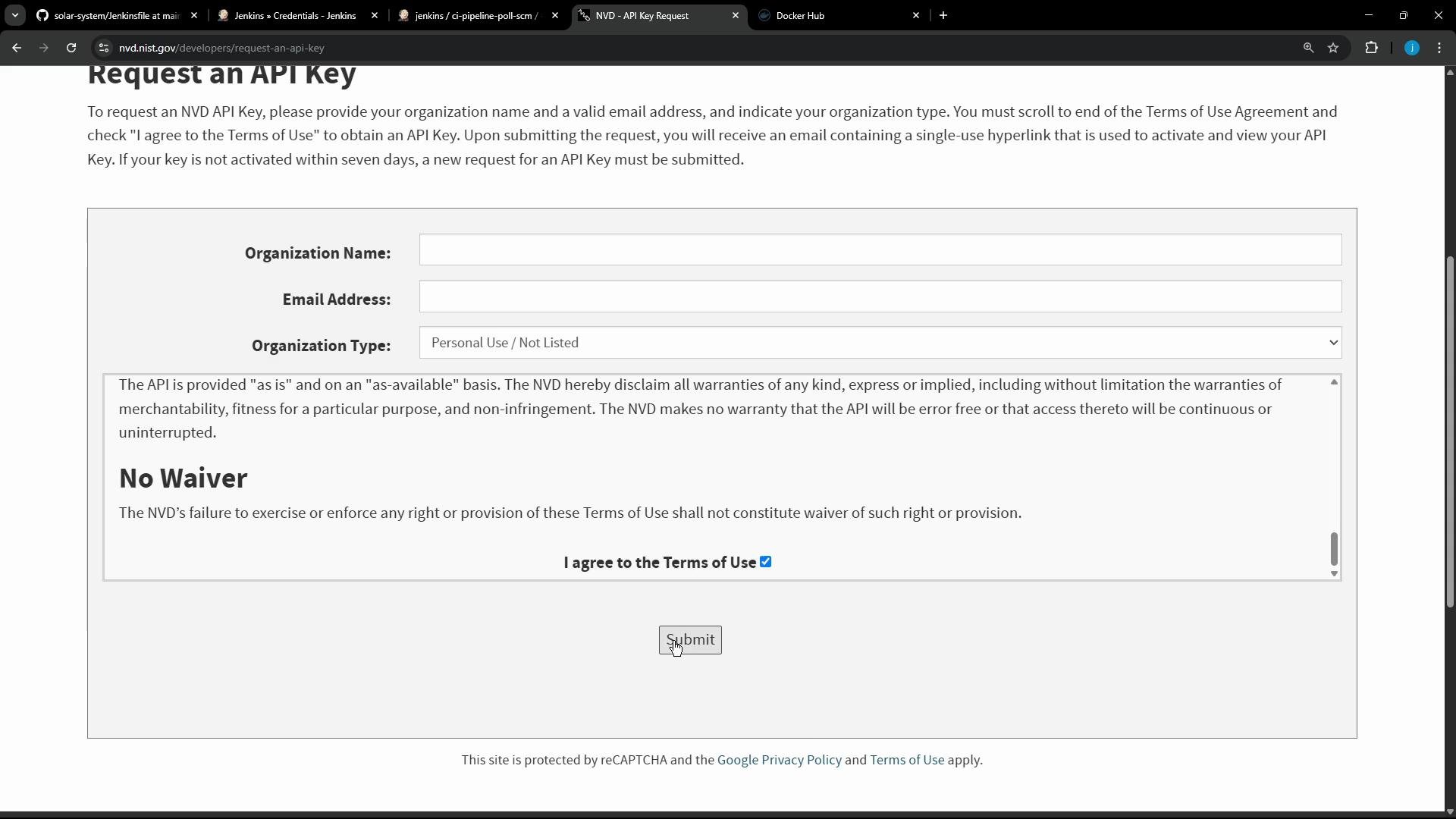
How to request an NVD API key (registration form)
Screenshot of a "Request an API Key" webpage (NVD) showing input fields for Organization Name, Email Address, and Organization Type, a Terms of Use text box with a checked "I agree" box, and a Submit button. The browser window and tabs are visible along the top.
  • Request the API key at: https://nvd.nist.gov/developers/request-an-api-key
  • After receiving the API key, create a Jenkins credential (Secret text) and reference that credential id in the Dependency-Check plugin configuration (nvdCredentialsId).
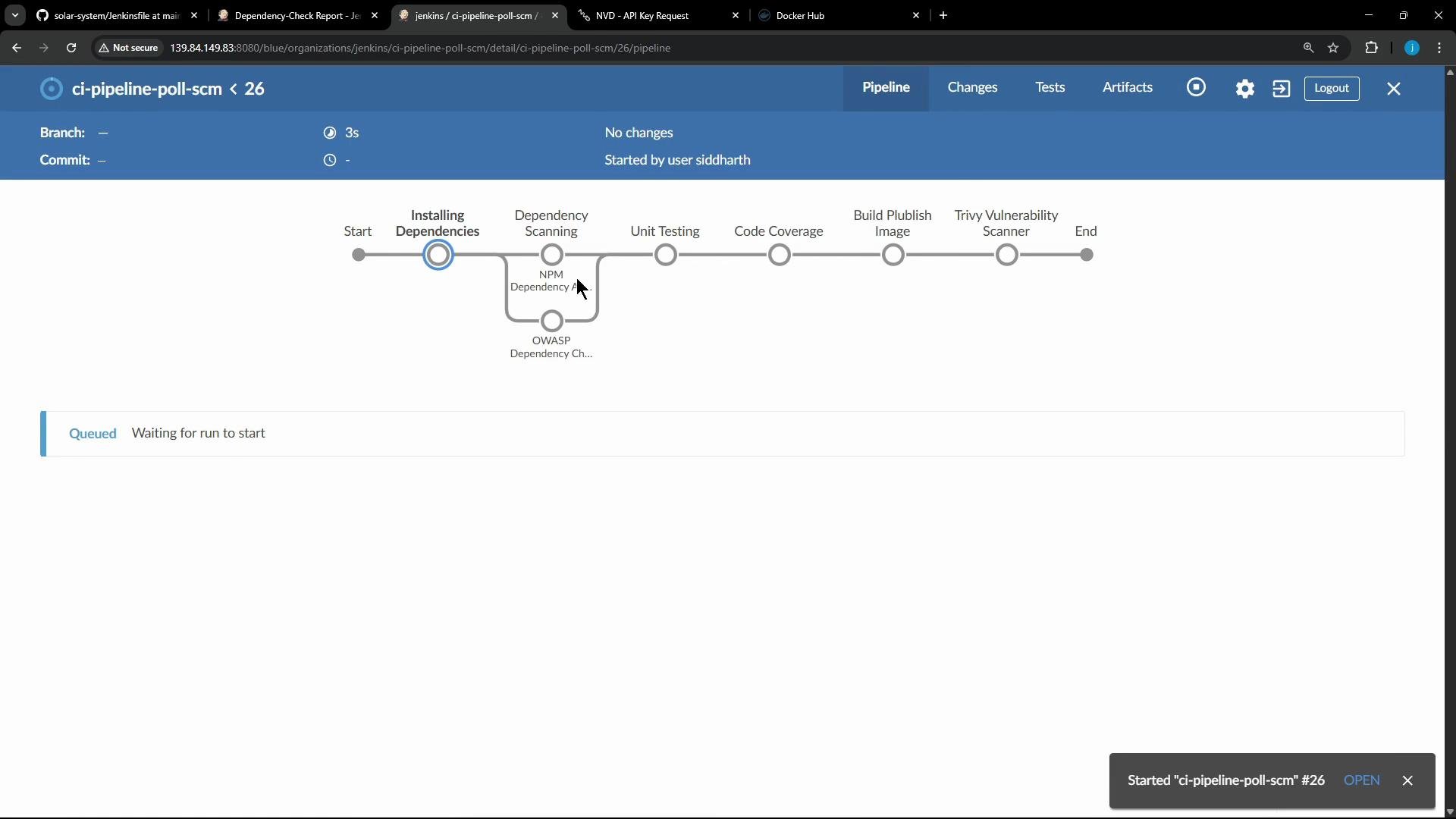
Triggering builds and inspecting results I triggered the pipeline manually (this job does not leverage webhooks). Blue Ocean shows each stage and the step-by-step progress.
A screenshot of a Jenkins Blue Ocean pipeline page for "ci-pipeline-poll-scm #26" showing staged steps (Start, Installing Dependencies, Dependency Scanning, Unit Testing, Code Coverage, Build Publish Image, Trivy Vulnerability Scanner, End). The pipeline is queued with a message "Waiting for run to start" and shows NPM/OWASP dependency checks.
Dependency scanning behavior
  • Installing Dependencies stage runs npm install inside a Docker container.
  • Dependency Scanning runs:
    • npm audit --audit-level=critical
    • OWASP Dependency-Check via the plugin which writes XML/HTML/JSON/SARIF/JUnit reports into the workspace.
When OWASP Dependency-Check finds vulnerabilities above configured thresholds, the dependencyCheckPublisher step will fail the build. In this project the publisher was initially set to fail on medium/low severities, which caused builds to fail. I adjusted the publisher to fail only on critical vulnerabilities by setting failedTotalCritical: 1 and removing medium/low thresholds. Dependency-Check update output (first run example):
[INFO] Checking for updates
[INFO] NVD API has 1,304 records in this update
[INFO] Downloaded 1,304/1,304 (100%)
[INFO] Begin database defrag
[INFO] End database defrag
[INFO] Check for updates complete
Dependency-Check analysis output (example):
[INFO] Analysis Started
[WARN] Analyzing `/home/jenkins-agent/workspace/ci-pipeline-poll-scm/package-lock.json` - however, the node_modules directory does not exist. Please run `npm install` prior to running dependency-check
[INFO] Analysis Complete
[INFO] Writing XML report to: /home/jenkins-agent/workspace/ci-pipeline-poll-scm/dependency-check-report.xml
[INFO] Writing HTML report to: /home/jenkins-agent/workspace/ci-pipeline-poll-scm/dependency-check-report.html
...
Collecting Dependency-Check artifact
Parsing file /home/jenkins-agent/workspace/ci-pipeline-poll-scm/dependency-check-report.xml
Findings exceed configured thresholds
The UI showed one Medium vulnerability (example: formidable:2.1.2 CVE-2025-46653). Because the publisher was originally configured to stop builds on medium/low findings, the pipeline failed until thresholds were relaxed.
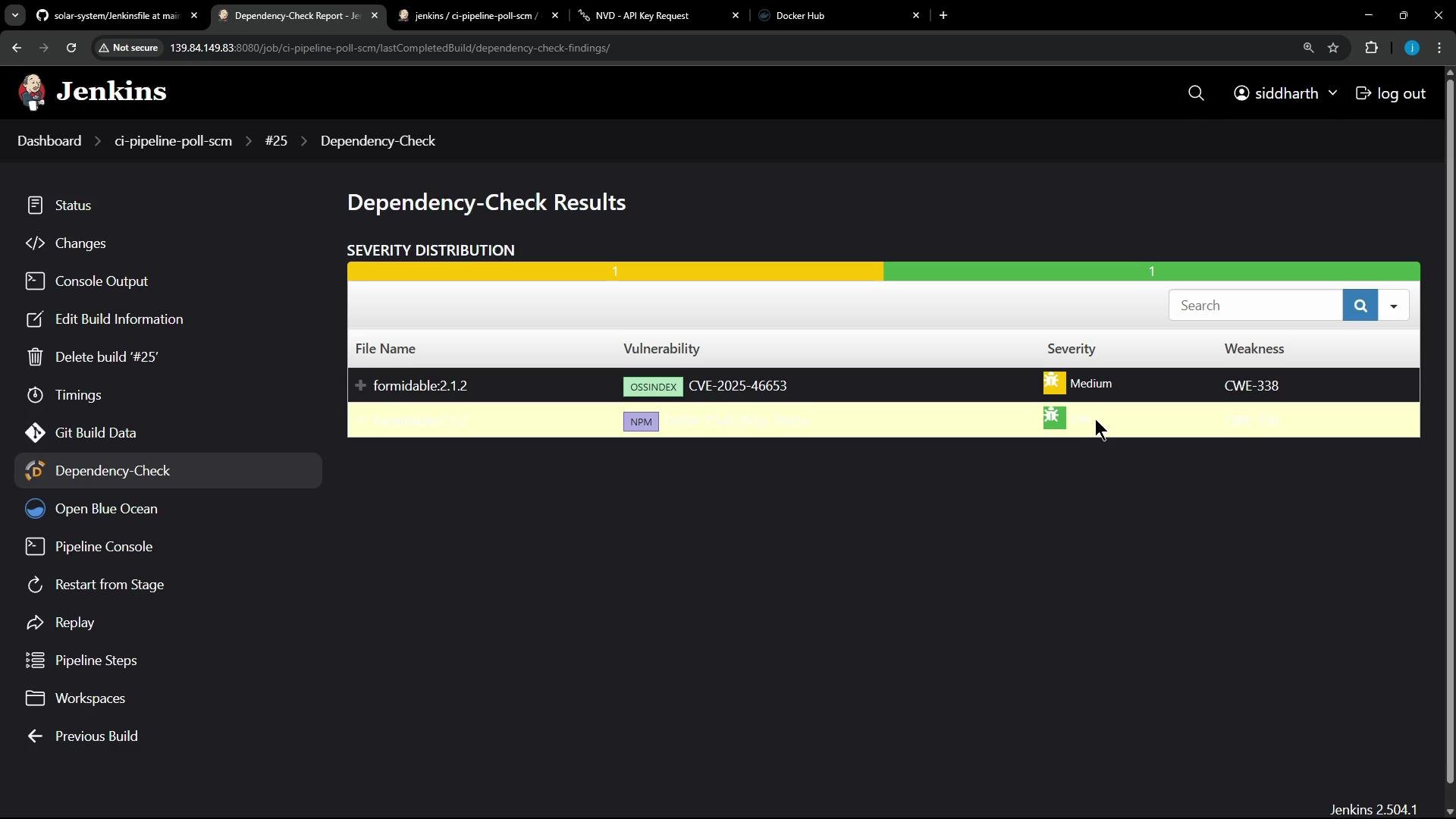
A screenshot of a Jenkins "Dependency-Check Results" page showing a severity distribution bar and a table listing a vulnerability for the package "formidable:2.1.2" (CVE-2025-46653) marked as Medium with weakness CWE-338. The Jenkins sidebar and build/job navigation are visible on the left.
Unit tests and coverage
  • Unit Testing runs npm test inside the Docker agent and uses retry(2) to handle transient failures.
  • Code Coverage runs npm run coverage (nyc). Coverage did not meet the global threshold in this run (~79% vs expected 90%), so the coverage stage failed its threshold check. Because coverage was wrapped with catchError(buildResult: 'SUCCESS', stageResult: 'UNSTABLE', ...), the overall build remained successful while the coverage stage was marked unstable.
Unit test output (truncated):
+ npm test
> Solar System@6.7.6 test
> mocha app-test.js --timeout 10000 --reporter mocha-junit-reporter --exit
Server successfully running on port - 3000
Coverage failure output (example):
+ npm run coverage
> Solar System@6.7.6 coverage
> nyc --reporter cobertura --reporter lcov --reporter text --reporter json-summary mocha app-test.js --timeout 10000 --exit

  11 passing (6s)

ERROR: Coverage for lines (79.06%) does not meet global threshold (90%)
---------------------------------------------------------------------------
File | % Stmts | % Branch | % Funcs | % Lines | Uncovered Line #s
---------------------------------------------------------------------------
All files | 79.54 | 33.33 | 70 | 79.06 |
app.js    | 79.54 | 33.33 | 70 | 79.06 | 23,49-50,58,62-67
---------------------------------------------------------------------------
script returned exit code 1
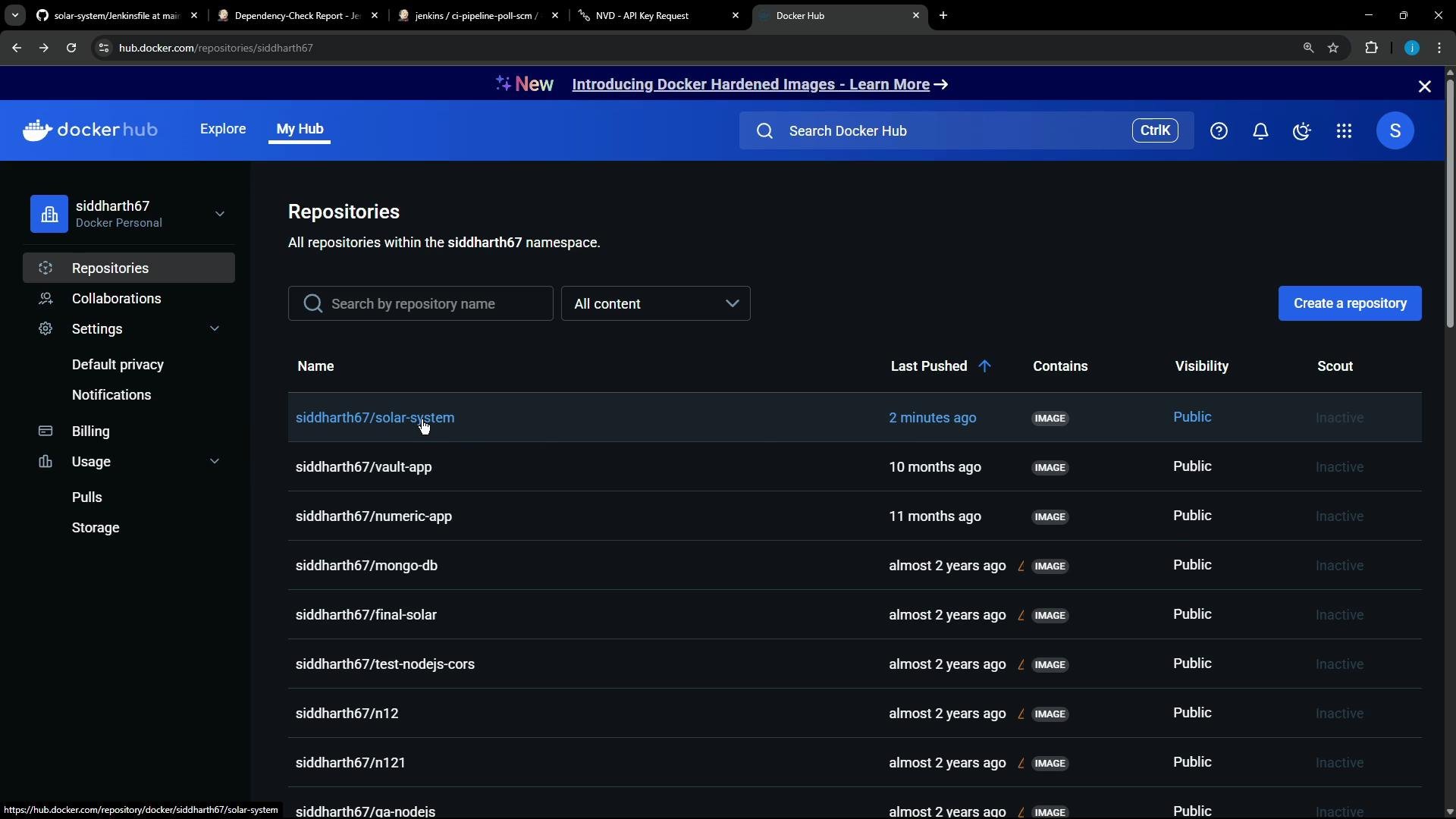
Docker image build, push and Trivy scan The Build & Publish Image stage builds a Docker image tagged with the Git commit and pushes it to Docker Hub using stored Docker Hub credentials:
docker build -t siddharth67/solar-system:$GIT_COMMIT .
withDockerRegistry([credentialsId: 'docker-hub-credentials', url: ""]) {
  docker push siddharth67/solar-system:$GIT_COMMIT
}
Build output shows the image was built and pushed. Docker lint warnings remind you not to place secrets in images.
A screenshot of the Docker Hub "My Hub" Repositories page for the user "siddharth67." It shows a list of repositories (e.g., siddharth67/solar-system, vault-app, numeric-app, mongo-db) with last-pushed timestamps and visibility set to Public.
After pushing the image, the pipeline runs a Trivy scan for CRITICAL severity (configured to exit with non-zero when CRITICALs are found):
trivy image siddharth67/solar-system:$GIT_COMMIT --severity CRITICAL --exit-code 1 --quiet --format json -o trivy-image-CRITICAL-results.json
trivy convert --format template --template "@/usr/local/share/trivy/templates/html.tpl" --output trivy-image-CRITICAL-results.html trivy-image-CRITICAL-results.json
In this run, Trivy did not find CRITICAL vulnerabilities and returned successfully. The JSON/HTML output can be published with publishHTML to surface results in Jenkins. Wrapping up
  • Both pipelines use the same Jenkinsfile from jenkins-demo-org/solar-system; the poll-SCM job adds a cron trigger.
  • OWASP Dependency-Check and Trivy are integrated for dependency and container-image vulnerability checks. Provide an NVD API key to speed Dependency-Check database updates.
  • Tests and coverage execute inside Docker agents. Use catchError in the coverage stage to surface coverage issues without failing the entire build.
  • Artifacts produced (Dependency-Check HTML, Trivy HTML, JUnit XML, coverage reports) are present but publishing calls are commented out — uncomment publishHTML or junit lines in the Jenkinsfile to show these reports in Jenkins.
  • Next steps: migrate this pipeline to GitHub Actions and enable publishing of test, coverage, and security reports from the CI workflow. See GitHub Actions course for guidance.

Watch Video

Practice Lab