In this lesson we’ll cover how to define and use environment variables and secrets in GitHub Actions workflows. We’ll continue with a simple example workflow that creates a text file containing a greeting and uploads it as an artifact. You can declare environment variables at the workflow (global) level or the job level. Sensitive values — such as API keys or passwords — should be stored as secrets in GitHub, not hard-coded into your workflow YAML.

Global environment variables

To make a variable available to every job and step in a workflow, define it at the top-level env: block. These values are accessible through the env context (${{ env.NAME }}) in expressions and are also exposed as environment variables inside each step. Example: a workflow that defines a global GREETING and uses it to create hello.txt:
name: Demo-2

on:
  workflow_dispatch:

env:
  GREETING: "Hello"

jobs:
  build:
    runs-on: ubuntu-latest
    steps:
      - name: Create a text file
        run: echo "${{ env.GREETING }}, world!" > hello.txt
      - uses: actions/upload-artifact@v4
        with:
          name: hello-file
          path: hello.txt

  test:
    runs-on: ubuntu-latest
    needs: build
    steps:
      - uses: actions/download-artifact@v4
        with:
          name: hello-file
      - name: List files
        run: ls
      - name: Test file
        run: cat hello.txt | grep -i "Hello, world!"

Job-level environment variables

If a variable should only be visible to a single job, place it inside that job’s env: block. Job-level variables override workflow-level variables with the same name for that job. Example: define a job-specific GREETING2 used only in the test job:
name: Demo-2

on:
  workflow_dispatch:

env:
  GREETING: "Hello"

jobs:
  build:
    runs-on: ubuntu-latest
    steps:
      - name: Create a text file
        run: echo "${{ env.GREETING }}, world!" > hello.txt
      - uses: actions/upload-artifact@v4
        with:
          name: hello-file
          path: hello.txt

  test:
    runs-on: ubuntu-latest
    needs: build
    env:
      GREETING2: "Hello2"
    steps:
      - uses: actions/download-artifact@v4
        with:
          name: hello-file
      - name: Show job-specific greeting
        run: echo "${{ env.GREETING2 }}"
      - name: Test file
        run: cat hello.txt | grep -i "Hello, world!"

How to reference environment variables in steps

  • In YAML expressions and action inputs use the expression syntax: ${{ env.VAR_NAME }}.
  • Inside a run: step, workflow env entries are injected as environment variables, so you can also access them using the shell form $VAR_NAME (for POSIX shells) or %VAR_NAME% (on Windows). The expression form ${{ env.VAR_NAME }} is evaluated before the step runs.
Example inline usages:
  • Expression (evaluated by GitHub Actions): ${{ env.GREETING }}
  • Shell usage inside a run step: echo "$GREETING"

Secrets

Secrets are intended for sensitive values (API keys, tokens, passwords). Create repository secrets via Settings → Secrets and variables → Actions. You can create secrets at different scopes:
ScopeAvailabilityTypical use
Repository-levelWorkflows in the repositoryRepo-specific API keys
Environment-levelJobs that target that environmentDeployment credentials for a staging/production environment
Organization-levelRepositories allowed to use the secretShared organization secrets (when permitted)
Create a repository secret named WORLD with the value world (or your actual secret). The UI will not display the secret value after creation. To reference secrets in a workflow, use the secrets context: ${{ secrets.WORLD }}. Example: combine a global GREETING env var with a WORLD secret to create the artifact:
name: Demo-2

on:
  workflow_dispatch:

env:
  GREETING: "Hello"

jobs:
  build:
    runs-on: ubuntu-latest
    steps:
      - name: Create a text file
        run: echo "${{ env.GREETING }}, ${{ secrets.WORLD }}!" > hello.txt
      - uses: actions/upload-artifact@v4
        with:
          name: hello-file
          path: hello.txt

  test:
    runs-on: ubuntu-latest
    needs: build
    steps:
      - uses: actions/download-artifact@v4
        with:
          name: hello-file
      - name: List files
        run: ls
      - name: Test file
        run: cat hello.txt | grep -i "Hello, world!"
Secrets are never shown in workflow logs. GitHub masks secret values (usually displayed as ***) when commands that include them are printed to logs. Learn more at the GitHub Actions secrets docs: Encrypted secrets for GitHub Actions.
When the workflow runs, the build job creates hello.txt and uploads it as an artifact. In the build logs you will see the run command with the secret masked:
▾ Run echo "Hello, ***!" > hello.txt
  echo "Hello, ***!" > hello.txt
  shell: /usr/bin/bash -e {0}

  env:
    GREETING: Hello
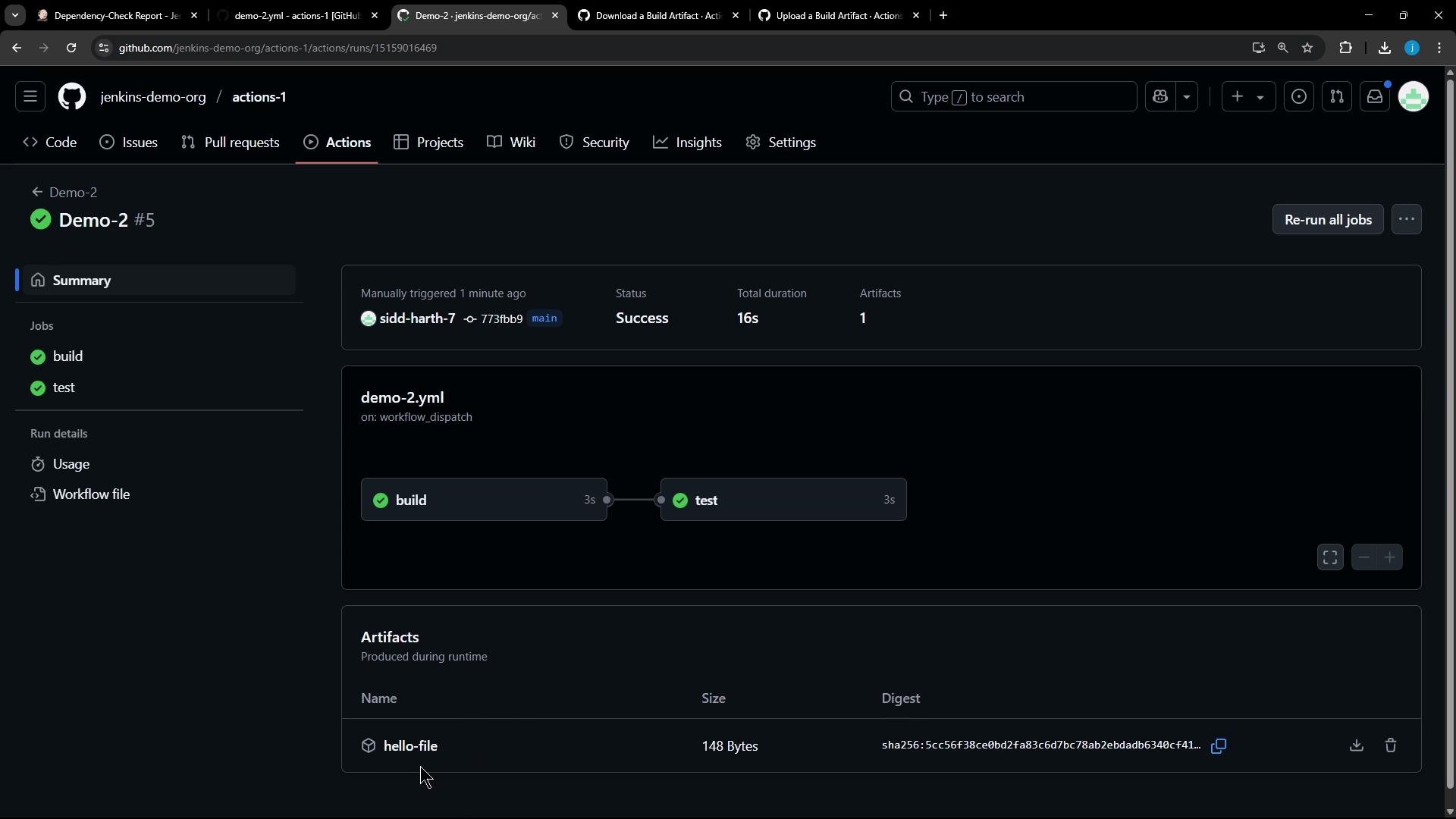
Note: the secret value is present inside the produced artifact (e.g., hello.txt) because the secret was used during the job — but the value is not revealed in the logs. After downloading the artifact (from the Actions run) you can verify the file content:
Hello, world!
Screenshot of a GitHub Actions run page for "Demo-2 #5" showing a successful workflow. The graph shows completed "build" and "test" jobs and an artifact named "hello-file" listed below.

Quick reference

TopicSyntax / example
Global envenv:\n GREETING: "Hello"
Job-level envjobs:\n test:\n env:\n GREETING2: "Hello2"
Secret reference${{ secrets.WORLD }}
Use in run step (expression)run: echo "${{ env.GREETING }}, ${{ secrets.WORLD }}!"
Use in run step (shell var)run: echo "$GREETING, $WORLD!" (only if WORLD is exported into the environment)
That’s how you define and use environment variables and secrets in GitHub Actions workflows.

Watch Video

Practice Lab