In this lesson you will configure the credentials required to authenticate the GitHub Actions Importer CLI with a Jenkins CI server. Follow the steps below to create and securely store the tokens, then configure the importer so it can access both GitHub and Jenkins.

Prerequisites

Install the GitHub Actions Importer extension and verify the help output:
gh extension install github/gh-actions-importer
gh actions-importer -h
Sample help output:
Options:
 -?, -h, --help Show help and usage information

Commands:
 update      Update to the latest version of GitHub Actions Importer.
 version     Display the version of GitHub Actions Importer.
 configure   Start an interactive prompt to configure credentials used to authenticate
             with your CI server(s).
 audit       Plan your CI/CD migration by analyzing your current CI/CD footprint.
 forecast    Forecast GitHub Actions usage from historical pipeline utilization.
 dry-run     Convert a pipeline to a GitHub Actions workflow and output its yaml file.
 migrate     Convert a pipeline to a GitHub Actions workflow and open a pull request
             with the changes.
 list-features List the available feature flags for GitHub Actions Importer.

Which credentials are required?

You need two credentials so the importer can access both GitHub and Jenkins:
CredentialPurposeExample environment variable
GitHub personal access token (classic) with workflow scopeAuthenticate the importer to create or read workflows and related repo dataGITHUB_PAT
Jenkins API token for the Jenkins user account used by the importerAuthenticate API calls to your Jenkins instanceJENKINS_API_TOKEN, used with JENKINS_USERNAME and JENKINS_BASE_URL

Create a GitHub personal access token (classic)

  1. In GitHub, go to Settings → Developer settings → Personal access tokens → Classic.
  2. Click Generate new token (classic).
  3. Give it a descriptive name (for example, jenkins-importer-token-2) and select the workflow scope.
  4. Generate the token and copy it to a secure location. Do not commit this token to source control.
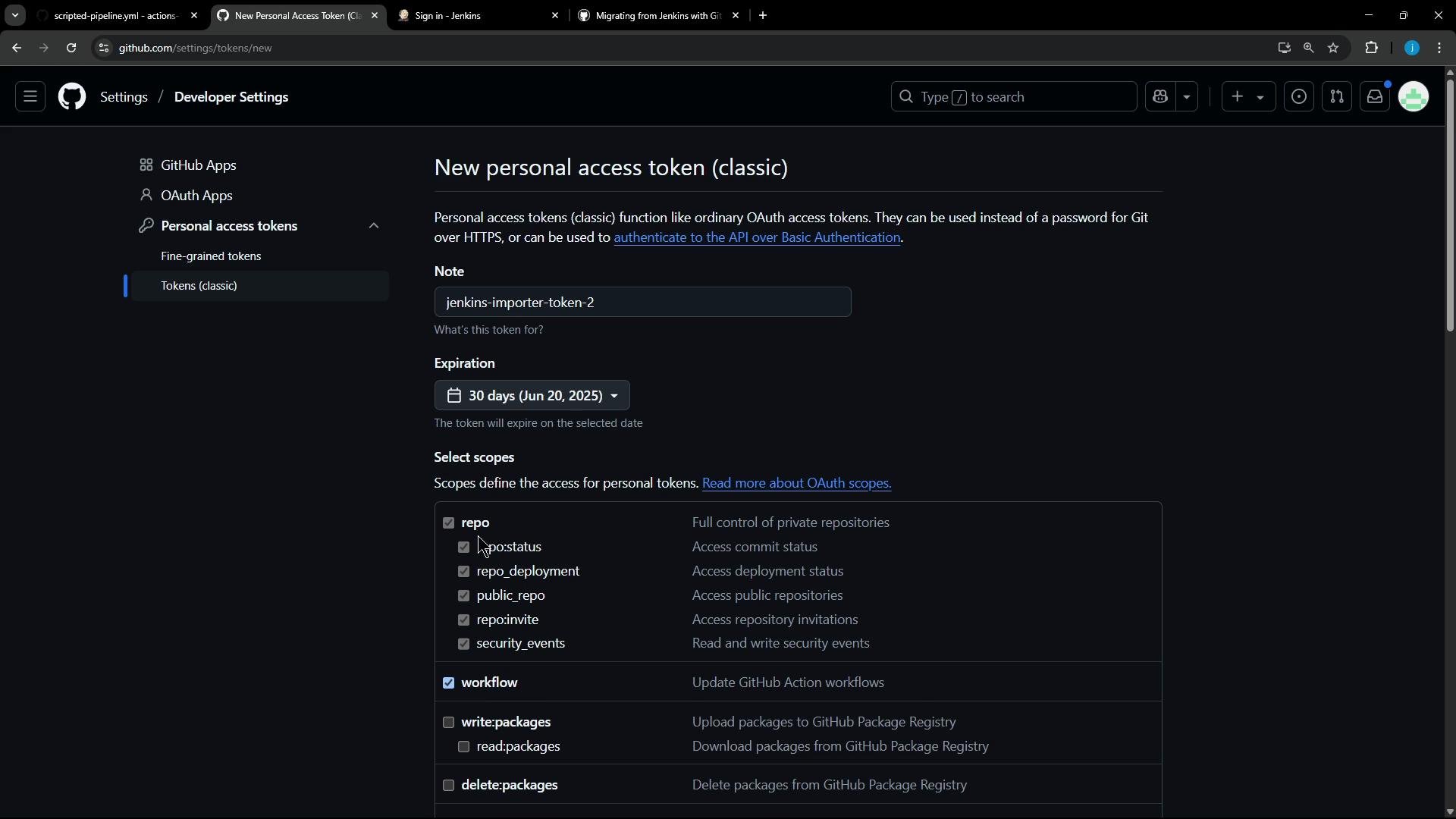
A dark-themed GitHub Developer Settings screen showing the "New personal access token (classic)" form with the note set to "jenkins-importer-token-2", a 30-day expiration, and various repo/workflow scopes selected.
Example placeholder (store securely; never post real tokens publicly):
# Example placeholder (replace with the actual token you generated)
GITHUB_PAT=ghp_XXXXXXXXXXXXXXXXXXXXXXXXXXXXXXXXXXXX

Create a Jenkins API token

  1. Log into your Jenkins instance as the user the importer will use (example: siddharth).
  2. Navigate to the user’s Security / API Token section.
  3. Create a new token (for example, GH Importer 2).
  4. Copy the generated token and store it in a secure secret store.
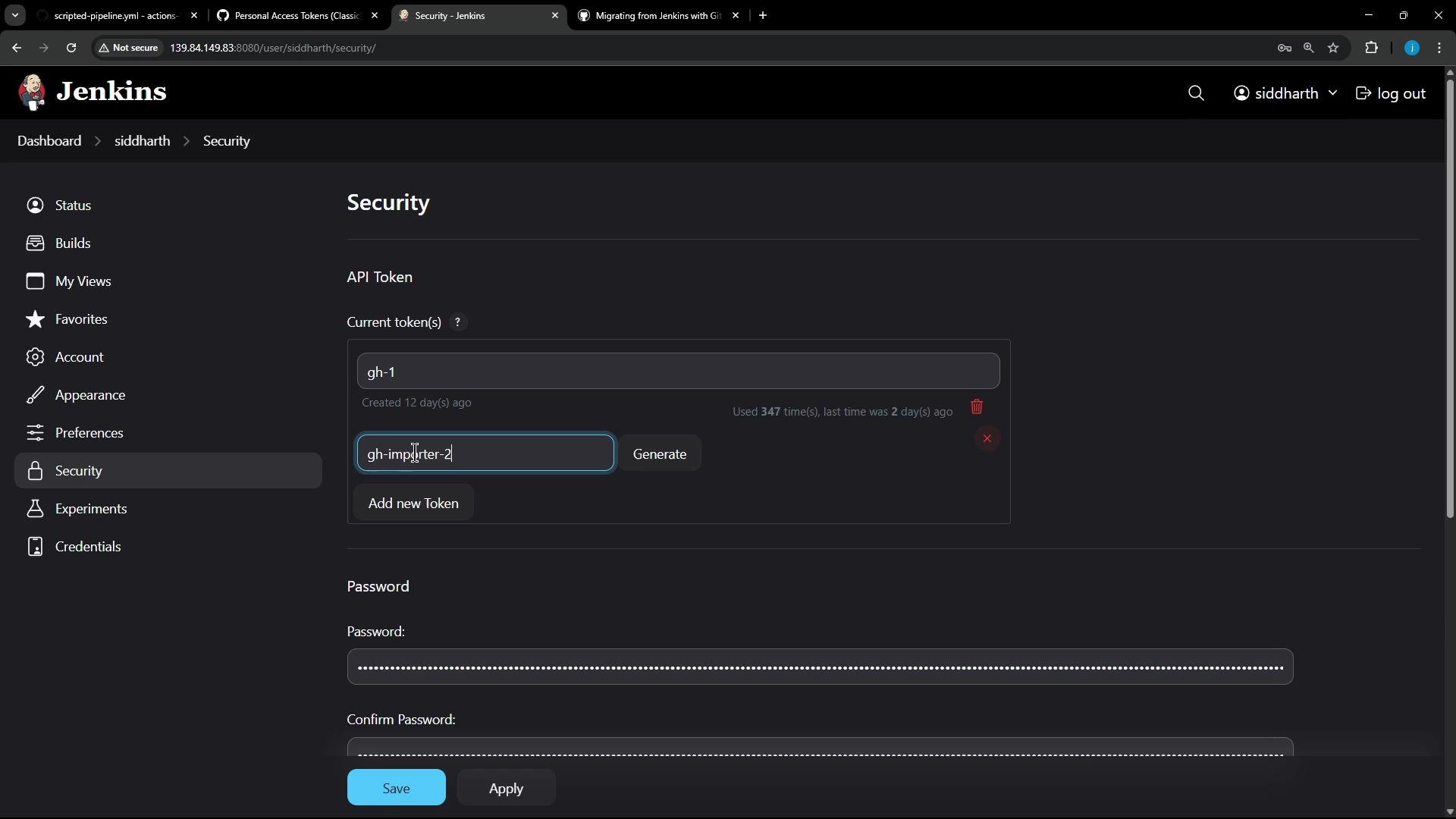
A screenshot of the Jenkins Security settings page showing API token management, with an existing token listed and a field to create a new token. The lower part shows masked password and confirm-password fields and Save/Apply buttons.
Example placeholder (store securely; never post real tokens publicly):
# Example placeholders (replace with the actual values you generated)
JENKINS_API_TOKEN=XXXXXXXXXXXXXXXXXXXXXXXXXXXXXXXX
JENKINS_USERNAME=siddharth
JENKINS_BASE_URL=http://139.84.149.83:8080/
GITHUB_BASE_URL=https://github.com

Configure the GitHub Actions Importer

Run the interactive configure command and follow the prompts to provide the tokens and base URLs:
gh actions-importer configure
Illustrative interactive session:
✓ Which CI providers are you configuring?: Jenkins
Enter the following values (leave empty to omit):
✓ Personal access token for GitHub: *******************************
✓ Base url of the GitHub instance: https://github.com
✓ Personal access token for Jenkins: *******************************
✓ Username of Jenkins user: siddharth
✓ Base url of the Jenkins instance: http://139.84.149.83:8080/
Environment variables successfully updated.
Store generated tokens securely (for example, in a credential manager or an encrypted secrets store). Avoid copying tokens into unencrypted text files or source control.

Next steps

You have now configured the GitHub Actions Importer with credentials for your Jenkins CI server. Next, run an audit to analyze your Jenkins CI/CD footprint and plan the migration:
gh actions-importer audit --provider jenkins --base-url http://139.84.149.83:8080/
By following these steps you’ll ensure the GitHub Actions Importer has the required, securely-stored credentials to interact with both GitHub and your Jenkins instance.

Watch Video