Demonstrates enabling JUnit test results and publishing HTML coverage and security reports from a Jenkins pipeline, including Trivy and OWASP Dependency Check integration.
This lesson shows how to enable JUnit test reports and publish HTML artifacts (coverage and security reports) from a Jenkins pipeline. In a previous pipeline run the coverage, dependency, and vulnerability-reporting steps were producing HTML outputs, but the publish/archive steps were commented out — so the reports never appeared in the Jenkins UI.Below are the key details, the fixed Jenkinsfile fragment (with report publishing enabled), console excerpts, and screenshots illustrating the published reports.
Unit tests, coverage, and vulnerability scans were executed, but Jenkins did not display the results because the JUnit archive and HTML publish steps were commented out.
Tools involved:
Trivy (image vulnerability scanner) — produces JSON and can convert it to HTML.
OWASP Dependency Check — produces XML and HTML reports.
Istanbul/nyc — produces coverage HTML (lcov-report).
Test runner — should produce JUnit XML results.
Example console excerpt from the previous run (showing Trivy converting JSON to HTML):
nodejs-22-6-0 — Use a tool from a predefined Tool Installation <1sFetches the environment variables for a given tool in a list of 'FOO=bar' strings suitable for the withEnv step. <1strivy image siddharth67/solar-system:$GIT_COMMIT --severity CRITICAL --exit-code 1 --quiet --format json -o trivy-image-CRITICAL-results.json — Shell Script 39strivy convert --format template --template "@/usr/local/share/trivy/templates/html.tpl" --output trivy-image-CRITICAL-results.html trivy-image-CRITICAL-results.json — Shell Script <1s
Below is a consolidated Jenkinsfile fragment with the publish/archive steps uncommented and adjusted. It focuses on Unit Tests, Code Coverage (Istanbul), Build/Push, Trivy scanning, and OWASP Dependency Check publishing.
pipeline { agent any environment { GIT_COMMIT = "${env.GIT_COMMIT}" } stages { stage('Unit Tests') { steps { sh 'npm test' // Archive JUnit-style test results (adjust pattern to match your test runner output) junit 'test-results/**/*.xml' } } stage('Code Coverage') { agent { docker { image 'node:24' args '-u root:root' } } steps { catchError(buildResult: 'SUCCESS', message: 'Oops! it will be fixed in future releases', stageResult: 'UNSTABLE') { sh 'npm run coverage' } // Publish coverage HTML report produced by Istanbul/nyc publishHTML([ allowMissing: true, alwaysLinkToLastBuild: true, keepAll: true, reportDir: 'coverage/lcov-report', reportFiles: 'index.html', reportName: 'Code Coverage' ]) } } stage('Build Publish Image') { steps { sh 'docker build -t siddharth67/solar-system:$GIT_COMMIT .' withDockerRegistry(credentialsId: 'docker-hub-credentials', url: "") { sh 'docker push siddharth67/solar-system:$GIT_COMMIT' } } } stage('Trivy Vulnerability Scanner') { steps { // Scan the built image and output JSON results sh ''' trivy image siddharth67/solar-system:$GIT_COMMIT --severity CRITICAL --exit-code 1 --quiet --format json -o trivy-image-CRITICAL-results.json ''' // Convert JSON to an HTML report using the provided template sh ''' trivy convert --format template --template "@/usr/local/share/trivy/templates/html.tpl" --output trivy-image-CRITICAL-results.html trivy-image-CRITICAL-results.json ''' publishHTML([ allowMissing: true, alwaysLinkToLastBuild: true, keepAll: true, reportDir: '.', reportFiles: 'trivy-image-CRITICAL-results.html', reportName: 'Trivy Image Scan' ]) } } stage('Security - Dependency Scans') { parallel { stage('NPM Dependency Audit') { steps { sh ''' npm audit --audit-level=critical || true ''' } } stage('OWASP Dependency Check') { steps { dependencyCheck additionalArguments: """ --scan './' --out './' --format 'ALL' --disableYarnAudit --prettyPrint --failOnCVSS 9 """, nvdCredentialsId: 'owasp-dependency-check', odcInstallation: 'OWASP-DepCheck-10' dependencyCheckPublisher failedTotalCritical: 1, pattern: 'dependency-check-report.xml', stopBuild: true publishHTML([ allowMissing: true, alwaysLinkToLastBuild: true, keepAll: true, reportDir: './', reportFiles: 'dependency-check-jenkins.html', reportName: 'OWASP Dependency Check' ]) } } } } }}
After committing these changes to the main branch, a new build was triggered and the pipeline completed successfully — including the publishing of HTML reports.
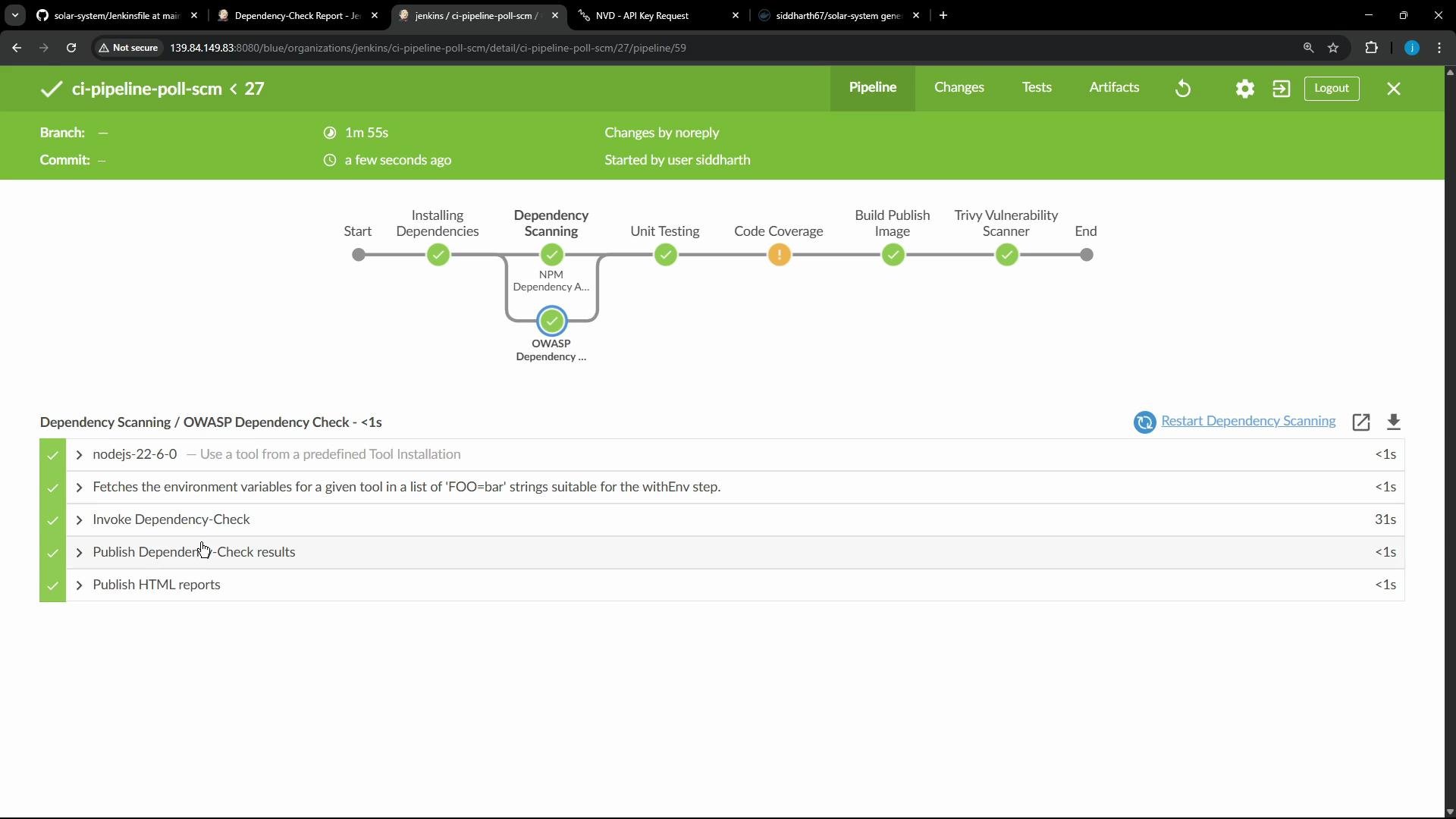
JUnit test results were archived and shown in the Tests page (Blue Ocean and classic UI).
Istanbul (nyc) coverage HTML report was published under coverage/lcov-report/index.html.
Trivy produced a JSON results file that was converted into an HTML report and published.
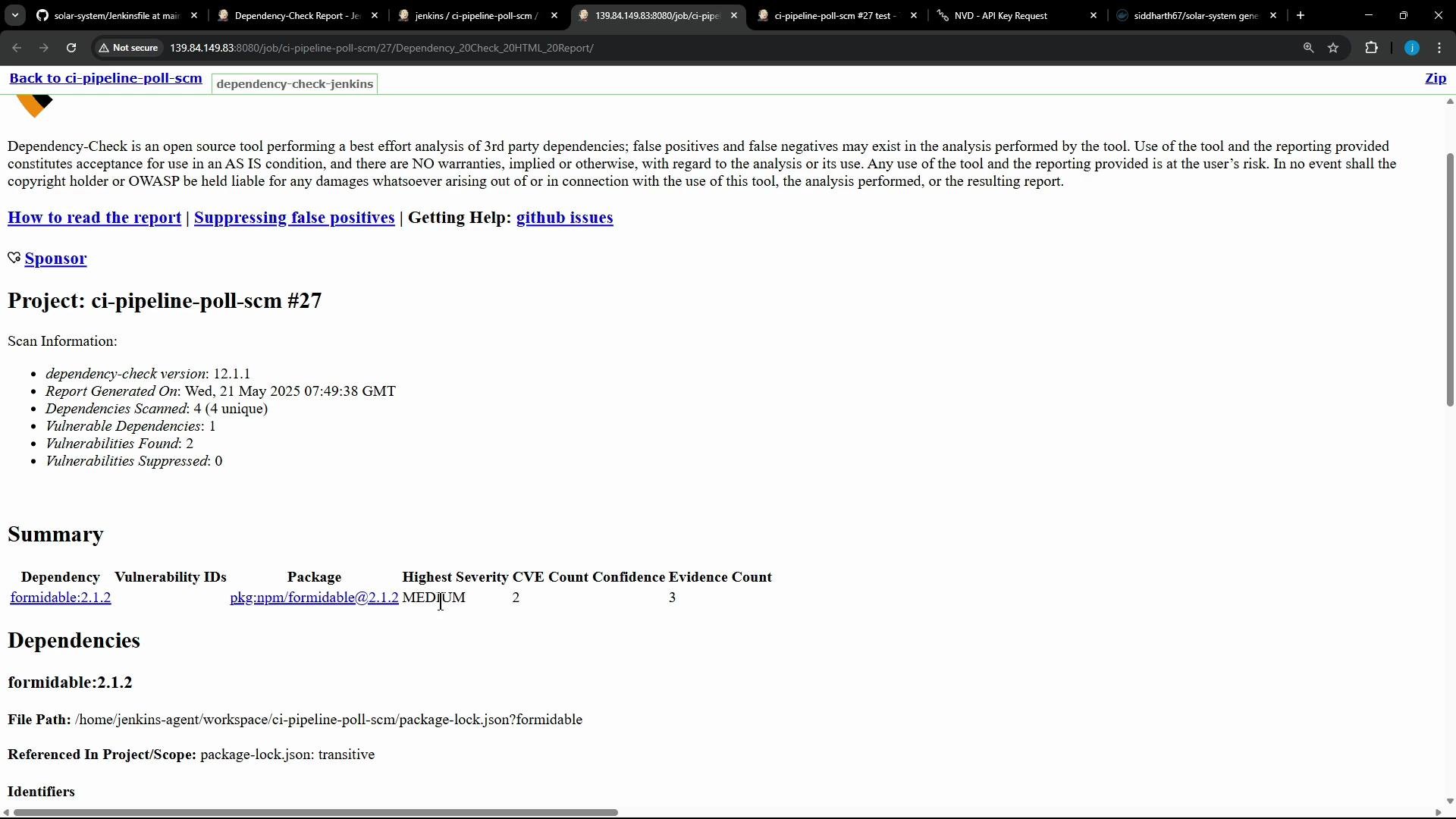
OWASP Dependency Check HTML report was published and made available under Artifacts.
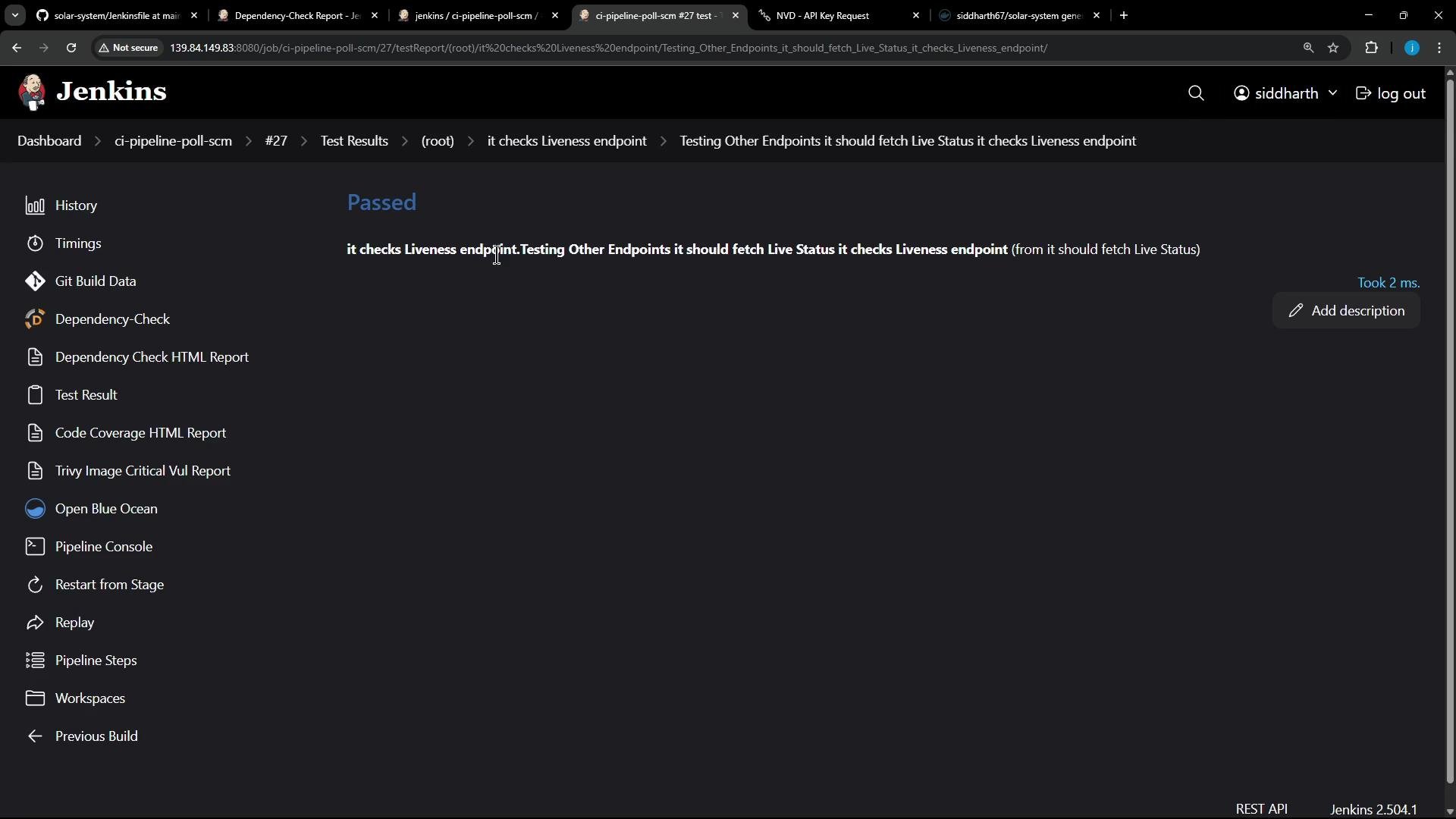
Console excerpt for the Code Coverage stage:
Code Coverage - 19s> Check out from version control> Checks if running on a Unix-like node> docker inspect -f . "$JD_TO_RUN" — Shell Script> nodejs-22-6-0 — Use a tool from a predefined Tool Installation> Fetches the environment variables for a given tool in a list of 'FOO=bar' strings suitable for the withEnv step.> npm run coverage — Shell Script> Publish HTML reports
Open the Tests page (Blue Ocean) or the classic UI to view detailed test results (test counts, durations, and per-test metadata). For this run all tests passed (11 tests total).
Full dependency scanning report and vulnerability summary.
Code Coverage (Istanbul)
coverage/lcov-report/index.html
Per-file code coverage with highlighted missed lines/branches.
Trivy (image scan)
trivy-image-CRITICAL-results.html
Image vulnerability summary converted from Trivy JSON output.
JUnit test results
test-results/**/*.xml
JUnit-style XML results used by Jenkins to display test summaries.
The OWASP Dependency Check report in this run highlighted some medium severity findings. Because the pipeline is configured with --failOnCVSS 9 (or the corresponding publisher threshold), the build only fails on critical CVSS >= 9 — medium findings do not fail the pipeline.
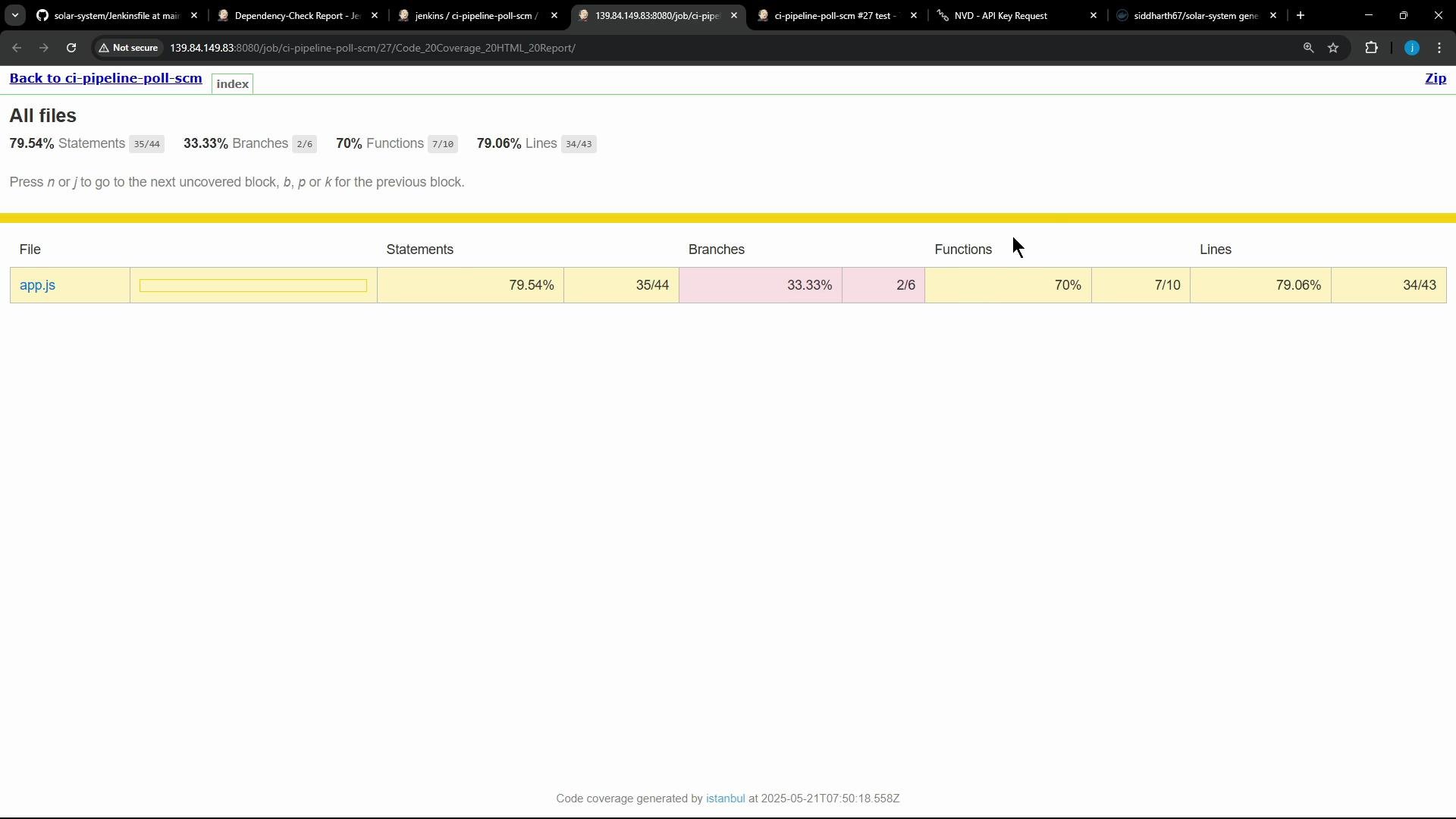
The Istanbul coverage report provides file-level details (for example, app.js shown at ~80% coverage) with marked statements and branches that need additional tests.Console excerpt for the Trivy stage showing JSON output and conversion to HTML:
Trivy Vulnerability Scanner - 12s> nodejs-22-6-0 — Use a tool from a predefined Tool Installation <1s> Fetches the environment variables for a given tool in a list of 'FOO=bar' strings suitable for the withEnv step. <1s> trivy image siddharth67/solar-system:$GIT_COMMIT --severity CRITICAL --exit-code 1 --quiet --format json -o trivy-image-CRITICAL-results.json — Shell Script 11s> trivy convert --format template --template "@/usr/local/share/trivy/templates/html.tpl" --output trivy-image-CRITICAL-results.html trivy-image-CRITICAL-results.json — Shell Script <1s> Publish HTML reports <1s
Ensure your test runner produces JUnit XML. Configure the junit step to match the test output path (e.g. test-results/**/*.xml).
For HTML publishing, always confirm reportDir and reportFiles point to the generated files. Use allowMissing: true to avoid breaking builds when a report is not generated.
Set security thresholds deliberately. In CI you may want to fail only on high/critical severity and publish informational reports for lower severities.
Consider archiving both raw JSON/XML outputs and the converted HTML so you can reprocess raw outputs later.
When publishing HTML reports from Jenkins, use allowMissing: true to avoid failing the build if a report is not produced. Also verify reportDir and reportFiles paths match the files generated by your tools.
These published artifacts improve visibility into test outcomes, coverage gaps, and security issues directly from the Jenkins build. If you plan to migrate to GitHub Actions, the GitHub Actions Importer can help transfer these stages and artifacts to workflows.