Overview of Jenkins core concepts, pipeline workflow, components, pros and cons, and best practices for CI/CD pipeline automation and managing Jenkins infrastructure.
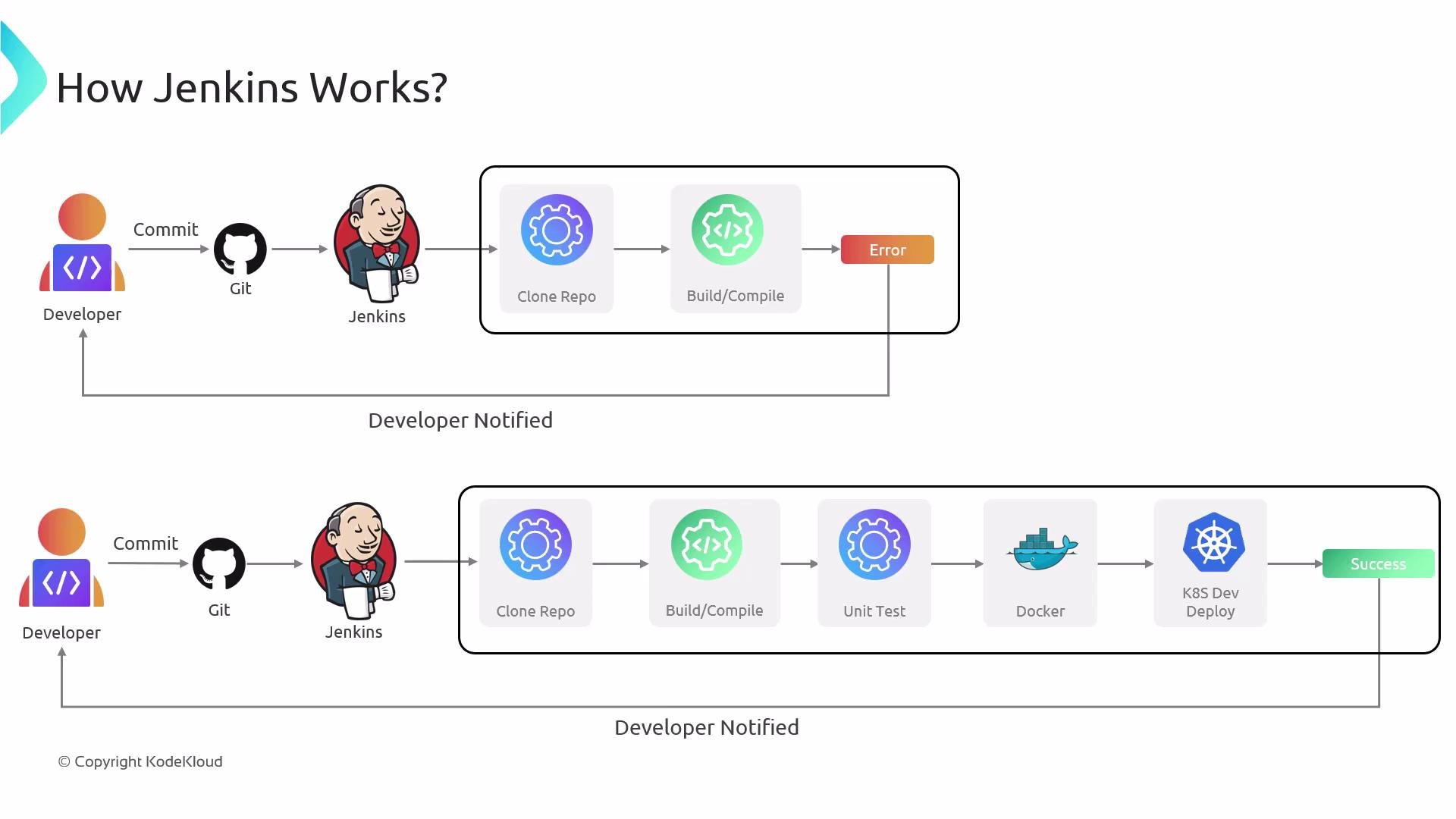
Imagine this: every code change you push automatically triggers a rapid sequence of build, test, and deploy steps — with minimal human intervention. That’s the core promise of Jenkins: an open-source automation server that streamlines continuous integration (CI) and continuous delivery/deployment (CD).Jenkins orchestrates the software delivery pipeline: it detects changes in source control, runs builds and tests, creates artifacts or container images, and can deploy them to targets like Kubernetes clusters or cloud VMs. By catching issues early and automating repetitive tasks, Jenkins helps teams deliver software faster and with higher quality.Developers push code to a Git repository. Jenkins watches that repo (via webhooks or polling). When Jenkins detects a change, it clones the repository and starts a build. If something fails, Jenkins notifies the developer, who fixes the issue and pushes updates. Jenkins re-runs the pipeline on the new commit. When builds, tests, and packaging succeed, Jenkins can publish artifacts and deploy the updated application to the target environment, then notify the team of success.
This automated loop — commit → build → test → deploy → notify — ensures your production environment stays aligned with the repository state, enforcing consistency and speeding up feedback for developers.Before we dive into Jenkins pipelines and configuration, review these core concepts that form the foundation of Jenkins-based CI/CD.
A job is Jenkins’s basic unit of work; it performs tasks like compiling code, running tests, packaging artifacts, or deploying.
Each run of a job is a build. Keep build history for auditing and troubleshooting.
Project types
Define how you express jobs.
- Freestyle projects: flexible, UI-driven. - Pipelines: defined in a Jenkinsfile (pipeline-as-code), versionable and easier to review.
Jenkinsfile / Pipeline structure
Describes the automated workflow as code.
Pipelines are composed of stages (e.g., build, test, deploy) and steps. Store Jenkinsfile in your repo to enable reproducible pipelines.
Nodes (controller & agents)
Machines that run Jenkins tasks.
The controller (formerly called “master”) coordinates builds and serves the UI; agents (workers) execute build steps. Use multiple agents to distribute and scale work.
Plugins
Extend Jenkins to integrate with SCMs, test systems, cloud platforms, notifications, and more.
Plugins enable most integrations but require lifecycle management (updates and compatibility checks).
Familiarize yourself with these concepts before writing or migrating pipelines — they shape how you design CI/CD workflows with Jenkins.
If tests pass and artifacts are produced, the pipeline can build a Docker image and deploy to the target (Kubernetes, cloud VM, etc.).
Jenkins notifies the team of success or failure, closing the feedback loop.
Next topics to explore include Jenkinsfile syntax (Declarative vs. Scripted), agent selection and labeling strategies, secure credential management, artifact storage, and choosing plugins that match your infrastructure.
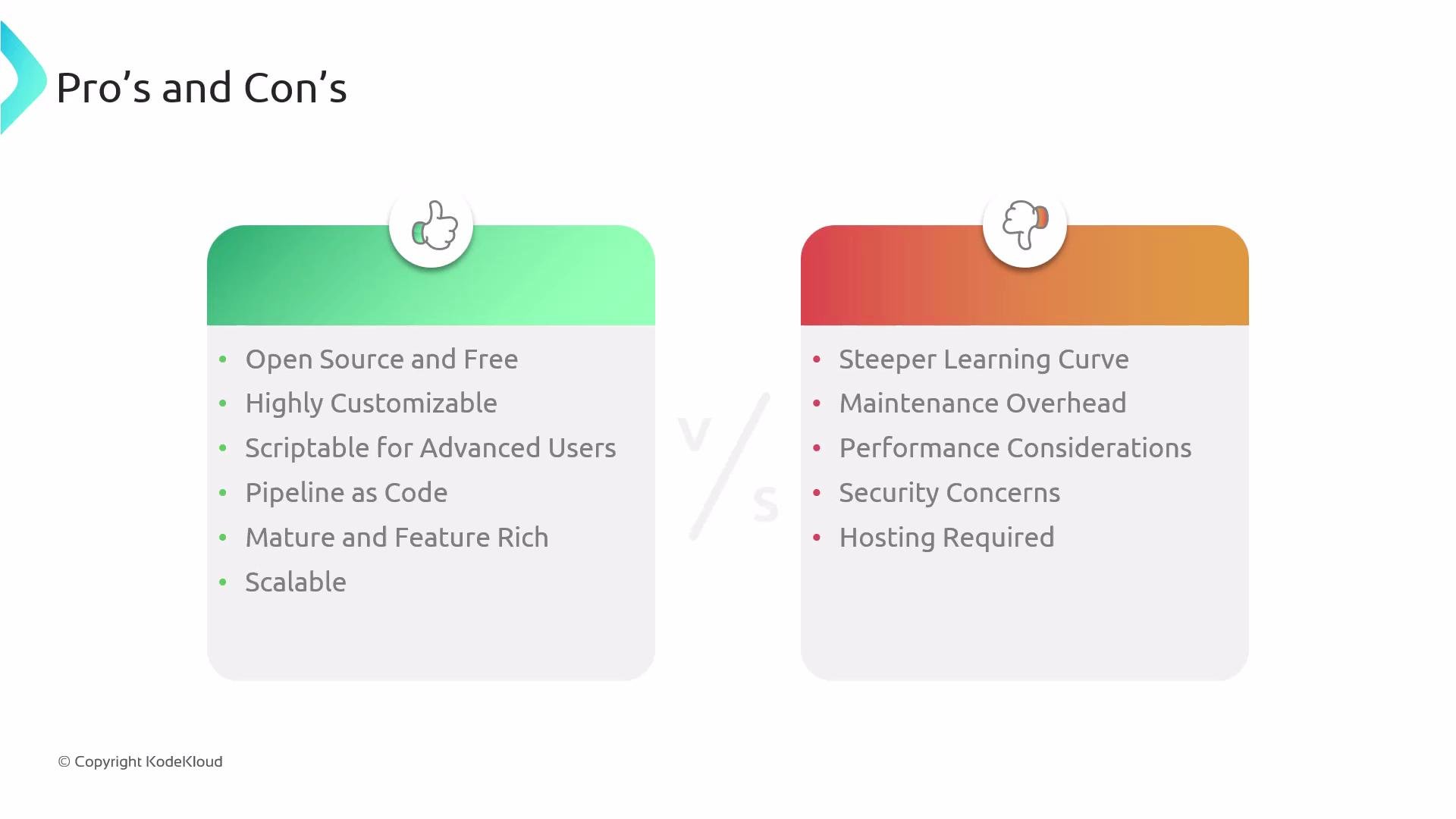
Open source with a large community and many integrations.
Steeper learning curve compared to some newer hosted CI tools.
Highly customizable through a rich plugin ecosystem.
Maintenance overhead: you must manage Jenkins server, OS, and plugin updates.
Scriptable with Groovy for complex logic and conditional flows.
Performance may degrade on single-server setups; scaling requires additional architecture and configuration.
Pipeline-as-code with Jenkinsfile for versioned, reviewable pipelines.
Security and operations are the user’s responsibility (patching, backups, access controls).
Mature features: parallel builds, artifact handling, and detailed reporting.
Self-hosted nature means you need to provision and operate infrastructure.
Because Jenkins is typically self‑hosted, plan and budget for ongoing maintenance: OS and plugin updates, backups, secure credential storage, access controls, and monitoring are essential to keep your CI/CD pipeline reliable and secure.
We’ve covered the essentials. From here, focus on writing a robust Jenkinsfile, deciding how to provision agents (static vs. dynamic), and adopting secure practices for credentials, secrets, and plugin management. For more details, consult the official Jenkins documentation and plugin-specific guides.