

Welcome back. In this lesson we’ll explore the core Amazon RDS architecture and related concepts by deploying a simple three-layer application to AWS and observing how the app interacts with a managed PostgreSQL database. This article covers:Documentation Index
Fetch the complete documentation index at: https://notes.kodekloud.com/llms.txt
Use this file to discover all available pages before exploring further.
- A concise use-case overview and conceptual architecture.
- What we’ll deploy (EC2 + RDS PostgreSQL + static web layer).
- A high-level sequence of interactions between components.
- Key operational considerations, best practices, and references for further reading.
- A user interacts with a static web front-end (Web layer).
- The application logic runs in Python on an EC2 instance (App layer).
- User information is persisted in PostgreSQL managed by Amazon RDS (DB layer).
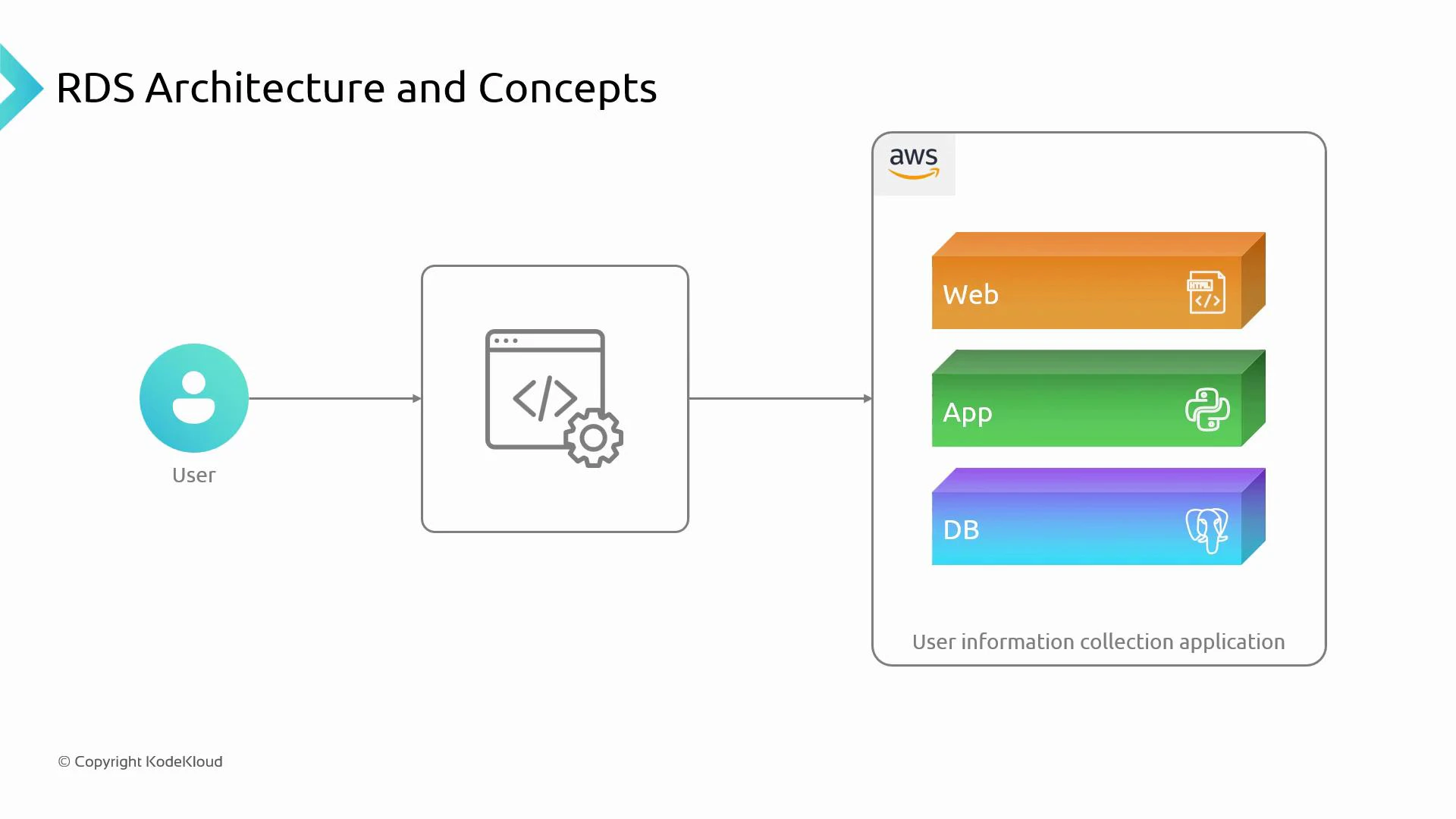
- Python application (app layer) running on an EC2 instance.
- Managed PostgreSQL database provided by Amazon RDS (DB layer).
- Static HTML web layer that serves pages and forwards requests to the Python app.
- The Python app connects to the RDS PostgreSQL endpoint to read and write user information.
- The user’s browser requests an HTML page from the web layer (HTTP/HTTPS).
- The web layer forwards application requests to the Python app on EC2.
- The Python app uses a PostgreSQL client/driver to open a TCP connection to the Amazon RDS PostgreSQL endpoint.
- Amazon RDS accepts the connection according to VPC, subnet, and security-group rules, executes SQL queries, and returns results.
- The application processes the results and renders HTML responses back to the user.
| Area | Concern | Recommended action |
|---|---|---|
| Connectivity | EC2 must reach the RDS endpoint | Place EC2 and RDS in the same VPC and appropriate subnets, or configure VPC peering / routing |
| Network security | Limit access to the DB port (default 5432) | Configure security groups to allow only the EC2 instance (or an application security group) to connect; never open RDS to 0.0.0.0/0 |
| Credentials & secrets | Avoid hard-coding DB credentials | Use AWS Secrets Manager or AWS Systems Manager Parameter Store to rotate and inject credentials securely |
| High availability & backups | Meet recovery and uptime objectives | Use Multi-AZ RDS deployments, enable automated backups and snapshots, plan restore tests |
| Monitoring & scaling | Track resource usage and connections | Monitor CPU, memory, disk, and connection count; use read replicas or instance resizing for scaling reads/writes |
- Use VPC security groups and subnet isolation to limit lateral movement and reduce blast radius.
- Enable RDS Enhanced Monitoring and CloudWatch alarms for CPU, memory, disk I/O, and connections.
- Use Secrets Manager with IAM roles for EC2 (or an instance profile) to grant least-privilege access to database credentials.
- Test backups and failover procedures regularly to validate recovery time and point objectives (RTO/RPO).
- Consider RDS Performance Insights for query-level diagnostics when troubleshooting slow queries.
| Service | Purpose |
|---|---|
| EC2 | Host the Python application and runtime |
| Amazon RDS (PostgreSQL) | Managed relational database service for storing user data |
| VPC | Network isolation and routing for EC2 and RDS |
| AWS Secrets Manager | Secure storage and rotation of database credentials |
| CloudWatch / RDS Monitoring | Metrics, logs, and alarms for operational visibility |
- Provision the EC2 instance and Amazon RDS PostgreSQL instance in the same VPC.
- Configure security groups, subnets, and routing so the EC2 instance can securely reach RDS.
- Store DB credentials in AWS Secrets Manager and retrieve them from the application using an IAM role.
- Deploy the Python application to EC2 and demonstrate read/write operations against RDS PostgreSQL.
Before deploying, ensure you have an AWS account with permissions to create EC2, Amazon RDS, VPC, and AWS Secrets Manager resources. Test in a separate, cost-monitored environment or use the AWS Free Tier where available.
- Amazon RDS product page
- Amazon EC2 product page
- Amazon VPC documentation
- AWS Secrets Manager
- PostgreSQL official site
- AWS Well-Architected Framework