

Use case and problem statement
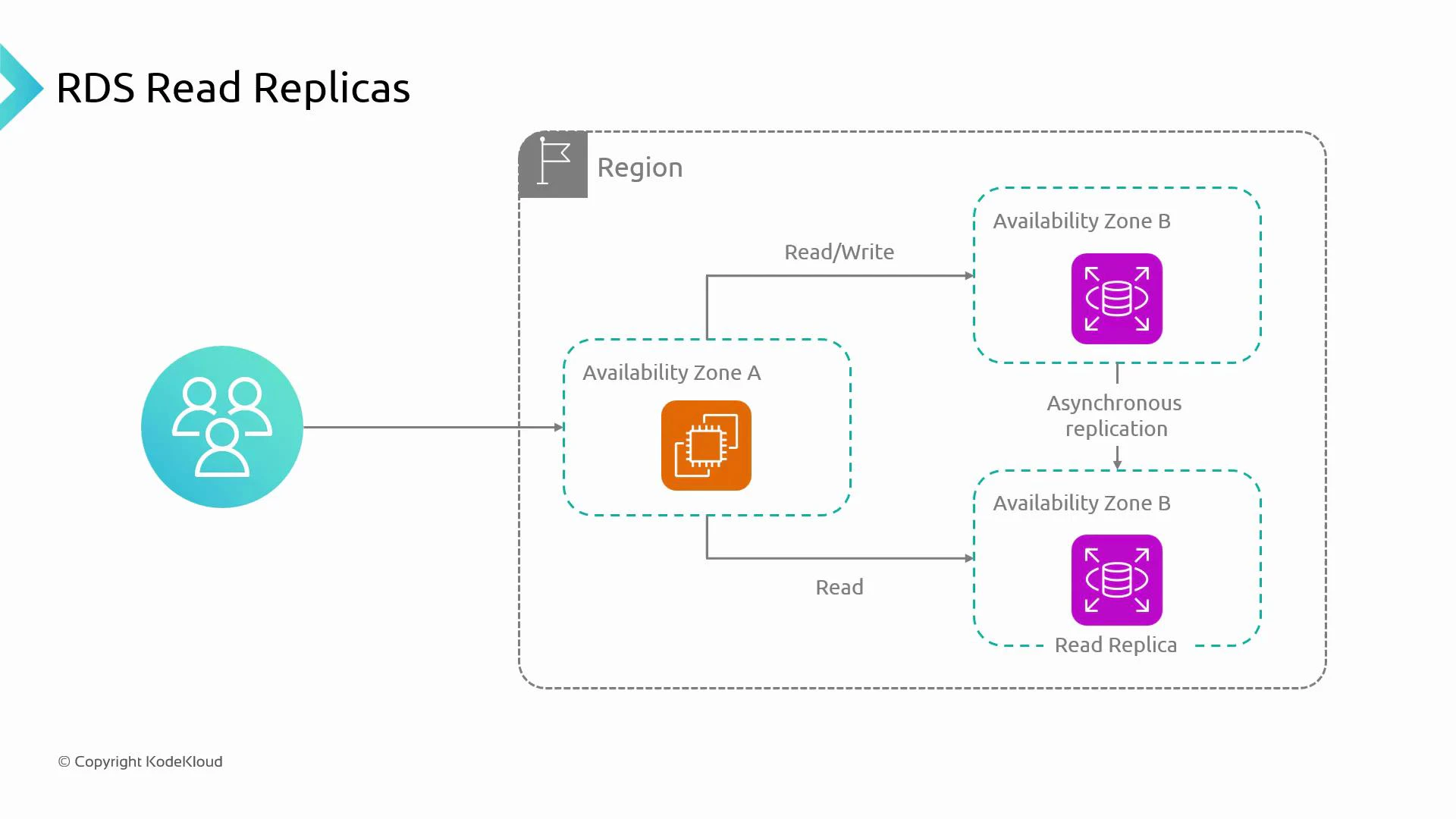
- Imagine an application running on a compute platform (EC2, ECS, EKS, or an Auto Scaling Group) deployed in one Availability Zone.
- The application performs reads and writes against a database hosted in a different Availability Zone (separating compute and data for scalability and recovery).
- When traffic is light, a single database instance handling both reads and writes is fine.
- As traffic grows, the primary database becomes a bottleneck: it must serve all read and write requests, increasing latency and reducing throughput.
What is a read replica?
- A read replica is a read-only copy of the primary database instance.
- Writes to the primary are propagated to replicas via asynchronous replication.
- Applications route read-only queries to read replica(s) and send write queries to the primary to offload read traffic and improve scalability.
Practical example
- An e-commerce site validates an existing user’s login (read) and creates a new account on registration (write).
- Route read operations (customer profile lookups, product catalog reads, reporting queries) to replicas and direct write operations (transactions, updates) to the primary.
Key characteristics and operational considerations
Note: replication behavior can differ by engine. For example, Amazon Aurora uses a distinct storage/replication model — consult the engine documentation for specifics.
Replication vs. High Availability
- Multi‑AZ vs Read Replicas: Multi‑AZ provides synchronous replication to a standby for high availability and automated failover. Read replicas use asynchronous replication and are intended for read scaling, not automatic failover.
- Replication lag: Applications that require read-after-write consistency must read from the primary or implement logic to handle stale reads from replicas.
Read replicas are ideal for offloading heavy read traffic, running read-only reporting/analytics, or providing geographically distributed read endpoints. Do not rely on replicas for immediate read-after-write consistency.
Operational tips
- Application routing
- Use separate connection strings or data sources for read vs write.
- Consider a proxy or query router (e.g., PgBouncer, HAProxy, RDS Proxy) to direct reads to replicas and writes to the primary.
- Monitoring
- Track replication lag metrics and set alerts when lag exceeds acceptable thresholds.
- Monitor replica health, CPU, memory, and I/O to determine when to add replicas or scale instances.
- Backups and maintenance
- Understand how backups, maintenance windows, and failover operations affect replicas for your chosen engine.
- Test promotion and recovery procedures to ensure readiness for disaster scenarios.
Avoid using read replicas for operations that require strict read-after-write consistency. If your application needs immediate consistency, direct read traffic to the primary or implement application-level consistency controls.
Summary
- Read replicas are read-only copies of the primary database that use asynchronous replication to offload read traffic and scale horizontally.
- Benefits: improved read throughput, isolation of heavy read workloads, and regional read endpoints.
- Trade-offs: potential replication lag (eventual consistency), increased cost, and manual promotion if a replica needs to become writable.
Next steps
- Practice creating and configuring read replicas for your RDS engine and test routing read traffic from your application.
- Validate replication lag, promote a replica in a test scenario, and compare behavior against a Multi‑AZ configuration.