

Table of Contents
- Prerequisites
- VM Specifications
- Provisioning the VM
- Software Installation
- Cluster Configuration
- Download Resources
Prerequisites
- Azure CLI ≥ 2.20 or GCP SDK
- Vagrant & VirtualBox (for local testing)
- Basic Linux shell proficiency
VM Specifications
The firewall rule allowing all inbound traffic is for demonstration only. Do not use such permissive settings in production environments.
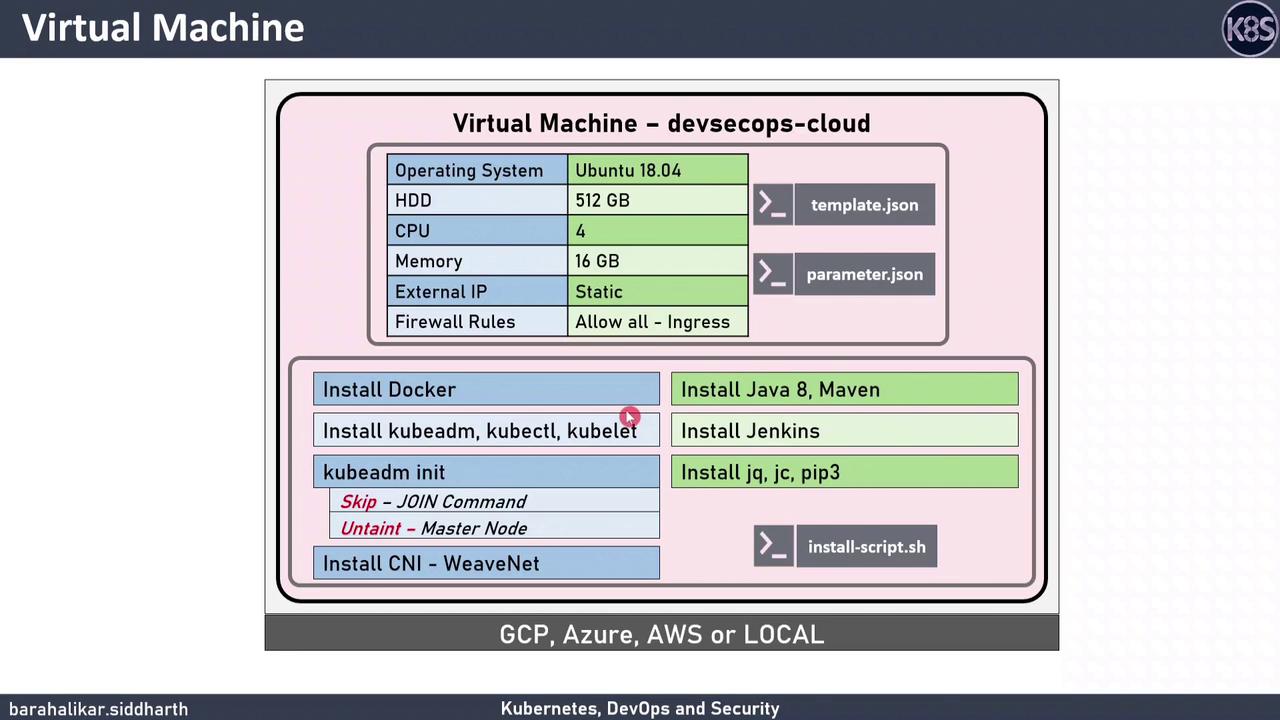
Provisioning the VM
Azure Resource Manager Template
Use the provided ARM template and parameters:Google Cloud Platform (gcloud) Commands
Or spin up a GCP instance:Local VirtualBox Deployment (Vagrant)
For local testing with Vagrant:Software Installation
SSH into your VM and run the installer:Installation Breakdown
The
install.sh script updates packages, installs Docker CE, sets up Kubernetes tools, initializes a single-node cluster, and deploys Jenkins.