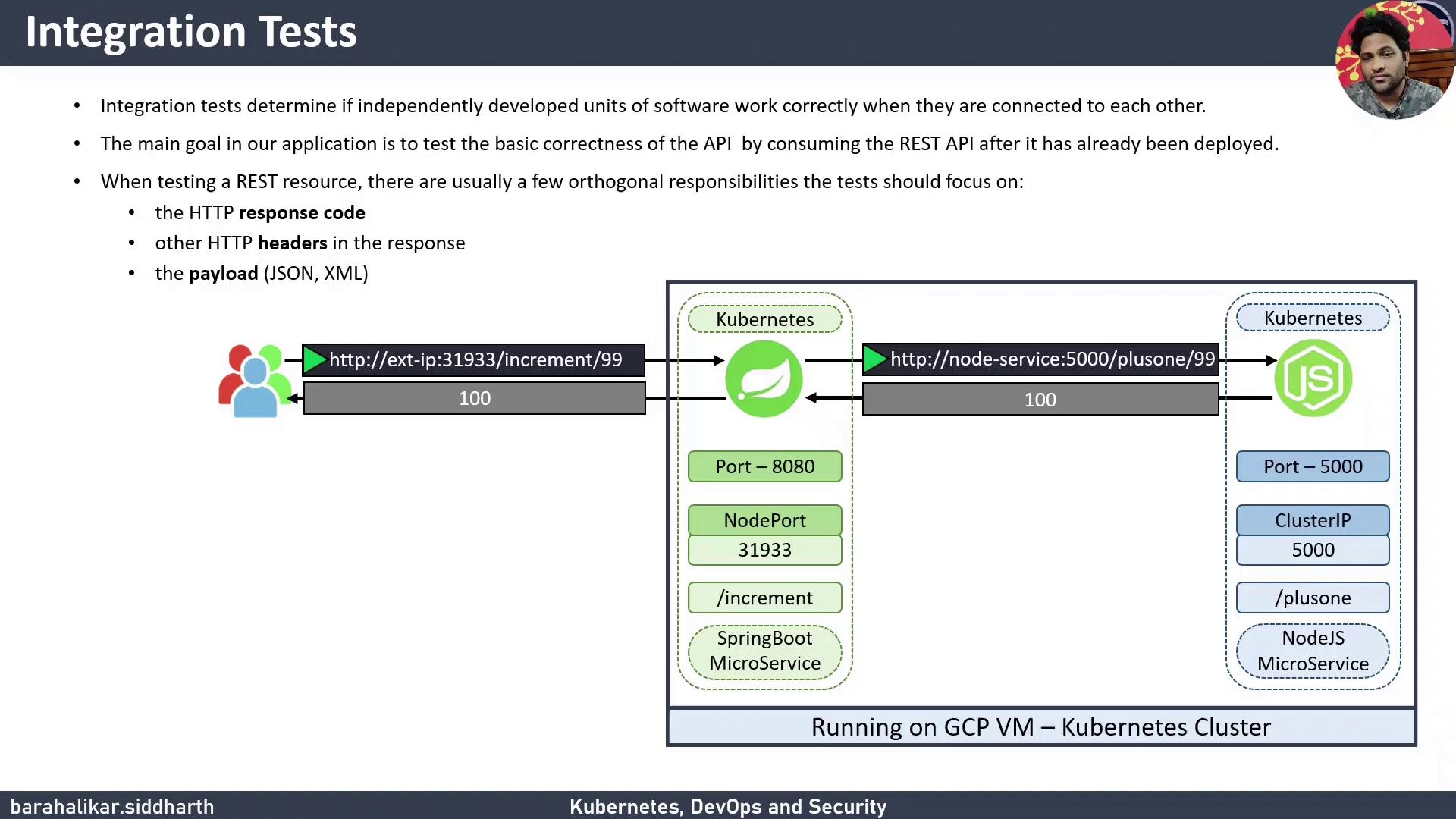
Integration tests ensure that individual components in your application communicate correctly when combined. This guide shows how to add an integration testing stage to a Jenkins Pipeline for a Kubernetes-based system using simple curl commands.
What You Will Learn
How to verify HTTP response codes and payloads with curl
Embedding integration tests in a Jenkinsfile
Rolling back failed deployments automatically
Why Integration Testing Matters
Integration testing catches issues that unit tests cannot, such as network connectivity, misconfigured services, or data serialization errors. For a REST API, common checks include:
HTTP status codes
Response headers
Payload validation (JSON, XML, or plain text)
Architecture Overview
Our demo application consists of two microservices:
A Spring Boot service listening on a NodePort (e.g., 31933)
A Node.js service that processes business logic
The Spring Boot service forwards requests to the Node.js service. We will run two curl-based tests:
Check that /increment/99 returns HTTP 200
Confirm payload increments 99 to 100
Manual Curl Commands
Use these commands for a quick sanity check:
# Check HTTP status code (should print 200)
curl -s -o /dev/null -w "%{http_code}" http:// < external-i p > :31933/increment/99
# Check payload (should return 100)
curl -s http:// < external-i p > :31933/increment/99
Embedding Integration Tests in Jenkins Pipeline
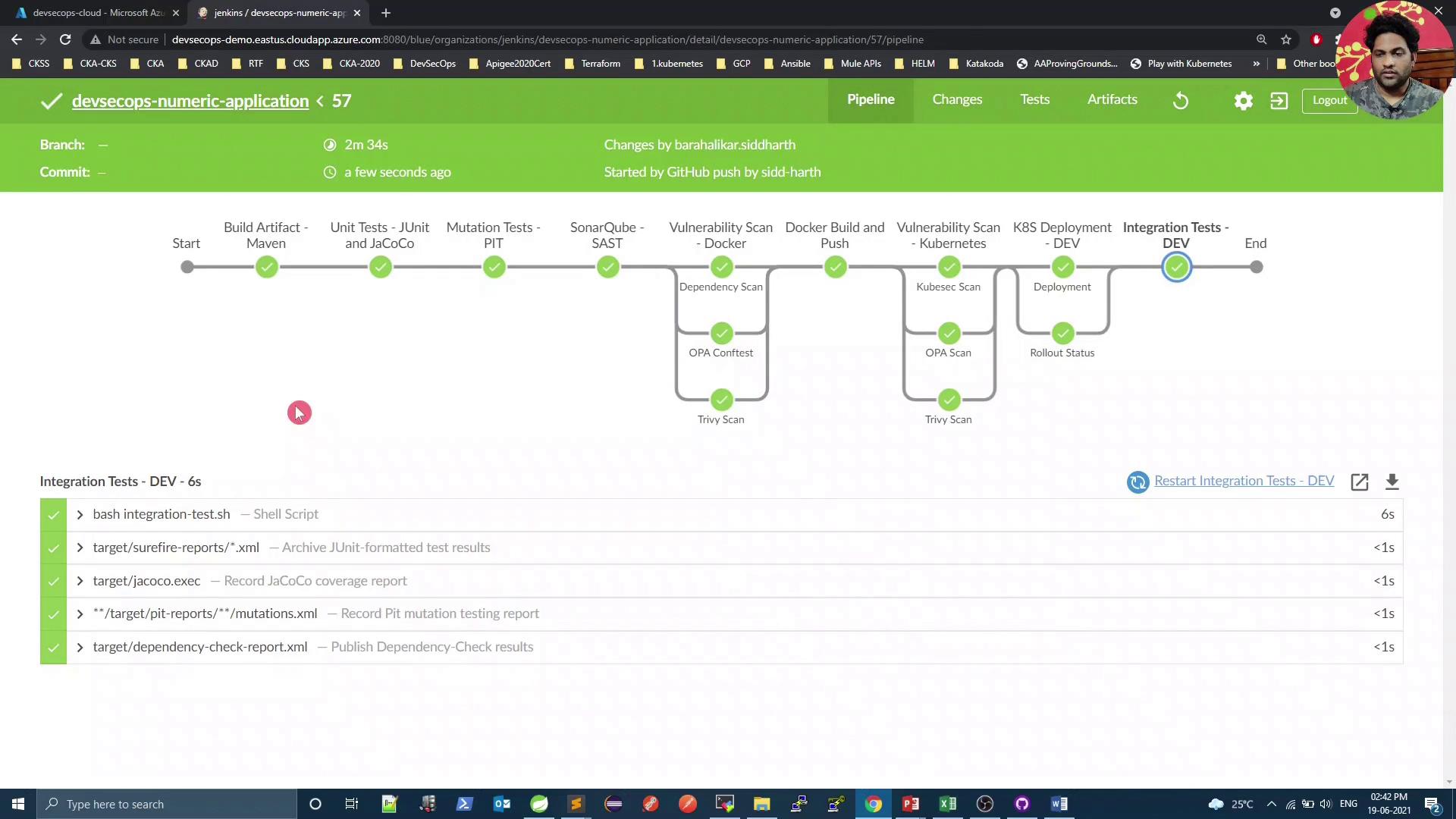
Add a dedicated Integration Test - DEV stage right after deploying to Kubernetes. The stage will:
Execute integration-test.sh for curl-based checks
Automatically roll back on failure using kubectl rollout undo
Jenkins Pipeline Stages at a Glance
Stage Purpose Command Example Build Artifact - Maven Compile code & package JAR mvn clean package -DskipTests=trueUnit Tests - JUnit & JaCoCo Run unit tests mvn testMutation Tests - PIT Perform mutation testing mvn org.pitest:pitest-maven:mutationCoverageSonarQube - SAST Static analysis & code quality mvn sonar:sonarK8S Deployment - DEV Deploy to Kubernetes and monitor rollout bash k8s-deployment.sh / bash k8s-deployment-rollout-status.shIntegration Test - DEV Validate connectivity and payload; rollback if needed bash integration-test.sh
Jenkinsfile Snippet
pipeline {
agent any
environment {
deploymentEnv = "devsecops"
containerName = "devsecops-container"
serviceName = "devsecops-svc"
imageName = "siddharth67/numeric-app: ${ GIT_COMMIT } "
applicationURL = "http://devsecops-demo.eastus.cloudapp.azure.com"
applicationURI = "/increment/99"
}
stages {
stage( 'Build Artifact - Maven' ) {
steps {
sh "mvn clean package -DskipTests=true"
archiveArtifacts artifacts : 'target/*.jar'
}
}
stage( 'Unit Tests - JUnit & JaCoCo' ) {
steps {
sh "mvn test"
}
}
stage( 'Mutation Tests - PIT' ) {
steps {
sh "mvn org.pitest:pitest-maven:mutationCoverage"
}
}
stage( 'SonarQube - SAST' ) {
steps {
withSonarQubeEnv( 'SonarQube' ) {
sh """
mvn sonar:sonar \
-Dsonar.projectKey=numeric-application \
-Dsonar.host.url=http://devsecops-demo.eastus.cloudapp.azure.com:9000
"""
}
}
}
stage( 'K8S Deployment - DEV' ) {
parallel {
stage( 'Deployment' ) {
steps {
withKubeConfig([ credentialsId : 'kubeconfig' ]) {
sh "bash k8s-deployment.sh"
}
}
}
stage( 'Rollout Status' ) {
steps {
withKubeConfig([ credentialsId : 'kubeconfig' ]) {
sh "bash k8s-deployment-rollout-status.sh"
}
}
}
}
}
stage( 'Integration Test - DEV' ) {
steps {
script {
try {
withKubeConfig([ credentialsId : 'kubeconfig' ]) {
sh "bash integration-test.sh"
}
} catch (e) {
withKubeConfig([ credentialsId : 'kubeconfig' ]) {
sh "kubectl -n default rollout undo deploy ${ serviceName } "
}
error( "Integration tests failed, rolled back deployment." )
}
}
}
}
}
post {
always {
junit 'target/surefire-reports/*.xml'
jacoco execPattern : 'target/jacoco.exec'
}
}
}
Ensure that the serviceName environment variable matches your Kubernetes Deployment name. Replace ${serviceName} if needed.
integration-test.sh Script
Create an integration-test.sh file with executable permissions (chmod +x integration-test.sh):
#!/usr/bin/env bash
set -euo pipefail
sleep 5
# Retrieve the NodePort for the service
PORT = $( kubectl -n default get svc "${ serviceName }" -o jsonpath='{.spec.ports[0].nodePort}' )
if [[ -z " $PORT " ]]; then
echo "Error: Service ${ serviceName } has no NodePort."
exit 1
fi
URL = "${ applicationURL }:${ PORT }${ applicationURI }"
echo "Testing endpoint: $URL "
# Validate payload increments 99 to 100
response = $( curl -s " $URL " )
if [[ " $response " != "100" ]]; then
echo "❌ Payload Test Failed: expected 100, got $response "
exit 1
else
echo "✅ Payload Test Passed"
fi
# Check HTTP status code 200
http_code = $( curl -s -o /dev/null -w "%{http_code}" " $URL " )
if [[ " $http_code " != "200" ]]; then
echo "❌ HTTP Status Test Failed: expected 200, got $http_code "
exit 1
else
echo "✅ HTTP Status Test Passed"
fi
Local Testing
Before committing to Jenkins, validate tests locally:
# Get NodePort
kubectl -n default get svc "${ serviceName }" -o jsonpath='{.spec.ports[0].nodePort}'
# Test status code
curl -s -o /dev/null -w "%{http_code}" http://localhost: < POR T > /increment/99
# Test payload
curl -s http://localhost: < POR T > /increment/99
If you see 200 and 100, your integration test script is working.
After pushing changes, Jenkins will run the updated pipeline, including the new integration test stage.
References
Thank you!