

- Verify our monitoring stack is running.
- Inspect Prometheus scrape targets.
- Cover PromQL fundamentals: gauges, counters, label filtering, aggregation, and calculating error rates.
- Show common query patterns used by dashboards and alerts.
Check the monitoring stack
The monitoring stack is deployed into themonitoring namespace. Confirm the pods are running with kubectl:
Prometheus targets
Open the Prometheus UI and inspect Status → Targets to see the endpoints Prometheus is scraping. If a target shows as DOWN here, Prometheus is not collecting data from it — this is the primary place to start when metrics are missing.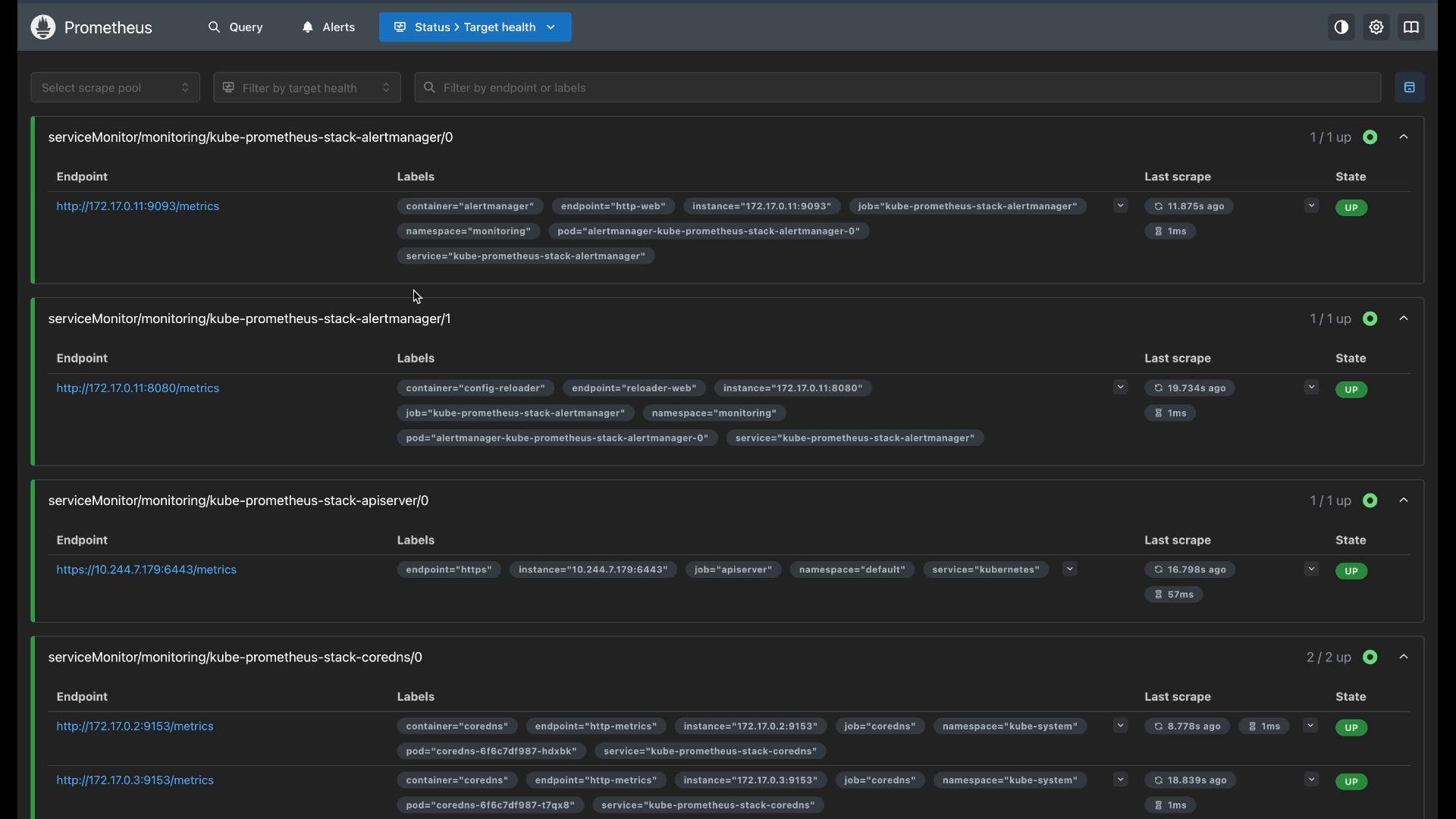
Gauges vs Counters
Prometheus metrics come in different types. Two common ones are gauges and counters.
Use gauges for instantaneous state (free memory, CPU usage) and counters for totals that you convert to rates or increases over windows.
Gauges
A common gauge isnode_memory_MemAvailable_bytes. Run this in the Prometheus expression field and convert bytes to gigabytes:
Counters and rates
Counters only increase, so the raw counter value is rarely meaningful by itself. Userate() or increase() to interpret counters:
rate(<counter>[5m])— per-second velocity estimated over the last 5 minutes.increase(<counter>[5m])— total increase over the last 5 minutes.
Filtering by labels
Prometheus metrics carry labels (dimensions) you can match with label selectors inside{}. Use exact matches or regex with =~.
Example: rate of successful GET requests (HTTP 200) to the API server:
Aggregation
Aggregate across series using aggregation operators (sum, avg, max, min, etc.) and optionally group by labels. Example: total rate per HTTP verb across all series:by (label) clause must follow the aggregation operator: sum(...) by (label).
Two common query patterns for dashboards
- Totals over a window — useful for pie charts or distributions. Use
increase()to get counts over a time interval.
- Error rate percentage — useful for platform health dashboards and alerts.
Quick reference — common PromQL functions
Troubleshooting tips
- Inspect Status → Targets in the Prometheus UI first when metrics are missing — DOWN targets indicate no scraping.
- Use label filtering to narrow noisy results and then aggregate.
- Prefer
rate()orincrease()for counters; usegaugeraw values directly for instantaneous state.
When writing PromQL in MDX/MD files, always place expressions containing curly braces and angle brackets in code blocks or inline code (backticks) so the MDX parser does not try to interpret them as JSX or JS objects.
Links and references
- Prometheus documentation: https://prometheus.io/docs/
- PromQL quick reference: https://prometheus.io/docs/prometheus/latest/querying/basics/
- Grafana: https://grafana.com/