

Logs show what happened inside a single service.
But when a request flows through multiple microservices and suddenly takes several seconds, how do you find the service responsible for the delay? Distributed tracing answers that question. OpenTelemetry (OTel) provides a vendor-neutral way to instrument applications and emit traces and metrics. Jaeger is a popular tracing backend that collects, stores, indexes, and visualizes those traces. In short: OpenTelemetry generates and exports traces; Jaeger collects and displays them. This guide shows how to enable OpenTelemetry in a Kubernetes deployment so traces from your application appear in Jaeger.
What is running in the cluster
Start by confirming the observability components and your application workloads are running:- Jaeger runs in the
observabilitynamespace. - Four microservices (frontend, order, inventory, payment) run in the
workloadsnamespace. - A traffic generator is exercising the services to generate traces.
frontend-svc) does not appear in the service list, that usually means the application is not configured to emit traces — the OpenTelemetry environment variables are missing or incorrect.
How to configure the frontend deployment to export traces
To export traces from the frontend to Jaeger via OTLP, add the appropriate OpenTelemetry environment variables to the frontend deployment. These variables tell the application’s OTel SDK what the service name is, which protocol and endpoint to use, and which exporter to enable. Use this table to guide the required variables:
Important: protocol and port must match the Jaeger collector. gRPC uses port
4317; HTTP/Protobuf uses port 4318. If you choose HTTP/Protobuf, some SDKs require an explicit scheme in the endpoint (for example http://jaeger-collector.observability.svc.cluster.local:4318).
Below is the patch fragment you can apply to the frontend deployment (save as frontend-patch.yaml):
Always ensure the
OTEL_EXPORTER_OTLP_PROTOCOL value matches the collector port you set in OTEL_EXPORTER_OTLP_ENDPOINT: use grpc for port 4317 or http/protobuf for port 4318. A mismatch will prevent traces from being delivered.If your language’s OpenTelemetry SDK exposes protocol-specific variables (for example
OTEL_EXPORTER_OTLP_TRACES_PROTOCOL), prefer those over the generic OTEL_EXPORTER_OTLP_PROTOCOL. Check your SDK docs — using the wrong variable is a common cause of silent failures.Verify traces in Jaeger
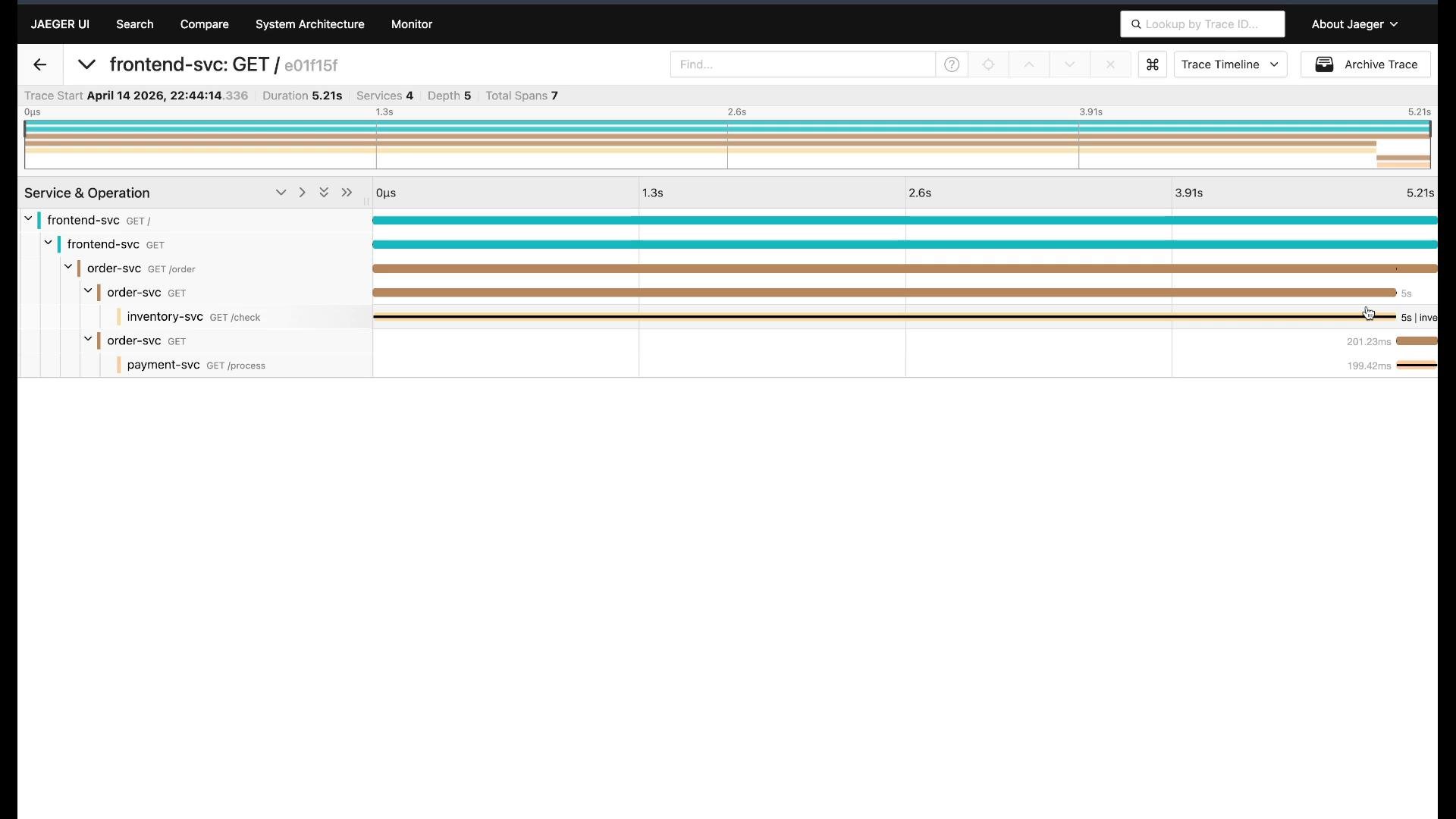
After the deployment restarts with the new environment variables:- Open the Jaeger UI (query service typically at the
jaeger-queryservice; many setups provide a UI route or NodePort). - Refresh the service dropdown —
frontend-svcshould now appear. - Search for recent traces for
frontend-svc. Open a trace to inspect the waterfall.
- Confirm the environment variables are present on the running pod:
- Confirm you patched the correct container name (the patch targets the container named
frontend-svcin this example). - Verify the OTLP endpoint and protocol match the Jaeger collector service and port.
- Inspect application and OTel SDK logs for errors or warnings that indicate export failures.
- Ensure network policies or service mesh sidecars (if present) are not blocking export traffic to the collector.
Summary and next steps
You enabled OpenTelemetry tracing for a Kubernetes service and exported traces to Jaeger by:- Setting the service name (
OTEL_SERVICE_NAME). - Pointing the SDK at the Jaeger OTLP endpoint (
OTEL_EXPORTER_OTLP_ENDPOINT). - Choosing the correct transport protocol (
OTEL_EXPORTER_OTLP_PROTOCOLor protocol-specific variables). - Enabling the OTLP exporter (
OTEL_TRACES_EXPORTER).
- OpenTelemetry — official site and SDK docs
- Jaeger Tracing — Jaeger documentation and UI guides
- Kubernetes: kubectl reference