

kubectl apply. Gatekeeper enforces policies at the API server level, preventing misconfigurations regardless of how a resource is created.
Gatekeeper two-resource model
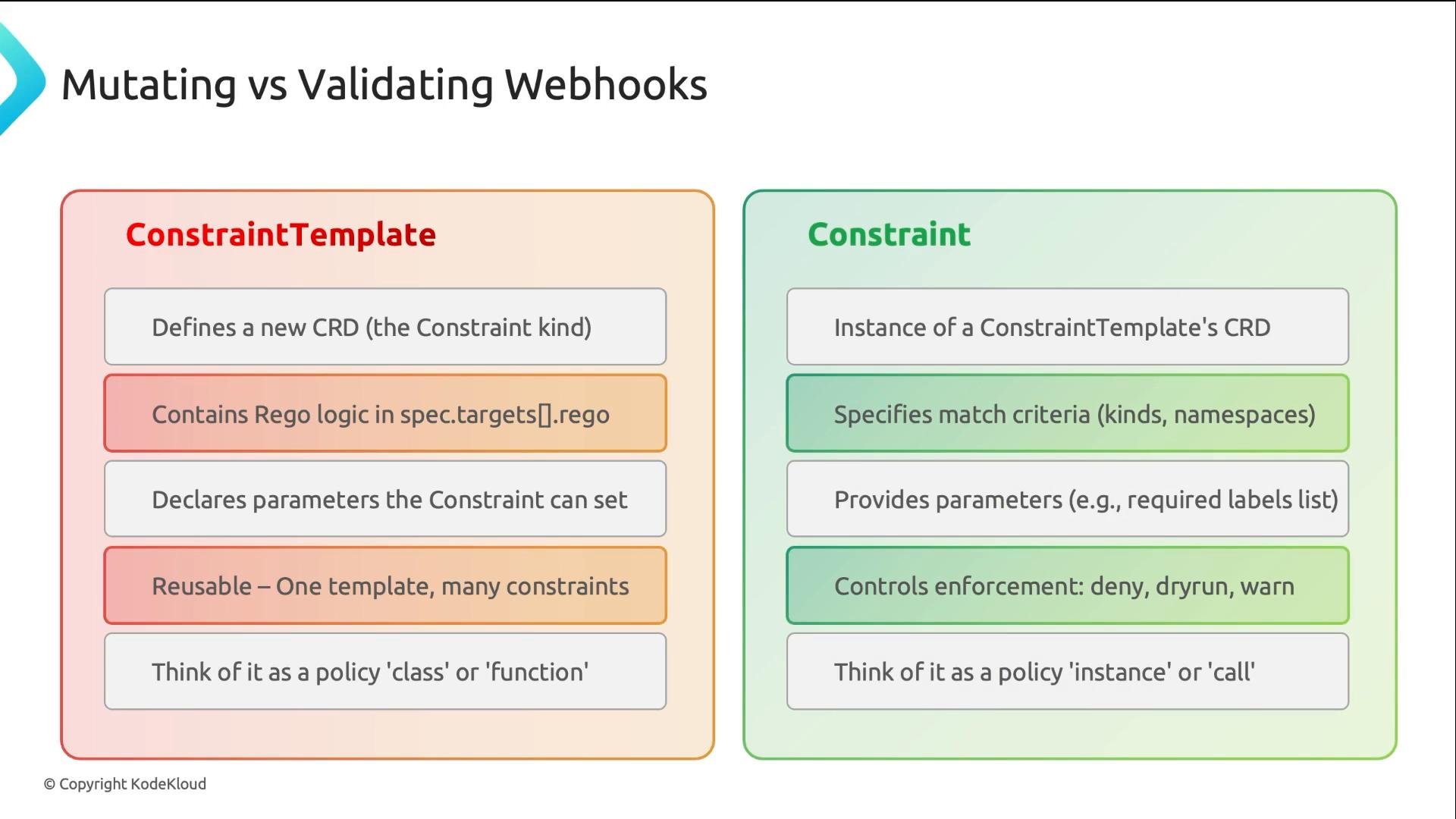
Gatekeeper policies are composed from two distinct Kubernetes resources:- ConstraintTemplate — authored by platform/security teams. Contains Rego logic and defines a new CustomResourceDefinition (CRD).
- Constraint — an instance of the CRD created by the template. Provides match criteria, parameter values, and enforcement behavior.
Example: Enforce required labels
Below is a concrete, commonly used example: require specific labels on objects. The ConstraintTemplate defines a kind namedK8sRequiredLabels and exposes a labels parameter (array of strings). The Rego policy inspects the admission review object (input.review.object) and the parameters passed from a Constraint (input.parameters.labels). If a required label is missing, the policy emits a violation.
- The template creates a CRD with kind
K8sRequiredLabels. Constraints must use that kind. - Use
input.review.objectto reference the resource being admitted. - Constraint parameters are available as
input.parameters.
spec.enforcementAction controls behavior: deny blocks requests, dryrun records violations without blocking, and warn allows the request but surfaces warnings. The spec.match field determines which resources are evaluated.
team label, Gatekeeper rejects the request with a clear message:
input.parameters, so the template contains the reusable logic while the constraint supplies the context and values.
Rollout strategy: start with
dryrun to collect violations without blocking resources, then move to warn to surface non-blocking warnings, and finally switch to deny for strict enforcement once teams have remediated issues.Enforcement actions quick reference
Debugging Gatekeeper and checking status
Common tasks for debugging Gatekeeper and verifying policy behavior:- Check ConstraintTemplates and their readiness:
kubectl get constrainttemplatesshows templates and their status; a non-ready template often indicates Rego syntax or schema errors.
- List constraints of a particular kind:
kubectl get k8srequiredlabelsshows instances and their enforcement actions and violation counts.
- View violation messages for a specific constraint:
kubectl get k8srequiredlabels require-team-label -o jsonpath='{.status.violations[*].message}'
- Inspect Gatekeeper controller logs for errors:
kubectl logs -n gatekeeper-system deployment/gatekeeper-controller-manager
Common checks when a policy isn’t working:
- Rego or schema errors in the ConstraintTemplate (inspect
kubectl describe constrainttemplate <name>and template status). - Webhook configuration issues (validating webhook not reachable or misconfigured).
- Gatekeeper controller pod not running or repeatedly crashing (check controller deployment and logs).
- Match expressions do not cover the intended resources (verify
spec.matchin Constraint).
Common pitfalls and tips
- Always validate Rego locally or in a CI step before applying ConstraintTemplates.
- Use small, focused templates to make debugging easier.
- Prefer parameterizing logic (via
input.parameters) rather than hardcoding resource names or labels. - When onboarding teams, start with
dryrunto avoid accidental outages and to build trust.
Wrapping up
Gatekeeper’s two-resource model gives platform teams a reliable way to enforce cluster-wide policies with reusable Rego logic and flexible parameterization. Remember:- Write the Rego logic in a ConstraintTemplate and expose only the parameters you need.
- Use Constraints to scope where the policy applies and to safely roll out enforcement via
dryrun→warn→deny. - Use Kubernetes primitives and Gatekeeper status fields to debug and iterate quickly.
Links and references
- Gatekeeper project: https://github.com/open-policy-agent/gatekeeper
- Open Policy Agent (OPA): https://www.openpolicyagent.org/
- Rego language: https://www.openpolicyagent.org/docs/latest/policy-language/
- Kubernetes admission webhooks: https://kubernetes.io/docs/reference/access-authn-authz/admission-controllers/