

- Plan stage: run
terraform initandterraform plan --out=..., then publish the generated plan as a pipeline artifact. - Apply stage: run as a
deploymentjob tied to an Azure DevOps environment (with approval checks). The job downloads the plan artifact and runsterraform applyagainst the downloaded plan file.
Key points explained
-
Structure
- The pipeline uses top-level
stages:containingPlanandApply. Each stage has jobs, and jobs contain steps/tasks. Splitting Plan and Apply allows you to review and approve the exact plan that will be run.
- The pipeline uses top-level
-
Plan stage
terraform initconfigures the backend and providers so Terraform can calculate changes.terraform planwith--out=$(Build.ArtifactStagingDirectory)/tfplanproduces a binary plan file on the agent. This file is required for deterministic apply and must be preserved beyond the job lifecycle.PublishPipelineArtifact@1uploads that plan to Azure DevOps pipeline storage. Uploaded artifacts are associated with the pipeline run and are immutable for traceability.
-
Artifact location and download
- When published, the
tfplanartifact is stored with the pipeline run and is immutable and traceable. - In Apply,
DownloadPipelineArtifact@2retrieves the artifact into$(Pipeline.Workspace)/tfplan. The concrete plan file path becomes$(Pipeline.Workspace)/tfplan/tfplan, which is whatterraform applyconsumes.
- When published, the
-
Apply stage and approvals
- The Apply job is a
deploymentjob scoped to an Azure DevOps environmentterraform-approval. Environments support checks such as manual approvals; when configured, the deployment pauses until an approver releases it. - After approval, the job downloads the plan, runs
terraform initagain (to ensure backend/provider configuration on the agent), and applies the exact binary plan viaterraform apply --auto-approve <plan-file>.
- The Apply job is a
Create an Azure DevOps environment named
terraform-approval (or change the pipeline to reference an existing environment). Configure approvals and checks for that environment to enforce a manual approval gate before the Apply job runs.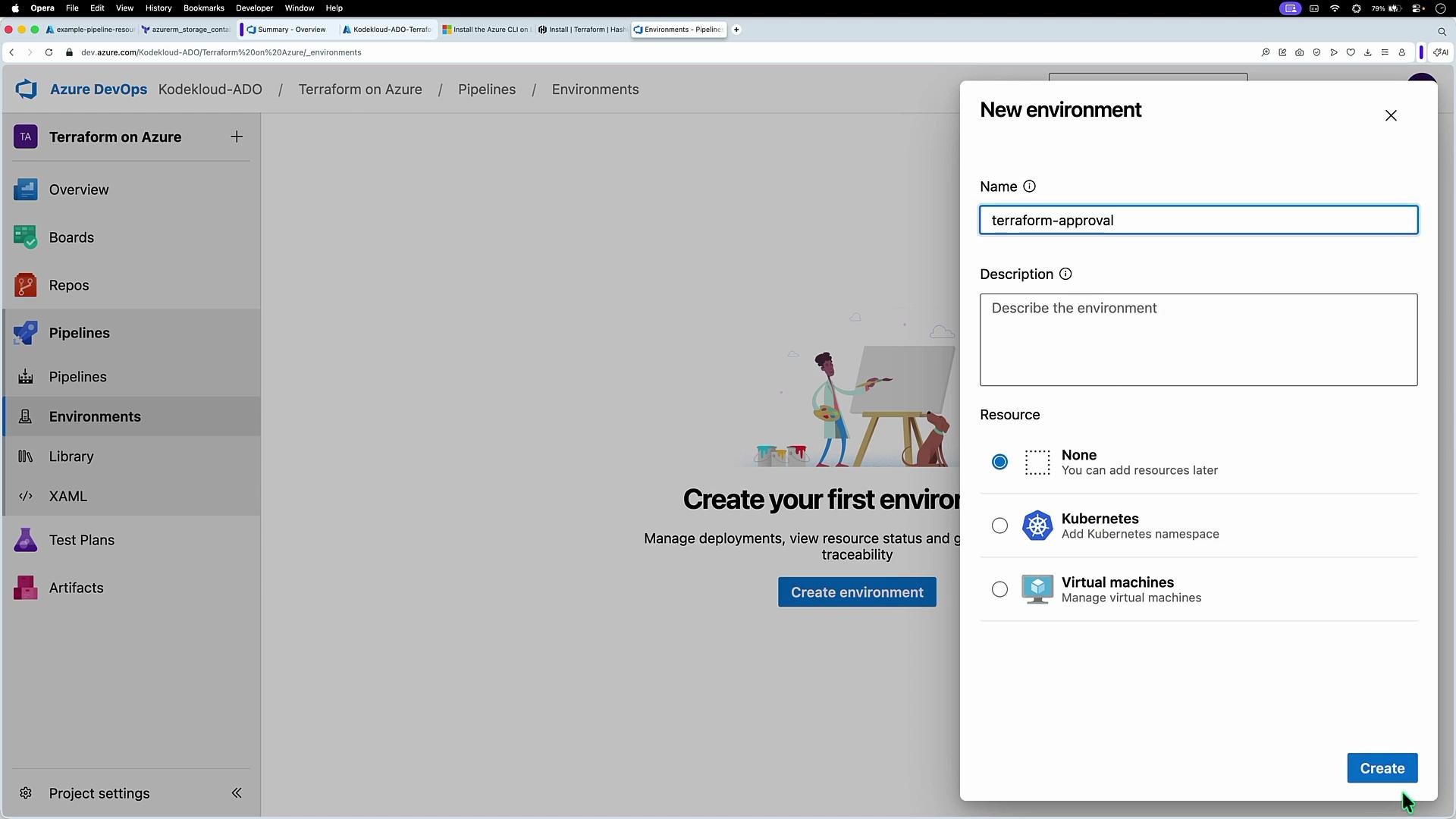
- Commit an HCL change to trigger Plan stage. Example Terraform configuration creating a resource group and storage account:
- Downloading artifact:
- Terraform apply execution (abridged):
- The example pipeline uses
trigger: noneto disable CI. If you want CI back, adjust thetriggersection to include branches or paths.
- Using pipeline artifacts plus environment approvals provides a safe, auditable, and repeatable process: generate the plan once, keep it immutable, and only apply what was reviewed.
- Keep credentials and service connections minimal. Grant the service connection only the permissions required.
Ensure the Azure DevOps service connection
tf-svc-01 has the required permissions: access to the backend storage account/container and the target subscription/resource group for resource creation. Misconfigured permissions will cause backend init or apply failures.- Azure DevOps Pipelines: https://docs.microsoft.com/azure/devops/pipelines/
- Terraform CLI docs: https://www.terraform.io/docs/cli/index.html
- Azure Provider docs: https://registry.terraform.io/providers/hashicorp/azurerm/latest/docs
- PublishPipelineArtifact: https://docs.microsoft.com/azure/devops/pipelines/tasks/utility/publish-pipeline-artifact
- DownloadPipelineArtifact: https://docs.microsoft.com/azure/devops/pipelines/tasks/utility/download-pipeline-artifact