

Using components provides a single source of truth for your features, ensuring that updates or changes propagate consistently across all overlays where the feature is enabled.
When to Use Components
Imagine a scenario where you have a set of configurations to enable a specific feature. If this feature were meant for all overlays, including the configuration in the Base might be appropriate. However, when the feature should only be activated in a subset of overlays, manually duplicating the configuration leads to scalability issues and potential errors. Components solve this problem efficiently by maintaining a centralized configuration that you can import wherever necessary.Visual Example
Consider an application that can be deployed in three variations: development, premium, and self-hosted. The Base configuration holds common settings, while each variation is represented by its own overlay folder. Suppose the application has two optional features:- Caching: Only the premium and self-hosted versions require caching, which involves deploying a Redis instance along with its configurations and secrets.
- External Database: A PostgreSQL database is enabled only for the development and premium versions.
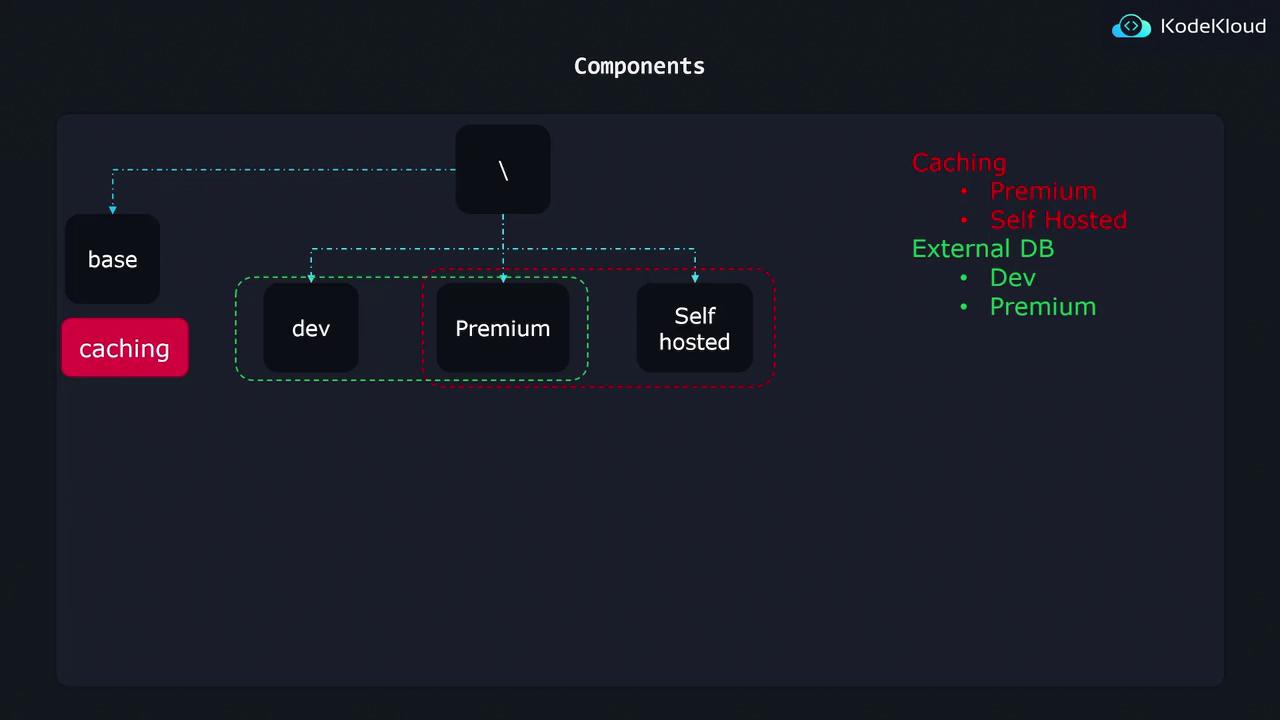
Organizing Components
A well-organized project structure simplifies management. Consider the following directory layout:- Base contains shared configurations.
- Overlays (dev, premium, standalone) inherit from the Base.
- Components store isolated configurations for individual features, such as caching and external database (db). Each component directory includes all the necessary Kubernetes resources to enable the feature.
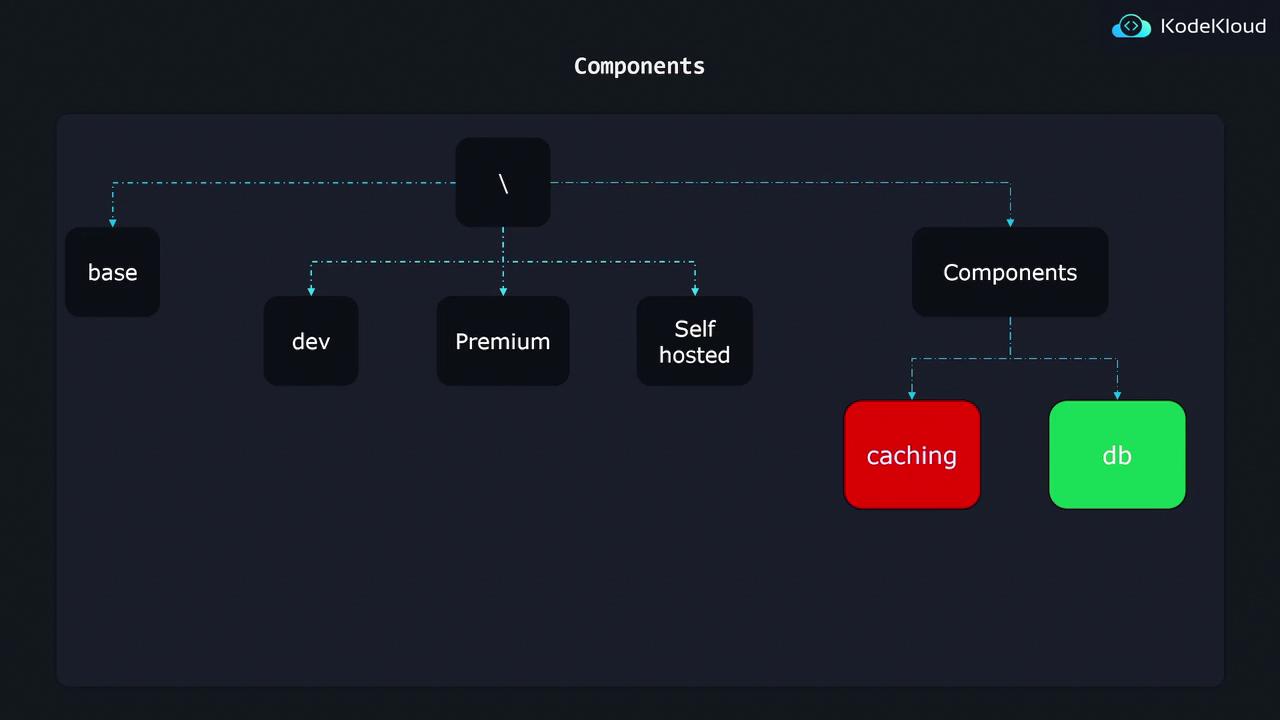
Implementing a Kustomize Component
Let’s walk through an example by implementing the database component. In the db folder, you will find the following files:- postgres-depl.yaml: Defines the deployment resource for a PostgreSQL database.
- deployment-patch.yaml: Contains a strategic merge patch to update the base deployment with database-specific configurations.
- kustomization.yaml: Declares the component by importing resources, generating secrets, and applying patches.
Postgres Deployment Configuration
Thepostgres-depl.yaml file creates a PostgreSQL deployment:
Component kustomization.yaml
In the component’skustomization.yaml, a different API version and kind indicate that this is a component. It imports the PostgreSQL deployment, generates a secret for the database password, and applies patches:
Deployment Patch
Thedeployment-patch.yaml file is a strategic merge patch that updates the Base deployment by adding an environment variable for the database password. This integration ensures that the Base application can securely access the database credentials when the feature is enabled:
Overlay Configuration
To integrate the database component into an overlay—such as the development overlay—the overlay’skustomization.yaml file should reference both the Base configuration and the specific component:
components section, the overlay effortlessly incorporates the external database feature without duplicating any configuration.
Always ensure that the paths in your overlay configurations accurately reference the component directories to prevent any configuration errors during deployment.