This article explores the operator framework, highlighting its role in simplifying Kubernetes resource deployment and management.
In this article, we dive into the operator framework and explore how it simplifies the deployment and management of Kubernetes resources. Previously, we discussed creating a Custom Resource Definition (CRD) and a custom controller to handle resource-specific logic. Traditionally, these components are deployed separately: you first create the CRD and its related resources, and then deploy the controller as a pod or as part of a deployment. With the operator framework, you can package both components into a single deployable entity.When you deploy the flight operator, it automatically creates the Custom Resource Definition, provisions the required resources, and deploys the custom controller as a Deployment. Consider the following example:
Below is an example of the custom controller written in Go. This controller monitors and synchronizes the state of FlightTicket resources within your Kubernetes cluster:
package flightticketimport "k8s.io/api/apps/v1"var controllerKind = v1.SchemeGroupVersion.WithKind("Flightticket")// Run begins watching and syncing.func (dc *FlightTicketController) Run(workers int, stopCh <-chan struct{}) {}// callBookFlightAPI invokes the Book Flight API for a ReplicaSet.func (dc *FlightTicketController) callBookFlightAPI(obj interface{}) {}
To deploy the operator, simply run:
# Deploy the operatorkubectl create -f flight-operator.yaml
The operator framework not only streamlines resource deployment but also simplifies ongoing management tasks such as application updates, backups, and recovery.
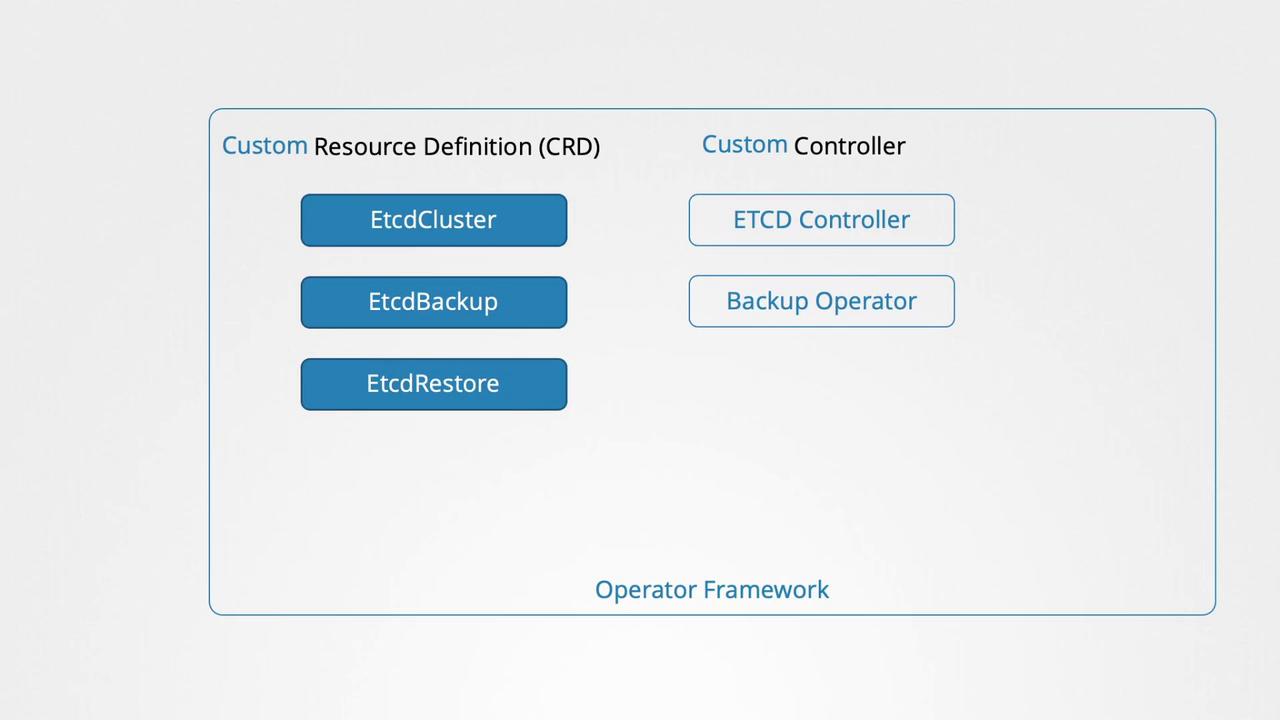
One of the most popular examples is the etcd operator. It deploys and manages an etcd cluster within Kubernetes using a dedicated CRD and a custom controller that observes changes in the etcd cluster resource. Additionally, it supports extended functionalities such as taking backups and executing restores, simply by creating supplementary CRDs. Backup and Restore operators enhance these capabilities further.
Kubernetes operators handle tasks that would typically require manual intervention by system administrators. These tasks include application installation, routine maintenance, backup operations, disaster recovery through data restoration, and troubleshooting.For a comprehensive list of available operators, visit the Operator Hub. Many popular applications—such as etcd, MySQL, Prometheus, Grafana, Argo CD, and Istio—have dedicated operators with detailed installation instructions accessible via an install button.
Deploying an application with an operator is an easy process that typically involves:
Installing the Operator Lifecycle Manager.
Deploying the operator.
Enjoying streamlined application management.
The following commands show you how to install the Operator Lifecycle Manager and deploy the etcd operator for hands-on practice:
# Install the Operator Lifecycle Managercurl -sL https://github.com/operator-framework/operator-lifecycle-manager/releases/download/v0.19.1/install.sh | bash -s v0.19.1# Deploy the etcd operatorkubectl create -f https://operatorhub.io/install/etcd.yaml# Retrieve the installed Cluster Service Version in the "my-etcd" namespacekubectl get csv -n my-etcd
This overview provides a high-level understanding of how operators simplify application management. A deep dive into operators will be explored in a dedicated future lesson. For exam preparation, note that most content primarily focuses on CRDs, making this article a valuable supplemental resource.
Thank you for reading, and we’ll see you in the next lesson.