In this lesson, we explore Docker networking, covering built-in modes and Linux network namespaces. You’ll learn how Docker uses a bridge network, veth pairs, and iptables NAT to connect containers and expose services.

Docker Networking Modes

Docker offers several network modes on a single host (e.g., host IP 192.168.1.10 on eth0):
ModeBehaviorExample
noneNo network interfaces except loopbackdocker run --network none nginx
hostShares the host’s network stack directlydocker run --network host nginx
bridgeDefault: containers attach to the docker0 bridgedocker run nginx
none
The container only has a loopback interface and cannot send or receive external traffic.
host
Containers share the host network namespace directly.
Using --network host removes network isolation. Ports in the container map directly to the host and may conflict with other services.
bridge
The default mode creates a docker0 bridge with a 172.17.0.0/16 subnet. Containers receive an IP on this network.
List Docker networks and host interfaces:
docker network ls
ip link show
You’ll see an interface named docker0:
3: docker0: <NO-CARRIER,BROADCAST,MULTICAST> mtu 1500 qdisc noqueue state DOWN 
    link/ether 02:42:88:56:50:83 brd ff:ff:ff:ff:ff:ff
Inspect its IP address:
ip addr show docker0

Docker and Network Namespaces

Each container runs in its own Linux network namespace. To view Docker namespaces on the host:
sudo ip netns
# Example output:
b3165c10a92b
Inspect a container’s sandbox and namespace path:
docker inspect 942d70e585b2 \
  --format '{{json .NetworkSettings}}'
{
  "Bridge": "",
  "SandboxID": "b3165c10a92b50edc4c8aa5f37273e180907ded31",
  "SandboxKey": "/var/run/docker/netns/b3165c10a92b"
}
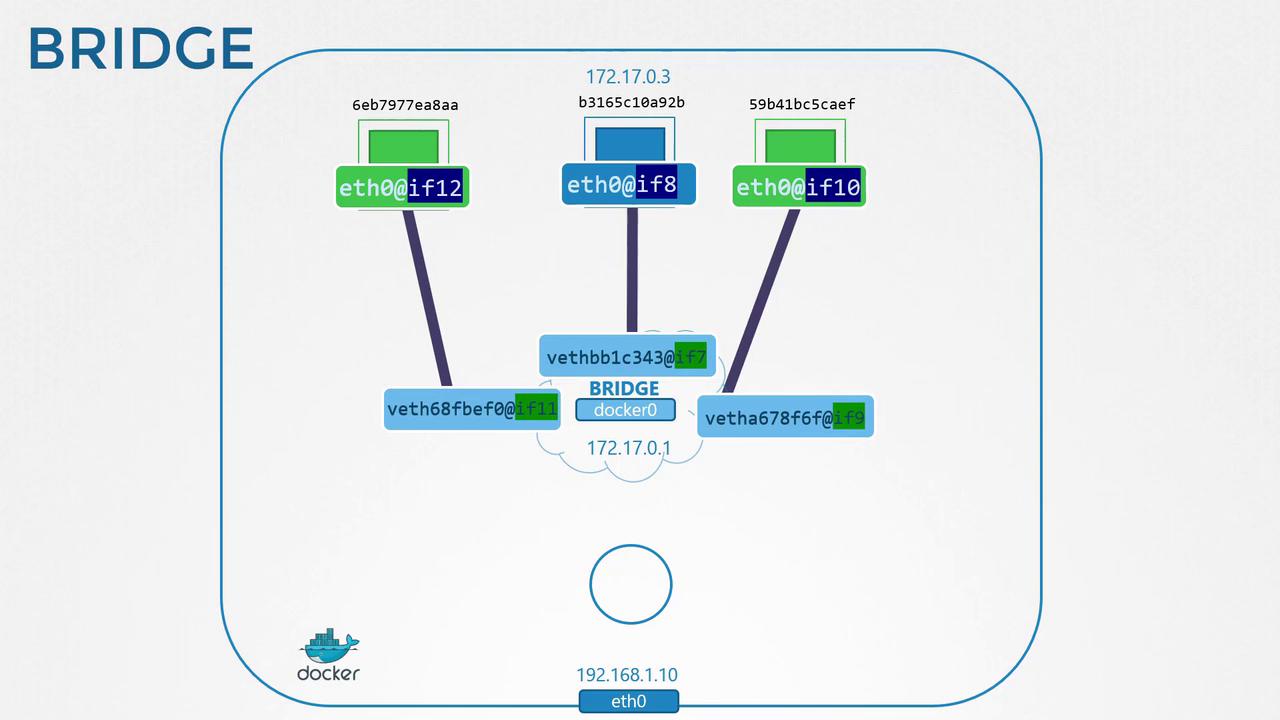
When a container starts, Docker creates a veth pair:
  • One end attaches to the host bridge (docker0).
  • The other end goes inside the container namespace as eth0.
Host side:
ip link show
# Example:
8: vethbb1c343@i7f: <BROADCAST,MULTICAST,UP,LOWER_UP> mtu 1500 qdisc noqueue master docker0
    link/ether 9e:71:37:83:9f:50 brd ff:ff:ff:ff:ff:ff link-netnsid 1
Container side:
ip -n b3165c10a92b addr
# Example:
7: eth0@if8: <BROADCAST,MULTICAST,UP,LOWER_UP> mtu 1500 qdisc noqueue 
    link/ether 02:42:ac:11:00:03 brd ff:ff:ff:ff:ff:ff 
    inet 172.17.0.3/16 brd 172.17.255.255 scope global eth0
Each new container repeats this process, assigning a unique IP in 172.17.0.0/16.
The image is a network diagram illustrating a Docker bridge network setup, showing connections between containers and the bridge interface docker0.

Container-to-Container and Host Communication

Containers on the same bridge can communicate by IP. The host also reaches them directly:
curl http://172.17.0.3:80
# => Welcome to nginx!
External clients cannot access container IPs on the bridge network without port publishing.

Publishing Ports (Port Mapping)

Expose container ports to external clients with -p hostPort:containerPort:
docker run -p 8080:80 nginx
Access via http://192.168.1.10:8080:
curl http://192.168.1.10:8080
# => Welcome to nginx!

Behind the Scenes: iptables NAT

Docker adds iptables NAT rules to forward traffic:
iptables -t nat -A DOCKER -p tcp --dport 8080 \
  -j DNAT --to-destination 172.17.0.3:80
This ensures incoming connections on host port 8080 are redirected to the container’s port 80.

References