

What the GitLab Kubernetes Agent provides
- Secure, authenticated communication between GitLab and your Kubernetes clusters without exposing the Kubernetes API server or embedding long-lived cluster credentials in CI/CD variables.
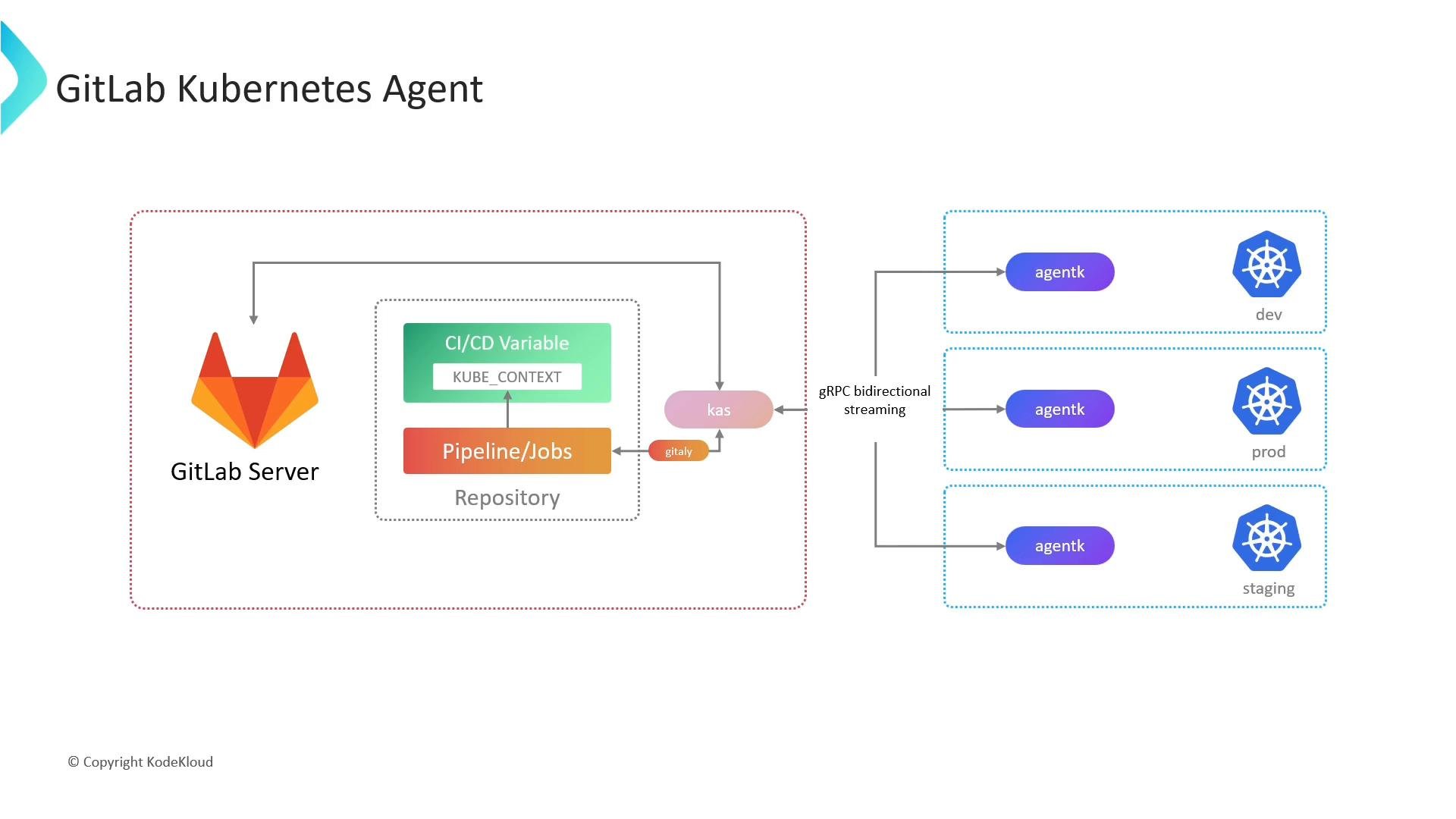
- A lightweight cluster-side component (agentK) that initiates connections outbound, making it firewall/NAT friendly.
- A centrally updatable server component (KAS) that mediates communication and fetches agent configuration/repository data, avoiding frequent in-cluster upgrades.
Architecture overview
The agent is implemented as a client/server pair:- agentK: the Kubernetes cluster-side agent that runs in your cluster and initiates the connection to GitLab.
- KAS (GitLab Agent Server): the server-side component that accepts agentK connections, authenticates them with GitLab, and fetches the agent configuration and Git data (via Gitaly).
KAS responsibilities
- Authenticate agentK connections by querying GitLab.
- Retrieve the agent’s configuration and repository data via Gitaly (GitLab’s RPC layer for interacting with Git repositories).
- Forward requests, responses, and notifications between GitLab and agentK.
Registering an agent — prerequisites and overview
Prerequisites:
High-level registration steps:
- In your GitLab project UI, navigate to Operate → Kubernetes clusters (or the UI location for Agents) and create a new agent. Give it a unique name.
- GitLab generates a secure token for the agent and displays Helm installation instructions (including the KAS address).
- Run the provided Helm commands on your Kubernetes cluster. The Helm chart uses the generated token and KAS address to register and connect the agent.
- After installation, the agent connects to GitLab and appears in the project’s Kubernetes/Agents section.
- Manage the agent configuration in your repository at
.gitlab/agents/<agent-name>/config.yaml. This file defines what manifests or projects to watch, CI/CD access, workspaces, and other agent behavior.
Example Helm installation
The GitLab Helm chart uses the token and KAS address shown in the GitLab UI. Replaceglagent-token and the KAS address with the values produced when you register your agent.
Agent configuration (config.yaml)
Create the agent configuration in your project at .gitlab/agents/<agent-name>/config.yaml. This YAML file controls GitOps settings, CI/CD access, and (on GitLab EE) remote development workspaces.
Example config.yaml:
Security and operational notes
- Treat the generated agent token (
config.token) as a secret: store it only in the GitLab UI when adding the agent and in Kubernetes secrets when installing via Helm. - The agent initiates outbound gRPC connections to KAS over TLS (wss:// or https://), so you typically do not need to open inbound ports on your cluster.
- Keep your agent configuration under version control in the project repository to track changes and enable GitOps workflows.
Using the GitLab Kubernetes Agent removes the need to expose your cluster API and avoids storing long-lived kubeconfig credentials in CI/CD variables. It also simplifies connectivity for clusters behind firewalls or NAT because the agent initiates the connection outbound.
Links and references
- GitLab Agent documentation: https://docs.gitlab.com/ee/user/clusters/agent/
- GitLab Agent Server (KAS) overview: https://docs.gitlab.com/ee/agents/
- Gitaly (GitLab’s RPC layer for Git): https://docs.gitlab.com/ee/infrastructure/gitaly/
- Kubernetes kubeconfig documentation: https://kubernetes.io/docs/concepts/configuration/organize-cluster-access-kubeconfig/
- gRPC official site: https://grpc.io/
- Helm charts documentation: https://helm.sh/docs/