

GitLab Server Overview
GitLab Server is an open-source DevOps platform that centralizes the entire software development lifecycle:- Git repository management with fine-grained access controls
- Issue tracking and project planning
- Built-in CI/CD pipelines for automated testing and deployment
- Container & package registries for Docker, Helm, npm, and more
- Security & compliance scanning, auditing, and reporting
- GitLab SaaS (hosted by GitLab.com)
- GitLab Self-Managed (on your infrastructure)
SaaS vs Self-Managed: A Side-by-Side Comparison
Choosing the right deployment model is critical for scaling, security, and cost management: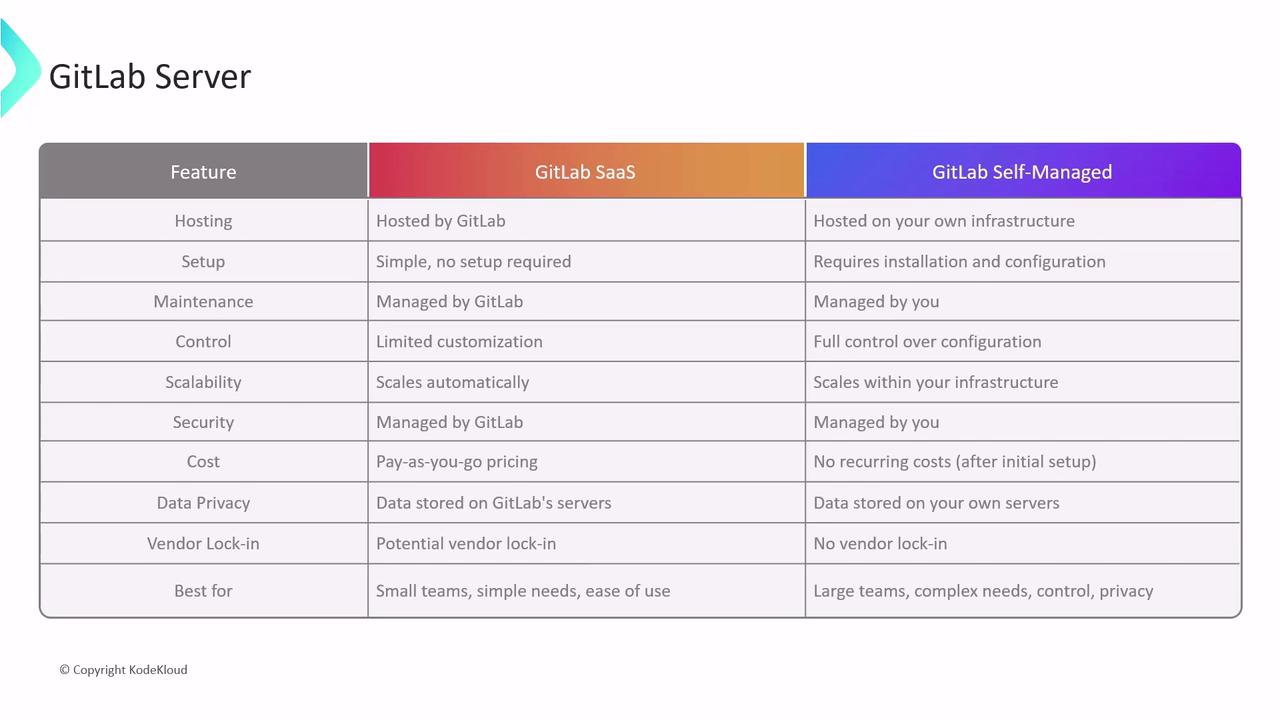
GitLab SaaS
Key Benefits- Zero infrastructure overhead: No servers to install or maintain.
- Quick setup: Start CI/CD in minutes, even without DevOps expertise.
- Elastic scalability: Automatic scaling and pay-as-you-go pricing.
- High availability: SLA-backed uptime and redundancy managed by GitLab.com.
- Automatic updates: Always on the latest version with security patches.
- Built-in security: Vulnerability scanning, dependency checks, and DAST/SAST as a service.
- Limited platform customization and plugin support.
- Data residency and privacy depend on GitLab.com’s infrastructure.
- Potential cost growth for large teams or high-load pipelines.
GitLab SaaS is ideal for small to medium teams that prefer minimal operational overhead. Check GitLab.com Pricing for details.
GitLab Self-Managed
Key Benefits- Full control & customization: Configure runners, storage, and plugins as needed.
- Complete data ownership: Host code, metadata, and artifacts on your hardware.
- No vendor lock-in: Freedom to migrate between clouds or on-premises.
- Cost efficiency at scale: More predictable costs for large enterprises.
- Requires in-house expertise for installation, upgrades, and security.
- Infrastructure must be provisioned and scaled by your team.
- You are responsible for patching, backup, and disaster recovery.
Self-managed GitLab transfers all security and maintenance responsibilities to your team. Ensure you have proper patch management and monitoring in place.
GitLab CI/CD Workflow Architecture
The following diagram shows how the GitLab Server, Runner, and Executor collaborate to process a CI/CD job: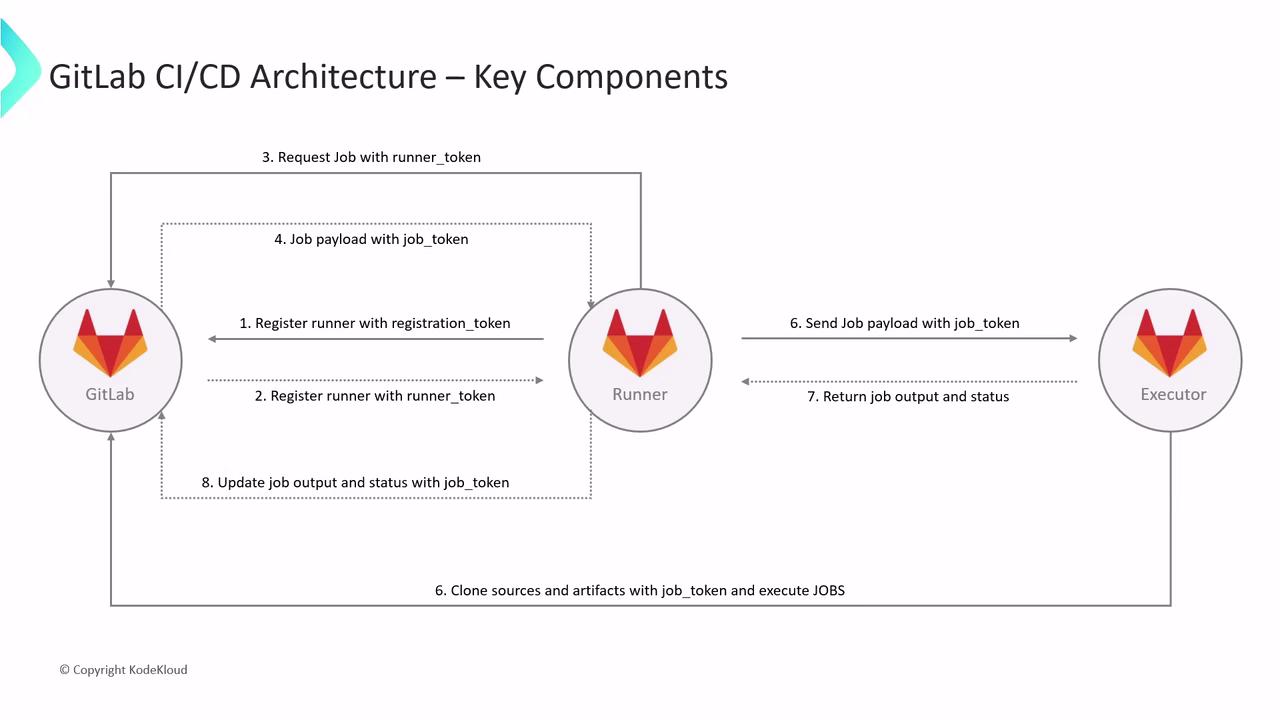
Workflow Phases
1. Registration Phase
- Runner sends a POST to
/runners/registerwith the registration token. - GitLab Server validates and returns a runner token.
- Runner stores this token for all future interactions.
2. Job Request Phase
- Registered Runner polls
/jobs/request, authenticated with its runner token. - Server responds with a job payload containing a job token for that execution.
3. Job Execution Phase
- Runner passes the payload to the Executor.
- Executor uses the job token to:
- Clone the repository
- Download dependencies and artifacts
- Execute the CI/CD script in an isolated environment (Docker, VM, shell)
- Isolation prevents cross-job interference and secures the runner host.
4. Job Reporting Phase
- Executor gathers logs, artifacts, and exit status.
- It POSTs back to
/jobs/:id/traceusing the job token. - GitLab Server records results and updates the pipeline UI.
Token Exchange Summary
By understanding these components—Server, Runner, Executor—and their interactions, you can design scalable, secure CI/CD pipelines on either GitLab SaaS or Self-Managed. Optimize runner tagging, parallelism, and caching to accelerate builds and reduce costs.
Links and References
- GitLab Runner Documentation
- Installing GitLab Self-Managed
- GitLab CI/CD Pipelines
- GitLab Security Features