In this guide, you’ll learn how to parameterize Kubernetes YAML manifests and dynamically inject environment-specific values during CI/CD. By leveraging envsubst, you can maintain a single set of manifests for development , staging , and production .
Prerequisites
Ensure you have the following installed locally:
node --version # v8.11.3 (or higher)
npm --version # 6.1.0 (or higher)
1. Manifest Files with Placeholders
Your repository structure should contain a single kubernetes/manifest/ folder with:
deployment.yaml
ingress.yaml
service.yaml
Each file uses Bash-style placeholders (${VAR}) to be substituted in CI/CD.
kubernetes/manifest/deployment.yaml
apiVersion : apps/v1
kind : Deployment
metadata :
name : solar-system
labels :
app : solar-system
namespace : ${NAMESPACE}
spec :
replicas : ${REPLICAS}
selector :
matchLabels :
app : solar-system
template :
metadata :
labels :
app : solar-system
spec :
containers :
- name : solar-system
image : ${K8S_IMAGE}
imagePullPolicy : Always
ports :
- containerPort : 3000
name : http
protocol : TCP
envFrom :
- secretRef :
name : mongo-db-creds
kubernetes/manifest/ingress.yaml
apiVersion : networking.k8s.io/v1
kind : Ingress
metadata :
name : solar-system
namespace : ${NAMESPACE}
annotations :
kubernetes.io/ingress.class : nginx
kubernetes.io/tls-acme : "true"
spec :
rules :
- host : solar-system.${NAMESPACE}.${INGRESS_IP}.nip.io
http :
paths :
- path : /
pathType : Prefix
backend :
service :
name : solar-system
port :
number : 3000
tls :
- hosts :
- solar-system.${NAMESPACE}.${INGRESS_IP}.nip.io
secretName : ingress-local-tls
kubernetes/manifest/service.yaml
apiVersion : v1
kind : Service
metadata :
name : solar-system
labels :
app : solar-system
namespace : ${NAMESPACE}
spec :
type : NodePort
ports :
- port : 3000
targetPort : 3000
protocol : TCP
selector :
app : solar-system
2. Placeholder Reference Table
Placeholder Description Example NAMESPACE Kubernetes namespace for deployment developmentREPLICAS Number of pod replicas 2K8S_IMAGE Docker image reference siddharth67/solar-system:123INGRESS_IP External IP of Ingress controller 139.84.208.48
3. Defining CI/CD Environment Variables
Configure global variables in your .gitlab-ci.yml under variables: or via the [GitLab UI][GitLab CI/CD Variables].
variables :
DOCKER_USERNAME : siddharth67
IMAGE_VERSION : $CI_PIPELINE_ID
K8S_IMAGE : $DOCKER_USERNAME/solar-system:$IMAGE_VERSION
MONGO_URI : 'mongodb+srv://supercluster.d83j5.mongodb.net/superData'
MONGO_USERNAME : superuser
MONGO_PASSWORD : $M_DB_PASSWORD
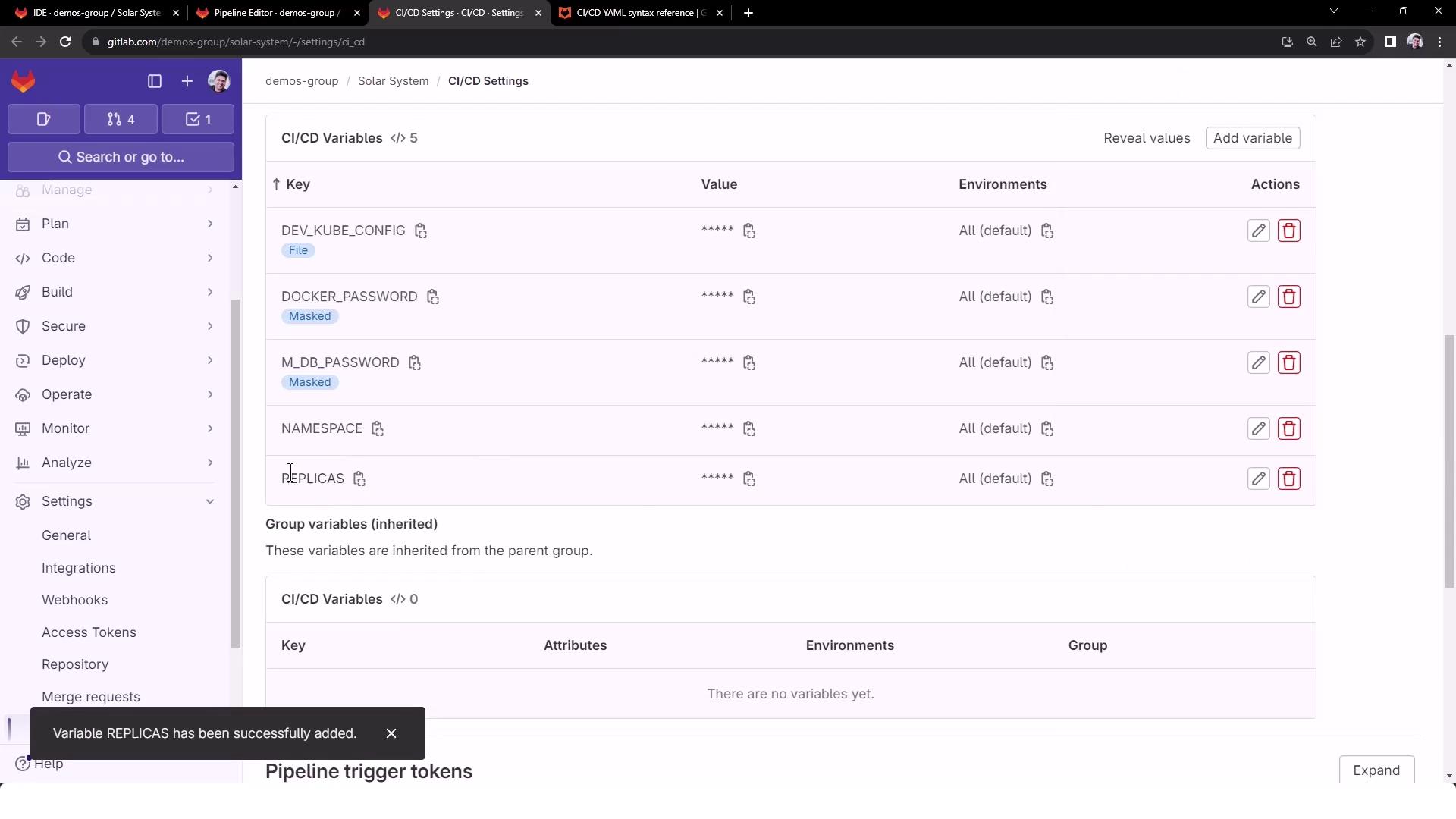
Add non-masked variables (NAMESPACE, REPLICAS) in CI/CD → Variables :
Never commit secrets (e.g., database credentials) directly in your YAML files. Always use masked or protected CI/CD variables.
4. Retrieving the Ingress Controller IP
At runtime, fetch the external IP of your Ingress controller:
kubectl -n ingress-nginx get service ingress-nginx-controller \
-o jsonpath="{.status.loadBalancer.ingress[0].ip}"
5. CI Job: dev-deploy
The dev-deploy job below installs kubectl and envsubst (from GNU gettext), exports INGRESS_IP, and replaces placeholders in your manifests.
k8s_dev_deploy :
stage : dev-deploy
image :
name : alpine:3.7
before_script :
# Install kubectl
- wget -qO kubectl \
https://storage.googleapis.com/kubernetes-release/release/\
$(wget -qO - https://storage.googleapis.com/kubernetes-release/release/stable.txt)/bin/linux/amd64/kubectl
- chmod +x kubectl && mv kubectl /usr/bin/kubectl
# Install envsubst
- apk add --no-cache gettext
- envsubst -V
script :
# Configure kubectl
- export KUBECONFIG=$DEV_KUBE_CONFIG
- kubectl version --client -o yaml
- kubectl config get-contexts
- kubectl get nodes
# Get Ingress IP
- export INGRESS_IP=$(
kubectl -n ingress-nginx get service ingress-nginx-controller \
-o jsonpath="{.status.loadBalancer.ingress[0].ip}"
)
- echo "Ingress IP : $INGRESS_IP"
# Substitute placeholders in manifests
- for file in kubernetes/manifest/*.yaml; do
echo "Processing $file"
envsubst < "$file" | kubectl apply -f -
done
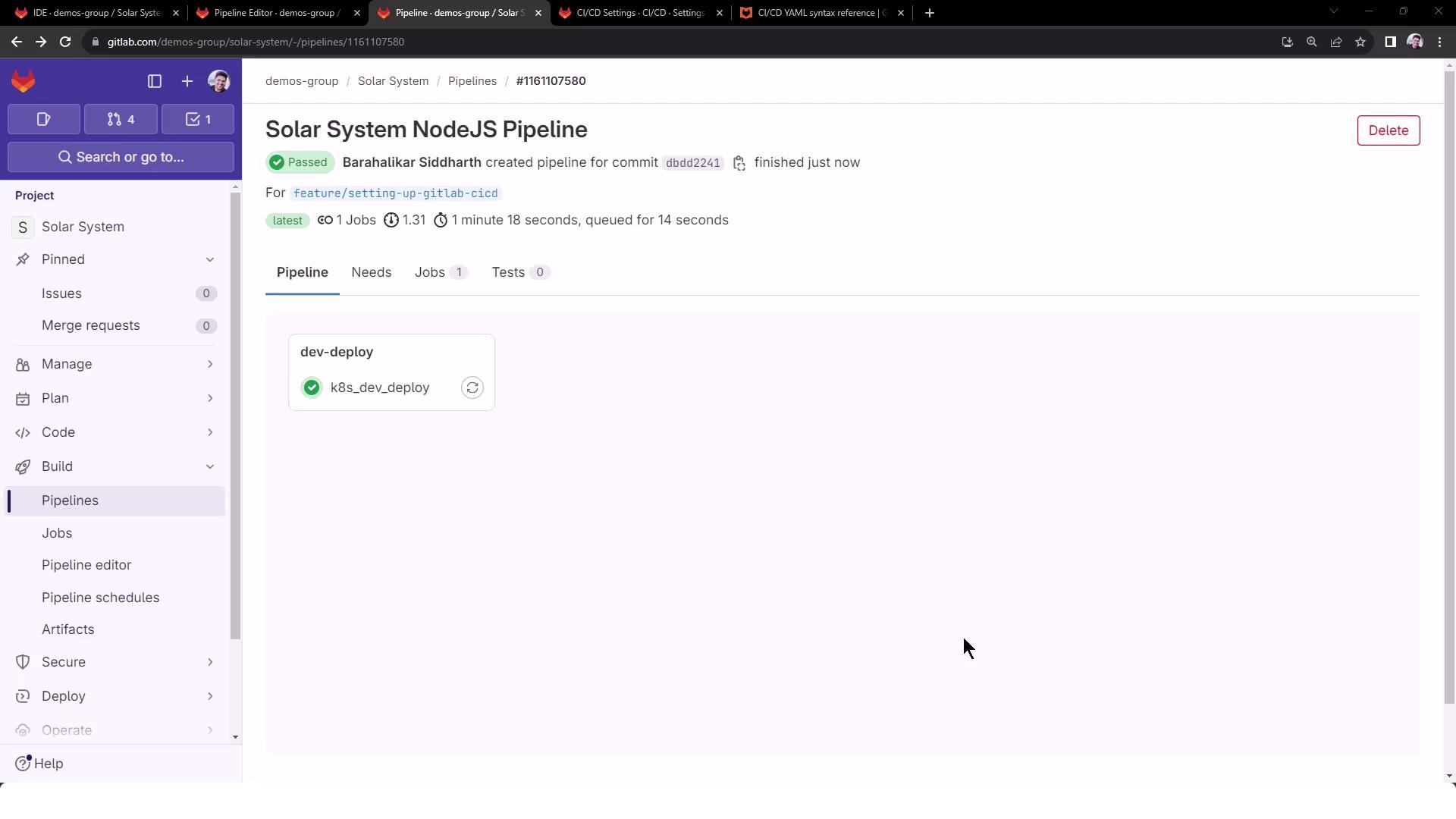
Commit and push to trigger the pipeline. You’ll see a successful dev-deploy stage:
6. Verifying the Logs
Key sections in the job logs:
$ apk add --no-cache gettext
( 1/1 ) Installing gettext (0.19.8.1-r0)
...
$ envsubst -V
envsubst (GNU gettext-runtime ) 0.19.8.1
$ export INGRESS_IP= 139.84.208.48
$ echo $INGRESS_IP
139.84.208.48
# deployment.yaml after substitution:
namespace: development
replicas: 2
image: siddharth67/solar-system:123
# ingress.yaml after substitution:
host: solar-system.development.139.84.208.48.nip.io
# service.yaml after substitution:
namespace: development
Here you can confirm all four placeholders (NAMESPACE, REPLICAS, K8S_IMAGE, INGRESS_IP) have been correctly injected.
You’re now ready to apply templated manifests across multiple environments, ensuring consistency and reusability.
References