

offset— shift the result relative to “now” (or relative to a specified timestamp).@(at) — request the value at an exact timestamp.
offset — read values from the past
Theoffset modifier reads metric values from some time before the evaluation time. For example:
node_memory_Active_bytes{instance="node1"} as it was 5 minutes ago.
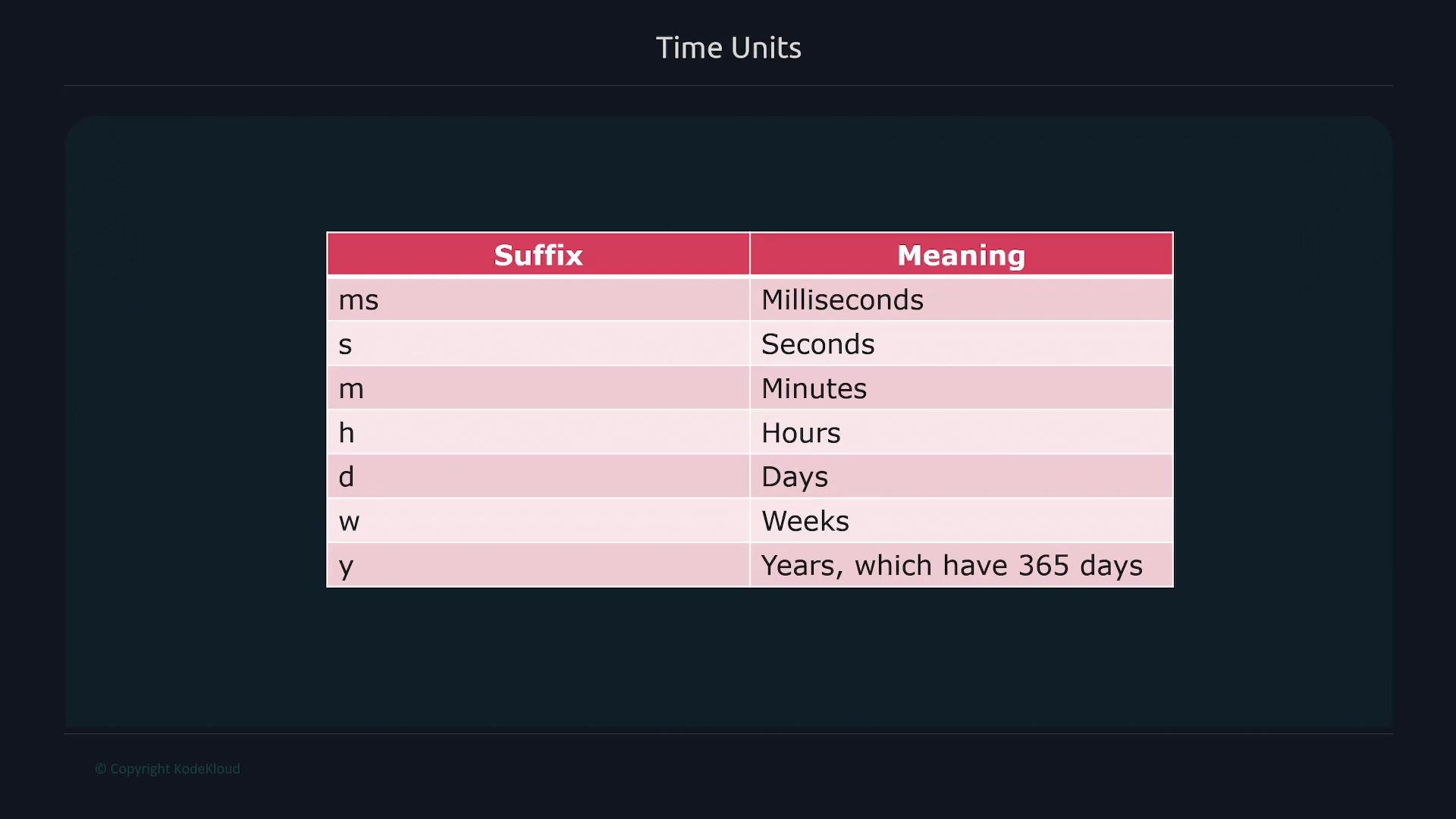
You can express durations with standard time-unit suffixes (see the image below for a quick visual reference).
Examples:
offset 5d— five days agooffset 2w— two weeks agooffset 90moroffset 1h30m— one and a half hours ago
@ (at) — query a specific timestamp
Use@ to evaluate a query at an exact time. The timestamp can be a Unix timestamp (seconds since the epoch) or an RFC3339 timestamp. Example with a Unix timestamp:
1663265188.
Combining @ and offset
You can combine @ and offset. Prometheus interprets the @ timestamp as the reference point and then applies the offset relative to that reference. The order of the modifiers does not change the result.
Examples:
@ sets the evaluation anchor; offset shifts relative to that anchor. You can use either Unix or RFC3339 timestamps with @. The order of @ and offset makes no difference to the final evaluation time.22259302.
Using @ and offset with range vectors
Range vectors select a time window of samples. For example, node_memory_Active_bytes{instance="node1"}[2m] normally selects two minutes of data up to the current time. When you combine range vectors with @ and/or offset, the entire time window is anchored relative to the specified time.
Examples:
@ timestamp up to 10 minutes before it — a two-minute window shifted 10 minutes earlier.
Practical uses
- Debug incidents by inspecting metric values at specific past times.
- Build dashboards that compare current values to past values (e.g., “value 1 hour ago”).
- Create alerting rules that reference a previous evaluation point for anomaly detection or trend comparisons.
References
- Prometheus PromQL documentation: https://prometheus.io/docs/prometheus/latest/querying/basics/