

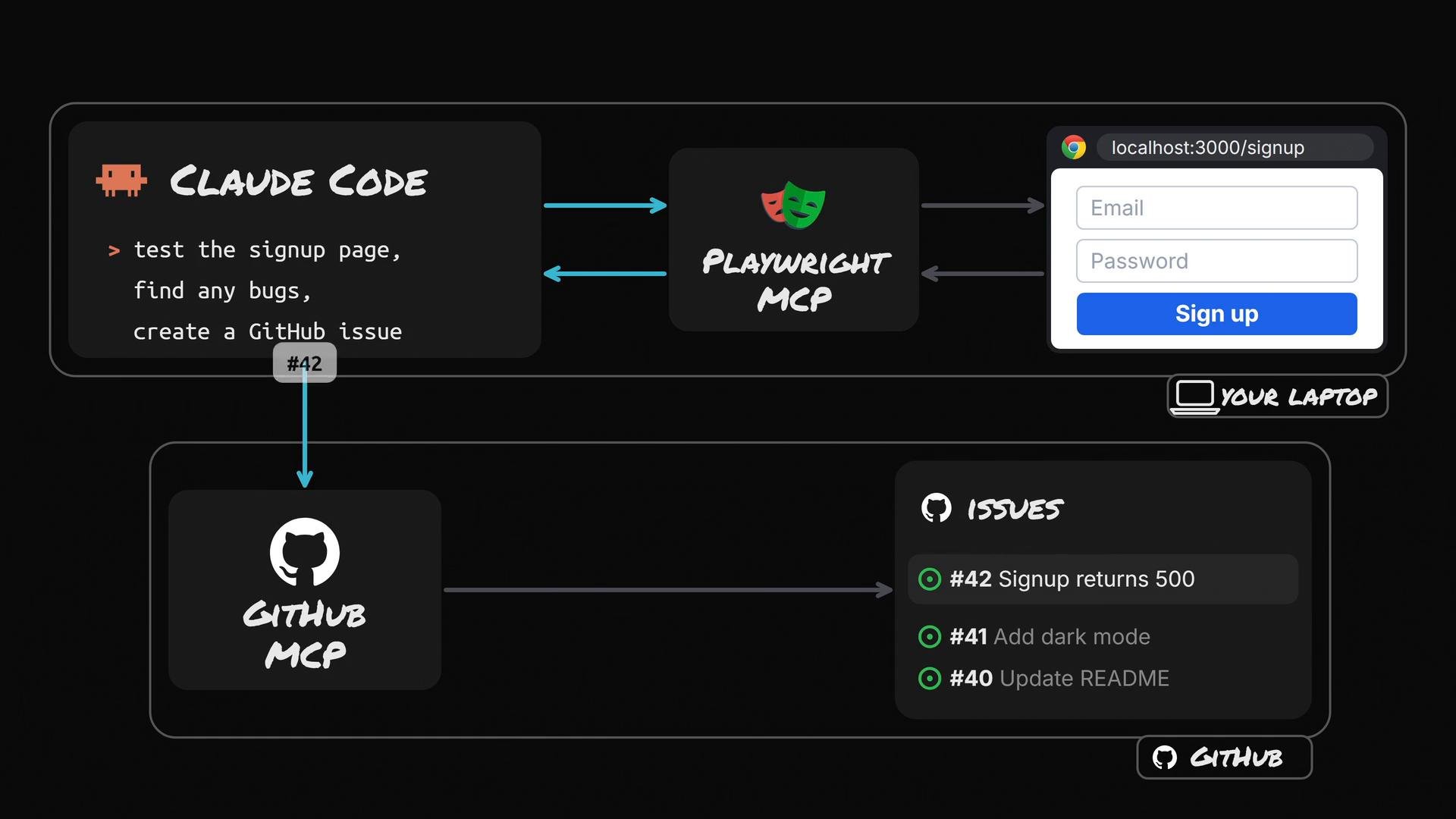
localhost:3000 and you want Claude Code to exercise it in a real browser. A convenient pattern is to connect a Playwright MCP server. That lets Claude open pages, type into fields, click buttons, and inspect network requests — effectively driving a browser like a human tester.
Below is a concise explanation of how it works and how to connect one.
Start a Playwright MCP server
Run this command locally to register a Playwright MCP server with Claude Code:playwrightis the instance name you assign to this MCP server.--separatesclaude mcp addarguments from the command used to start the MCP server.npx @playwright/mcp@latestruns the Playwright MCP server program (a small Node.js program provided by Microsoft).
localhost addresses that are only available from your laptop.
Playwright MCP runs locally, so it can access
localhost addresses that are only reachable from your machine. Be mindful of any sensitive data you expose to local processes.Tool discovery — how Claude learns what the server can do
After Claude connects, its built-in MCP client performs tool discovery: it asks the Playwright server which browser actions are available. The server responds with a list of tools (actions) such asbrowser_navigate, browser_click, browser_type, and browser_snapshot.
Common Playwright MCP tools
Once Claude knows the available tools, you can give plain-English instructions and Claude will sequence the appropriate browser actions.
Example: test the signup page
From within Claude Code you can invoke the MCP client (for example, with/mcp) and specify the target page:
localhost:3000/signup. Sign up with an empty password and tell me what happens.
What happens next
- Claude chooses the relevant tools (e.g.,
browser_navigate,browser_type,browser_click) and may prompt for permission to run them. - A browser window opens on your screen under Playwright’s control.
- The Playwright server returns a text-based snapshot of the page — a structured list of elements with short references instead of an image:
500 status indicates a server-side failure while processing the signup request.
Create a GitHub issue for the bug
To create an issue automatically from Claude, add GitHub’s MCP server (this one runs on GitHub’s side) and connect it over HTTP. You do not run GitHub’s MCP server locally. Example (replacehttps://mcp.github.example and your token):
--transport httptells Claude to connect to this MCP server over the network.- The token scopes which repositories Claude can access.
- Use Playwright to test the page and detect that the signup API returned a
500. - Ask GitHub’s MCP server to create an issue describing the bug.
- Receive the new issue number and present it to you.
Quick reference: useful commands and patterns
Never store long-lived secrets or broad-permission tokens on shared machines. Limit the GitHub token scopes to the minimum required and rotate tokens periodically.
Summary
- Running a local Playwright MCP server lets Claude drive a real browser on your machine and access
localhostresources. - Tool discovery tells Claude what browser actions are available so you can give simple natural-language commands.
- Combine a local Playwright MCP with a remote GitHub MCP to automate testing and create issues without writing glue code.