

Where Kubernetes stores Secrets
Kubernetes stores Secret objects in etcd. By default, values are written to etcd unencrypted on disk. For example, an API key like:sk_live_51Hx9Qp
can end up sitting in etcd in plaintext (base64-encoded), meaning anyone who can read etcd or access etcd backups can obtain the key.
Anyone with permission to read Secrets can run:
Base64 is an encoding, not encryption. Encoding makes data safe for transport/storage formats, but it does not protect confidentiality.
Pod access patterns and environment-variable leaks
Any pod in the same namespace can mount or reference a Secret if its Pod spec includes that Secret. Without namespace isolation and strict RBAC, other workloads in the namespace may be able to access Secrets. A common, but risky, pattern is exposing secrets to applications via environment variables. If a developer prints environment variables for debugging, that output goes to the pod logs. Many teams aggregate logs to centralized systems (Datadog, Splunk), so sensitive values can leak there. Example JavaScript snippet that prints environment variables:Avoid printing or persisting secrets in logs. Centralized logging systems can expose secrets to anyone with log access.
Two common approaches to mitigate these risks
You have two primary approaches to secure secrets used by workloads on Kubernetes. Choose based on your risk tolerance, compliance needs, and operational maturity.1) Keep Secrets in Kubernetes, but harden the cluster
- Enable encryption at rest for etcd so the API server encrypts Secret values before writing them to disk.
- Manage the encryption key with a cloud Key Management Service (KMS) to separate key material from the cluster.
- With encryption at rest enabled, etcd backups contain encrypted blobs that are useless without KMS access.
- Apply namespace isolation and strict RBAC so only the payment service’s namespace and specific service accounts can create pods or read Secrets.
- Limit use of environment variables for secrets and prefer mounted files with limited file permissions when necessary.
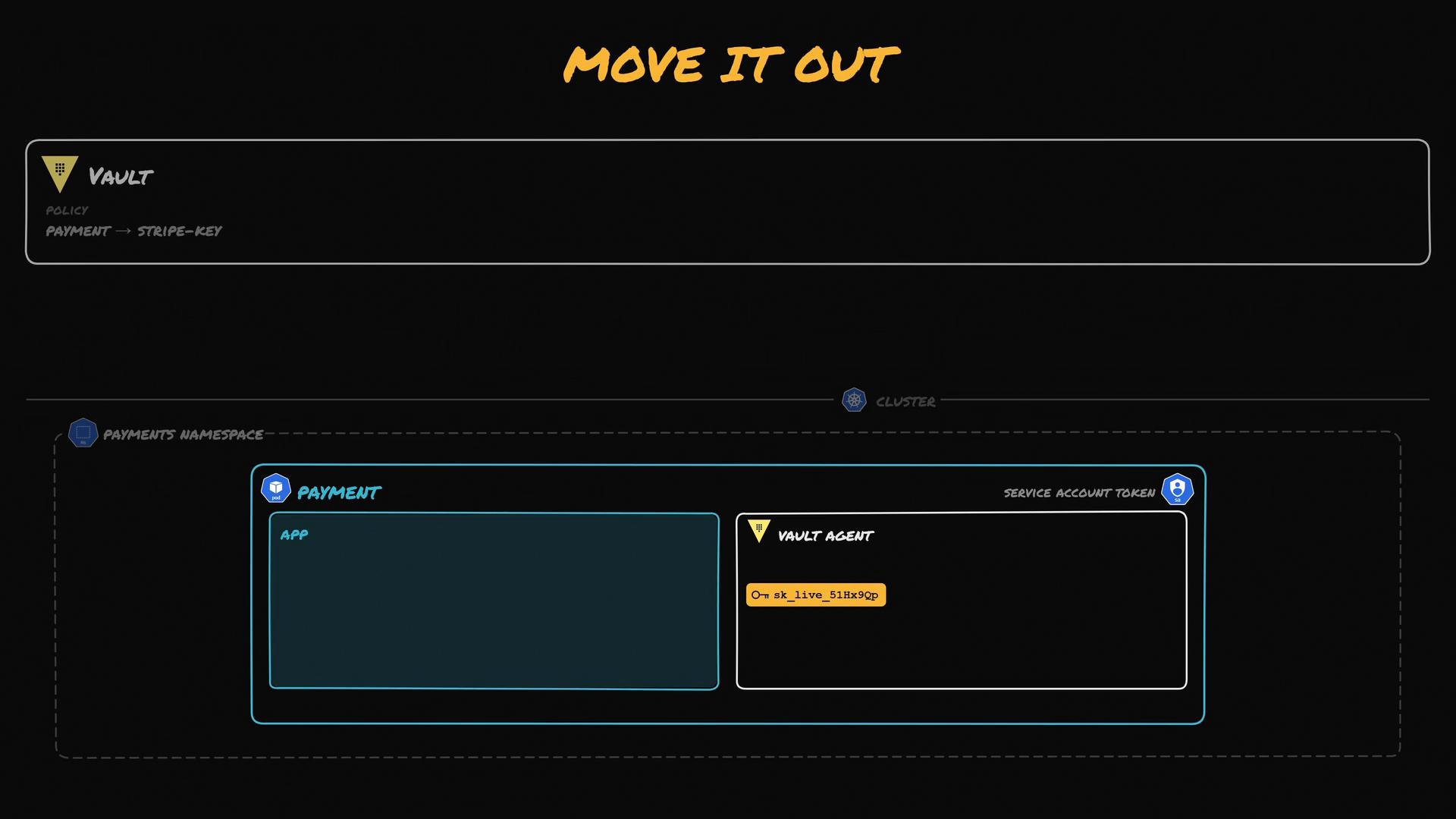
2) Move secrets out of Kubernetes into a dedicated secrets store
A stronger pattern is to keep secrets outside Kubernetes in a purpose-built secrets manager (HashiCorp Vault, AWS Secrets Manager, GCP Secret Manager, etc.). A typical flow when using Vault looks like this:- The payment pod authenticates with Vault using its Kubernetes service account token.
- Vault verifies the token against the Kubernetes API server and enforces policies to decide which secrets the pod can access.
- Rather than pushing secrets into containers directly, deploy a Vault agent as a sidecar in the same pod.
- The Vault agent writes secrets to a shared emptyDir or serves them in-memory so the application reads them from a local file or memory, avoiding creation of a Kubernetes Secret object that would persist into the API server.
Comparison: Keep in Kubernetes vs. Dedicated secrets store
Practical best practices
- Use KMS-backed etcd encryption if you keep secrets in Kubernetes.
- Use least privilege RBAC and isolate namespaces by workload.
- Avoid exposing secrets via environment variables; prefer mounted files or in-memory injection.
- Rotate credentials regularly and use short-lived/dynamic secrets when possible.
- Audit access to secrets and monitor for anomalous reads.
- Avoid storing secrets in source control or in plain text in logs.
For production-grade security, combine multiple measures: encrypt etcd at rest, enforce RBAC and network isolation, and consider an external secrets manager for centralized rotation and auditing.
Links and References
- Kubernetes Secrets - official docs
- etcd encryption at rest - Kubernetes documentation
- HashiCorp Vault
- AWS Secrets Manager
- GCP Secret Manager
- Datadog — centralized logging and monitoring
- Splunk — centralized logging and analysis