

google.com to an IP address (for example, 142.250.183.238) and explains why DNS is fast in practice.
Why this matters: the browser needs the IP address to open a TCP connection to the Google server. DNS resolution answers the question “What IP do I connect to for google.com?” and it does so with caching and a recursive lookup process.
High-level lookup sequence
- Browser checks its own cache.
- Operating system checks its DNS cache.
- The client queries a configured recursive resolver (usually provided by DHCP from your router or set to a public resolver).
- If the resolver has no cache entry, it performs recursive queries:
- Query a root name server for the
.comTLD servers. - Query a
.comTLD server for authoritative name servers forgoogle.com. - Query one of Google’s authoritative name servers for
google.com’s A/AAAA record.
- Query a root name server for the
- The resolver returns the final IP to your OS, which returns it to the browser.
- The browser initiates the TCP handshake with the returned IP.
Local caches (examples)
First the browser checks its cache. If you visited Google recently, the browser may have an entry and can use it immediately: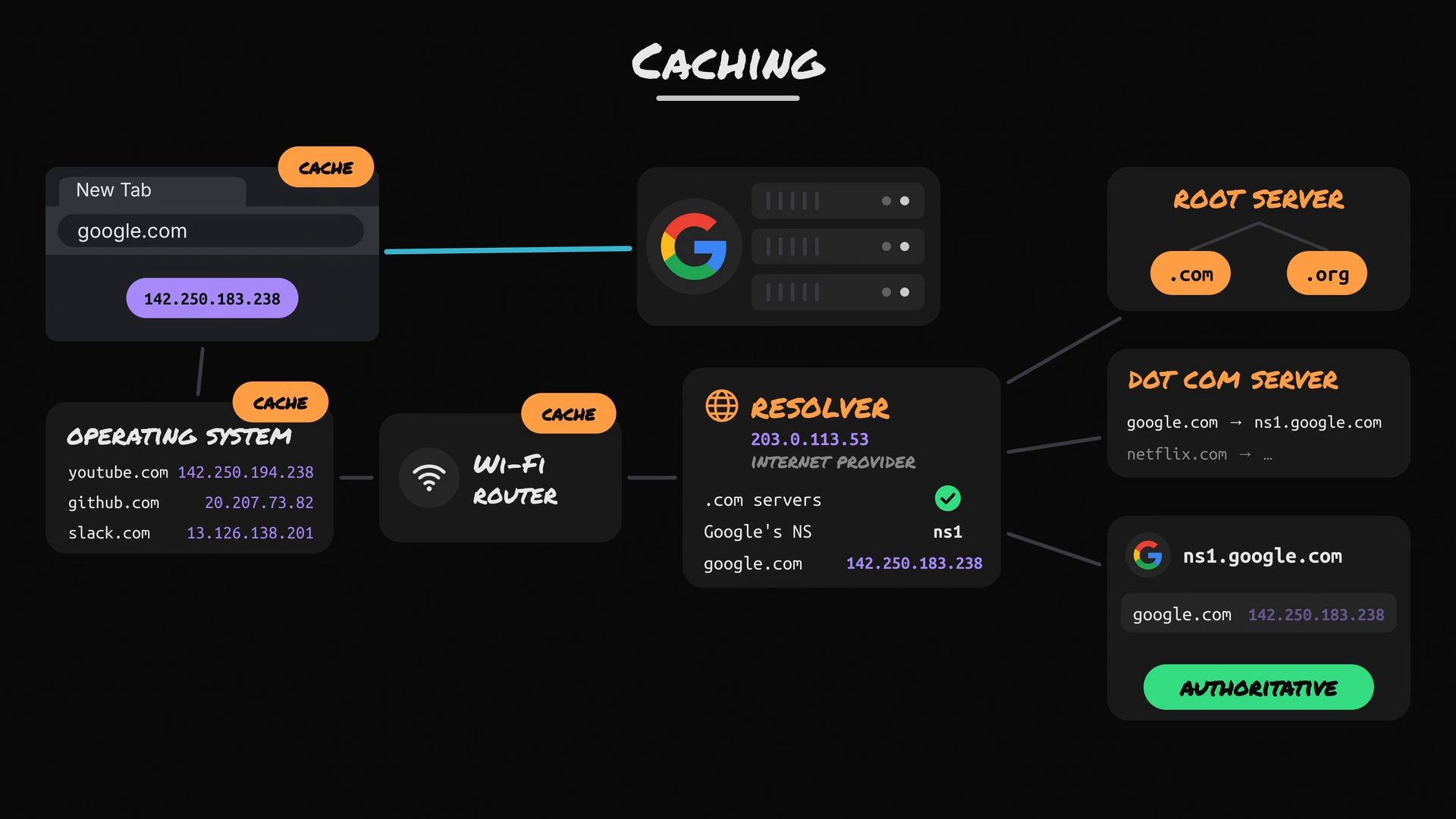
What is a recursive resolver and how your device finds it
When your laptop connects to the network (typically via DHCP from a Wi‑Fi router or corporate network), the network supplies the IP address of one or more DNS resolvers. These resolvers are often:- Provided by your ISP
- Public resolvers like Google Public DNS or Cloudflare
- A recursive resolver running on your router or in your local network
The hierarchical DNS server types
Typical recursive resolver flow for resolving google.com
- Resolver asks a root server: “Which servers are authoritative for
.com?” - Root replies with the list of
.comTLD servers. - Resolver asks a
.comTLD server: “Which servers are authoritative forgoogle.com?” - TLD responds with the names (and sometimes glue addresses) of Google’s authoritative name servers (e.g.,
ns1.google.com). - Resolver asks one of Google’s authoritative servers: “What’s the A or AAAA record for
google.com?” - Authoritative server replies with the IP address (for example,
142.250.183.238). - Resolver caches the response (respecting TTL) and returns the IP to your OS and then the browser.
Ports, transport, and special cases
- DNS queries usually use UDP on port 53 for performance and to minimize TCP connection overhead.
- DNS can fall back to TCP on port 53 for larger responses (DNSSEC, large zone transfers, or responses that exceed UDP size limits).
- DNS over TLS (DoT) and DNS over HTTPS (DoH) are modern options that wrap DNS in encrypted transports; they use different ports and improve privacy.
Caching and TTL: why DNS is fast
Caching is essential to DNS performance. Records are cached at:- Browser
- Operating system
- Recursive resolver
- Possibly intermediate caches/CDNs
Quick glossary
Further reading and references
- Kubernetes Documentation (DNS-related docs)
- IETF RFC 1034 and RFC 1035 — DNS concepts and implementation
- Root servers — list of root server operators
- Public resolvers: Google Public DNS, Cloudflare DNS
DNS lookups are fast in practice because of caching at multiple layers. Also remember DNS queries typically use UDP/53, but they can use TCP/53 when necessary (e.g., large responses).