

- Kubernetes assigns the pod a Kubernetes ServiceAccount named
payments-service. - When the pod starts, Kubernetes mounts a service account token (a JWT) inside the pod. This token proves the pod’s Kubernetes identity.
- Alan could modify his application code to authenticate with Vault and fetch the password directly, for example:
- When Vault Agent starts, it reads the Kubernetes service account token from the pod filesystem and sends that token to Vault together with a configured Vault role name.
- Vault validates the Kubernetes token using Kubernetes’ TokenReview API instead of blindly trusting it. Vault calls the API server to confirm the token and retrieve the service account and namespace associated with it.
- After validation, Vault checks the configured Vault role that maps Kubernetes service accounts and namespaces to Vault policies. The role determines which policies will be applied to the resulting Vault token.
- If the service account and role match, Vault issues a short-lived Vault token to the agent. This Vault token is separate from the Kubernetes JWT: the Kubernetes token proves the pod’s identity, while the Vault token defines which secrets and operations the agent can perform.
- The agent uses the Vault token to request the Postgres credential. Vault validates the request against the policy and returns the credential. The agent writes the secret into a file on a shared volume mounted into the pod (for example, an
emptyDirvolume). The payments application reads that file and uses the username and password to connect to Postgres.
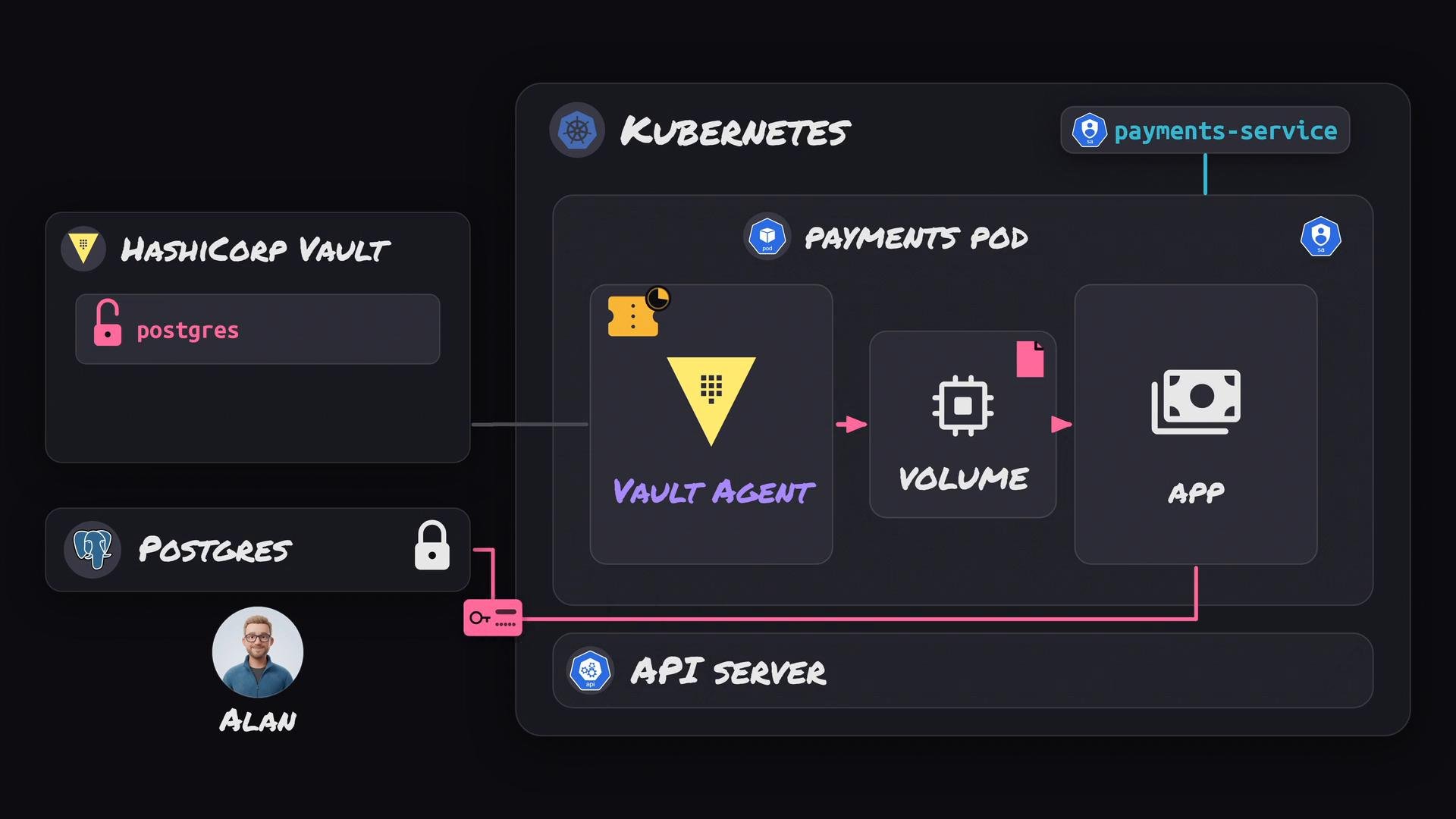
- The application itself does not need to implement Vault authentication; Vault Agent or other integrations handle it.
- Vault can generate dynamic, short-lived PostgreSQL credentials instead of returning long-lived static passwords, improving security and rotation.
- Centralized secrets management reduces credential sprawl and improves auditability.
- Give each application its own Kubernetes
ServiceAccount. - Create Vault roles that bind specific
ServiceAccountnames and namespaces to Vault policies. - Run Vault Agent as a sidecar (or use projected service account tokens and external injectors) to deliver approved secrets to each application.
References
- Vault Kubernetes auth method: https://www.vaultproject.io/docs/auth/kubernetes
- Vault Agent documentation: https://www.vaultproject.io/docs/agent
- Kubernetes TokenReview API & authentication: https://kubernetes.io/docs/reference/access-authn-authz/authentication/
- hvac (Python client) docs: https://hvac.readthedocs.io/
Vault validates Kubernetes tokens using the TokenReview API, then issues short-lived Vault tokens mapped to policies. This separation between Kubernetes identity (who the pod is) and Vault token (what the pod is allowed to do) is essential for least-privilege secret access and secure credential lifecycle.