

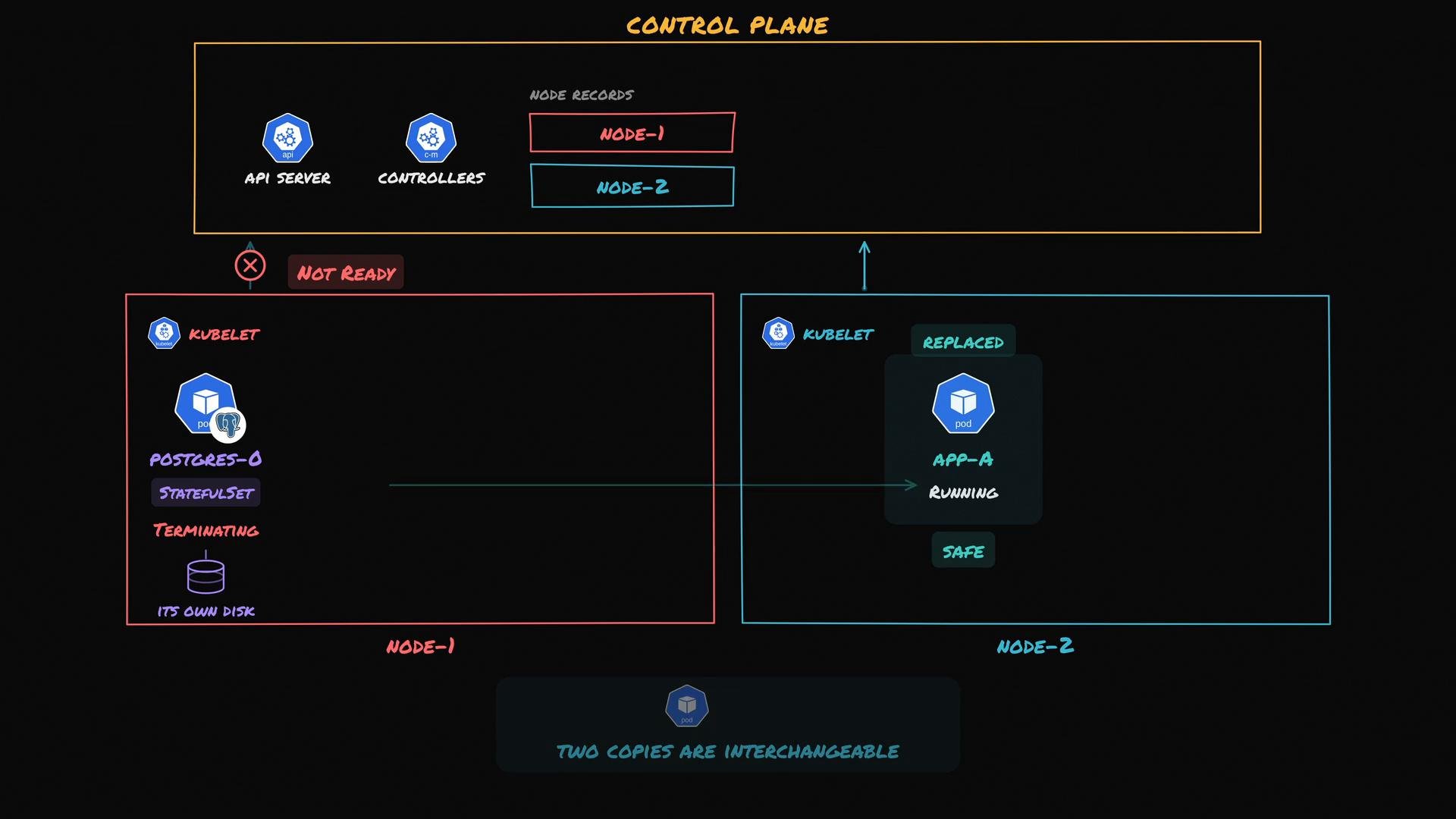
- A node goes into
NotReady. - That node was running:
- A Postgres pod managed by a StatefulSet.
- A stateless replica of an application (App-A) from a Deployment/ReplicaSet.
- After ~5 minutes App-A is recreated on another node and traffic is fine, but the Postgres pod remains stuck in
Terminatingand no replacement is created.
Kubernetes treats stateless replicas and stateful pods differently to protect data integrity. Understanding eviction timing, controllers, and the attach/detach lifecycle will help you recover stuck pods safely.
What does NotReady mean?
When a node is NotReady, the kubelet on that node has stopped sending heartbeats to the control plane (API server & controllers). The control plane cannot immediately tell whether the node is temporarily unreachable (reboot/network glitch) or permanently dead. Controllers therefore take conservative actions to avoid data corruption.
After the control plane considers a node unreachable for long enough (by default the pod eviction timeout is 5m), it evicts pods that are safe to replace — i.e., stateless replicas. The StatefulSet controller uses stricter rules to prevent split-brain for stateful workloads.
Why App-A was recreated but Postgres was not
-
App-A (stateless, from a Deployment/ReplicaSet)
- Interchangeable replicas can be safely brought up elsewhere.
- After the control plane evicts the old Pod object (post-eviction timeout), the ReplicaSet/Deployment controller immediately creates a replacement Pod on a healthy node.
-
Postgres (StatefulSet-managed)
- StatefulSet pods have stable, unique identities such as
postgres-0. - Kubernetes must ensure there is never more than one Pod with the same identity and attached persistent volume active simultaneously to avoid split-brain.
- While the original
postgres-0Pod object still exists in the API (even if stuck inTerminating) and the volume may still be attached to the unreachable node, the StatefulSet controller will not create anotherpostgres-0. - The controller waits until the old Pod is fully removed and the volume is safely detached before creating the replacement.
- StatefulSet pods have stable, unique identities such as
Quick summary table
Practical recovery steps (least to most disruptive)
Follow these steps in sequence. Start with the least-disruptive checks and escalate only when you are sure the node will not recover.Stage 1 — Confirm the node status
- Verify whether the node is truly down or temporarily unreachable.
- Commands:
- Check your cloud provider or hypervisor console and try to SSH into the node. If the instance is alive and the kubelet is running, it may re-register.
Stage 2 — If the machine is down but you plan to recover it later
- Cordon the node to prevent new scheduling:
- Attempt to drain the node (will attempt graceful eviction). Note:
kubectl draincan hang if pods are unreachable:
- If
draincannot complete because pods are stuck inTerminatingon an unreachable node, you can force-delete the problematic Pod objects so controllers can create replacements:
- For StatefulSet pods: after the Pod object is removed the StatefulSet controller will attempt to create the replacement Pod with the same identity. The cluster then relies on the attach/detach controller and cloud provider to detach the disk from the old node and attach it to the new node. If necessary, manually check/detach the disk in your cloud provider console.
Stage 3 — If the machine is not coming back
- Terminate the instance in your cloud provider (ensures kubelet cannot re-register).
- Delete the Kubernetes Node object:
- Only delete the Node object after the instance is truly terminated. If the kubelet is still running, the node may re-register and the problem persists.
Additional troubleshooting commands
- Check PVC/PV and volume attachments if the Pod is stuck waiting on storage:
Force-deleting pods and manually detaching disks can cause data corruption if the original node is still alive and the kubelet is running. Always confirm the instance is truly down before forcing deletion or detaching volumes.
Links & references
- Kubernetes: What is a Node? — https://kubernetes.io/docs/concepts/architecture/nodes/
- StatefulSet documentation — https://kubernetes.io/docs/concepts/workloads/controllers/statefulset/
- Pod eviction and node conditions — https://kubernetes.io/docs/concepts/scheduling-eviction/eviction/
Quick interview takeaways
- Stateless pods (Deployments/ReplicaSets) are replaceable and will be recreated after the node is declared unreachable (default eviction ~
5m). - Stateful pods (StatefulSets) are not automatically replaced until Kubernetes is sure the original identity is gone and the storage can be safely moved, to avoid split-brain.
- Kubernetes intentionally favors data safety over immediate availability for stateful workloads.