In this tutorial, we’ll extend our GitHub Actions CI/CD pipeline to deploy Kubernetes manifests into a production environment. By cloning the existing dev-deploy and dev-integration-testing jobs, renaming them for production, updating manifest paths, and configuring environment protection, you’ll achieve a safe, repeatable deployment process.

Workflow Configuration

Begin by updating the workflow metadata, trigger conditions, and shared environment variables:
name: Solar System Workflow

on:
  workflow_dispatch:
  push:
    branches:
      - main
      - feature/*
  
env:
  MONGO_URI: "mongodb+srv://supercluster.d83jj.mongodb.net/superData"
  MONGO_USERNAME: ${{ vars.MONGO_USERNAME }}
  MONGO_PASSWORD: ${{ secrets.MONGO_PASSWORD }}

jobs:
  unit-testing:
    # existing configuration

  code-coverage:
    # existing configuration

  docker:
    # existing configuration

  dev-deploy:
    # existing configuration

  dev-integration-testing:
    # existing configuration

Production Deployment Jobs

Below is the new production deployment job, which depends on dev-integration-testing, runs against the production environment, and exports the ingress URL:
  prod-deploy:
    needs: dev-integration-testing
    environment:
      name: production
      url: https://${{ steps.set-ingress-host-address.outputs.APP_INGRESS_HOST }}
    runs-on: ubuntu-latest
    steps:
      - name: Checkout Repo
        uses: actions/checkout@v4

      - name: Fetch Kubernetes Cluster Details
        run: |
          kubectl version --short
          echo "----- Nodes -----"
          kubectl get nodes

      - name: Save Nginx Ingress IP
        run: |
          echo "INGRESS_IP=$(kubectl -n ingress-nginx get svc ingress-nginx-controller \
            -o jsonpath='{.status.loadBalancer.ingress[0].ip}')" >> $GITHUB_ENV

      - name: Replace Tokens in Production Manifests
        uses: cschleiden/replace-tokens@v1
        with:
          tokenPrefix: '{{%'
          tokenSuffix: '%}}'
          files: ["kubernetes/production/*.yaml"]
        env:
          NAMESPACE: ${{ vars.NAMESPACE }}
          REPLICAS: ${{ vars.REPLICAS }}
          IMAGE: ${{ vars.DOCKERHUB_USERNAME }}/solar-system:${{ github.sha }}
          INGRESS_IP: ${{ env.INGRESS_IP }}

      - name: Review Production Manifests
        run: cat kubernetes/production/*.yaml

      - name: Create MongoDB Secret
        run: |
          kubectl -n ${{ vars.NAMESPACE }} create secret generic mongo-db-creds \
            --from-literal=MONGO_URI=${{ env.MONGO_URI }} \
            --from-literal=MONGO_USERNAME=${{ vars.MONGO_USERNAME }} \
            --from-literal=MONGO_PASSWORD=${{ secrets.MONGO_PASSWORD }} \
            --save-config --dry-run=client -o yaml | kubectl apply -f -

      - name: Deploy to Production
        run: kubectl apply -f kubernetes/production

      - name: Set App Ingress Host URL
        id: set-ingress-host-address
        run: |
          echo "APP_INGRESS_HOST=$(kubectl -n ${{ vars.NAMESPACE }} get ingress \
            -o jsonpath='{.items[0].spec.tls[0].hosts[0]}')" >> $GITHUB_OUTPUT
    outputs:
      APP_INGRESS_URL: ${{ steps.set-ingress-host-address.outputs.APP_INGRESS_HOST }}
Next, add a job to validate the live endpoint via Curl and JQ:
  prod-integration-testing:
    name: Prod Integration Testing
    needs: prod-deploy
    runs-on: ubuntu-latest
    steps:
      - name: Verify Live Endpoint
        env:
          URL: ${{ needs.prod-deploy.outputs.APP_INGRESS_URL }}
        run: |
          echo "Testing URL: https://$URL/live"
          curl https://$URL/live -s -k | jq -r .status | grep -i live
Note: Ensure that vars.NAMESPACE, vars.REPLICAS, and secrets.MONGO_PASSWORD are defined in your GitHub repository settings or organization variables.

Job Overview

Here’s a quick breakdown of the full CI/CD pipeline:
Job NamePurposeDepends On
unit-testingRun unit tests
code-coverageMeasure code coverageunit-testing
dockerBuild and push Docker imagescode-coverage
dev-deployDeploy to development namespacedocker
dev-integration-testingRun integration tests against dev clusterdev-deploy
prod-deployApply production manifests to prod clusterdev-integration-testing
prod-integration-testingValidate production endpointprod-deploy

Running the Workflow

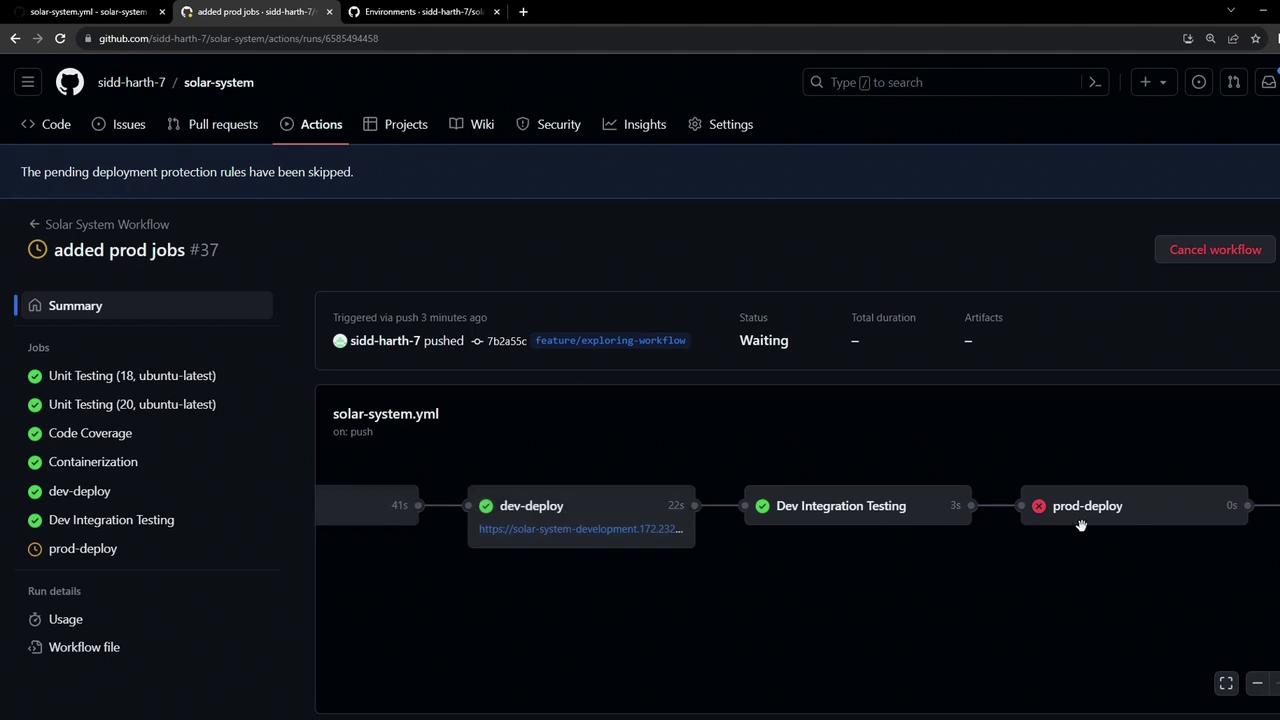
After pushing these changes from a feature branch, GitHub Actions will schedule all jobs:
  1. unit-testing
  2. code-coverage
  3. docker
  4. dev-deploy
  5. dev-integration-testing
  6. prod-deploy
  7. prod-integration-testing
The image shows a GitHub Actions workflow interface with a series of jobs, including unit testing, code coverage, and deployment steps. The "prod-deploy" step has failed, indicated by a red cross.
Warning: Because the production environment has branch protection rules (only main allowed), any attempt to deploy from a feature branch will be blocked. Subsequent jobs in the workflow are skipped when this rule is not met.
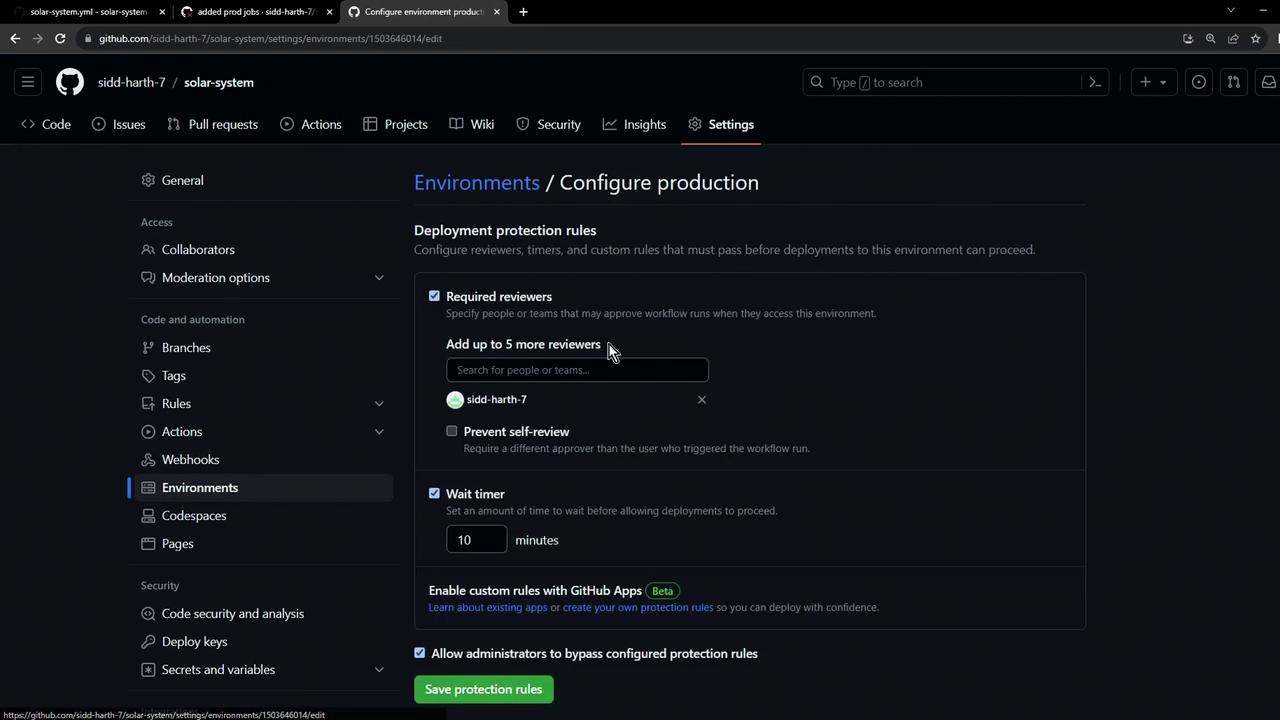
The image shows a GitHub settings page for configuring deployment protection rules in a production environment, including options for required reviewers, self-review prevention, and a wait timer.
Any unmet protection rule halts the prod-deploy job and skips downstream steps. In the next lesson, we’ll cover how to configure approvals and satisfy these rules for safe, automated releases.