

- AWS EC2 (Docker container)
- Kubernetes via GitOps (Argo CD)
- AWS Lambda (serverless)
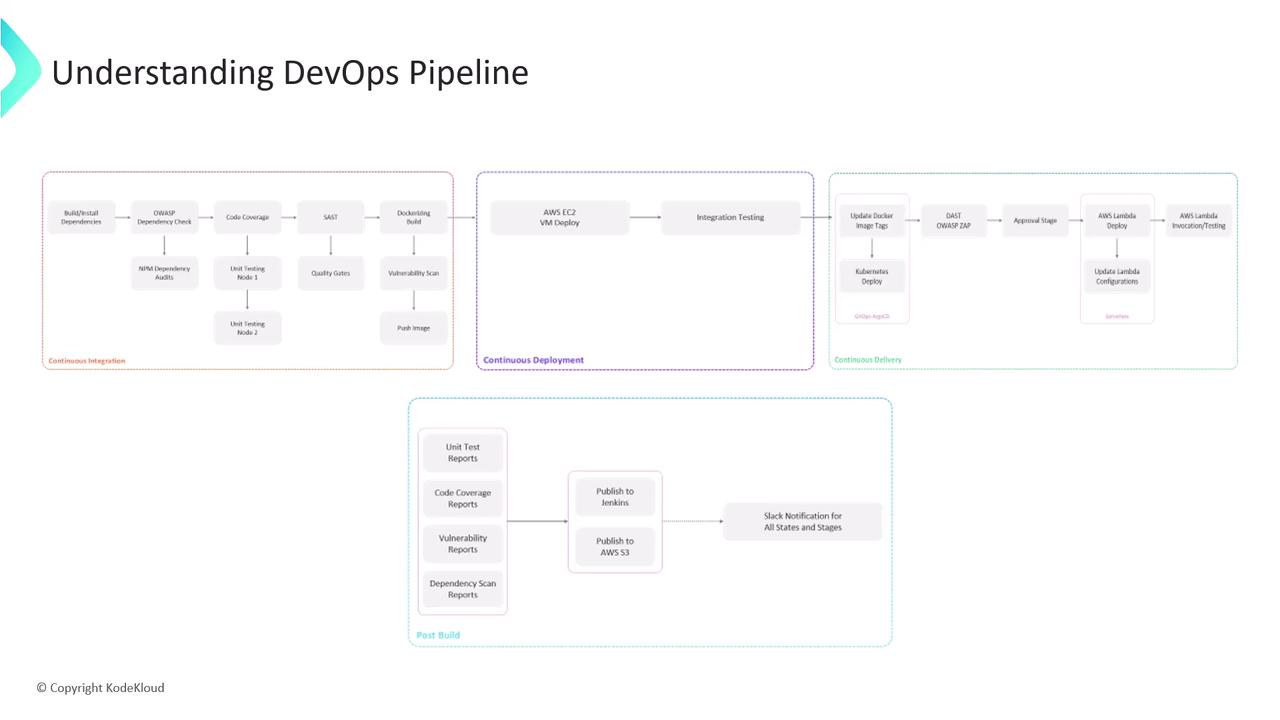
Continuous Integration (CI)
We adopt a feature-branch workflow:Developers work in
feature/* branches. Every push to a feature branch automatically triggers the Jenkins CI pipeline.CI Stages Overview
1. Install Dependencies
2. Dependency Vulnerability Scans
3. Unit Tests & Coverage
4. Static Code Analysis (SonarCloud)
5. Containerization
6. Image Vulnerability Scan (Snyk)
7. Push to Container Registry
Continuous Deployment (CD)
Once the Docker image lands in AWS ECR, we deploy to an EC2 instance:-
Run Container on EC2
-
Integration Tests
-
Open Pull Request
Contributors open a PR to mergefeature/*intomain, kicking off Continuous Delivery.
Continuous Delivery (CDel)
After the PR CI build succeeds:-
Deploy to Kubernetes via GitOps
Update the image tag in your Git manifest:Argo CD auto-detects the change and syncs the cluster. -
Dynamic Application Security Testing (DAST)
-
Merge Pull Request
After security review, approve and merge intomain. -
Approval & AWS Lambda Deployment
Jenkins pauses for a manual approval. Once approved: -
Lambda Invocation Tests
Ensure your AWS credentials have
lambda:UpdateFunctionCode and lambda:UpdateFunctionConfiguration permissions.Post-Build Reporting
Finalize the pipeline by aggregating results and notifying the team:-
Archive & Publish Reports
-
Slack Notifications
This end-to-end pipeline integrates roughly 15–20 stages, combining multiple security checks, tests, and deployment strategies. Let’s begin by configuring the Jenkinsfile for CI!