In this lesson, we’ll walk through exposing outputs from a reusable workflow so downstream jobs—in this case, dev-integration-testing —can access the application URL generated during deployment.
Troubleshooting the Integration Test Failure
When dev-integration-testing runs without the exposed URL, you might see:
echo $URL
# shell: /usr/bin/bash -e {0}
# env:
# MONGO_URI: mongodb+srv://...
URL: [
Error: Process completed with exit code 1.
The root cause is that APP_INGRESS_URL isn’t available to the test job. To fix this, we need to define and export outputs in our reusable workflow.
1. Define Workflow-Level Outputs
Edit .github/workflows/reuse-deployment.yml and add an outputs section under on.workflow_call:
name : Deployment - Reusable Workflow
on :
workflow_call :
inputs :
environment :
description : Deployment environment (dev or prod)
required : true
default : dev
type : string
mongodb-uri :
description : MongoDB connection URI
required : true
type : string
k8s-manifest-dir :
description : Path to Kubernetes manifests
required : true
type : string
kubectl-version :
description : kubectl version
required : false
default : v1.24.0
type : string
secrets :
k8s-kubeconfig :
required : true
mongodb-password :
required : true
outputs :
application-url :
description : The application ingress URL
value : ${{ jobs.reuse-deploy.outputs.APP_INGRESS_URL }}
2. Map Job Outputs to Workflow Outputs
Inside the reuse-deploy job, expose the ingress host address:
jobs :
reuse-deploy :
runs-on : ubuntu-latest
environment :
name : ${{ inputs.environment }}
url : https://${{ steps.set-ingress-host.outputs.ingress_host }}
outputs :
APP_INGRESS_URL : ${{ steps.set-ingress-host.outputs.ingress_host }}
steps :
- name : Checkout repository
uses : actions/checkout@v4
- name : Install kubectl
uses : azure/setup-kubectl@v3
with :
version : ${{ inputs.kubectl-version }}
- name : Configure kubeconfig
uses : azure/k8s-set-context@v3
with :
kubeconfig : ${{ secrets.k8s-kubeconfig }}
- name : Deploy manifests
run : |
kubectl apply -f ${{ inputs.k8s-manifest-dir }}
echo "Deployment complete."
- name : Extract ingress host
id : set-ingress-host
run : |
host=$(kubectl get ingress \
-n ${{ inputs.environment }} \
-o jsonpath='{.status.loadBalancer.ingress[0].hostname}')
echo "ingress_host=$host" >> $GITHUB_OUTPUT
Make sure the id in the step (here: set-ingress-host) matches when you reference steps.<id>.outputs.
3. Consume Outputs in the Caller Workflow
In your main workflow (e.g., .github/workflows/ci.yml), invoke the reusable workflow and pass its outputs to integration tests:
jobs :
docker :
runs-on : ubuntu-latest
# Build and push image
steps : …
dev-deploy :
needs : docker
uses : ./.github/workflows/reuse-deployment.yml
with :
mongodb-uri : ${{ vars.MONGO_URI }}
environment : development
k8s-manifest-dir : kubernetes/development
secrets :
k8s-kubeconfig : ${{ secrets.KUBECONFIG }}
mongodb-password : ${{ secrets.MONGO_PASSWORD }}
dev-integration-testing :
needs : dev-deploy
runs-on : ubuntu-latest
steps :
- name : Run integration tests
env :
URL : ${{ needs.dev-deploy.outputs.application-url }}
run : |
echo "Testing $URL"
curl -s -k https://$URL/live | jq -r '.status' | grep -qi live
prod-deploy :
if : github.ref == 'refs/heads/main'
needs : docker
uses : ./.github/workflows/reuse-deployment.yml
with :
mongodb-uri : ${{ vars.MONGO_URI }}
environment : production
k8s-manifest-dir : kubernetes/production
secrets :
k8s-kubeconfig : ${{ secrets.KUBECONFIG }}
mongodb-password : ${{ secrets.MONGO_PASSWORD }}
prod-integration-testing :
if : github.ref == 'refs/heads/main'
needs : prod-deploy
runs-on : ubuntu-latest
steps :
- name : Validate production URL
env :
URL : ${{ needs.prod-deploy.outputs.application-url }}
run : |
echo "Production URL: $URL"
curl -s -k https://$URL/live | jq -r '.status' | grep -qi live
Job Consumes Output dev-deploy Generates application-url via reusable wf dev-integration-testing Uses ${{ needs.dev-deploy.outputs.application-url }} prod-deploy Generates application-url for production prod-integration-testing Uses ${{ needs.prod-deploy.outputs.application-url }}
4. Verify the Workflow Summary
After committing and pushing, the GitHub Actions summary will show all jobs passing, including the integration tests with the correct URLs.
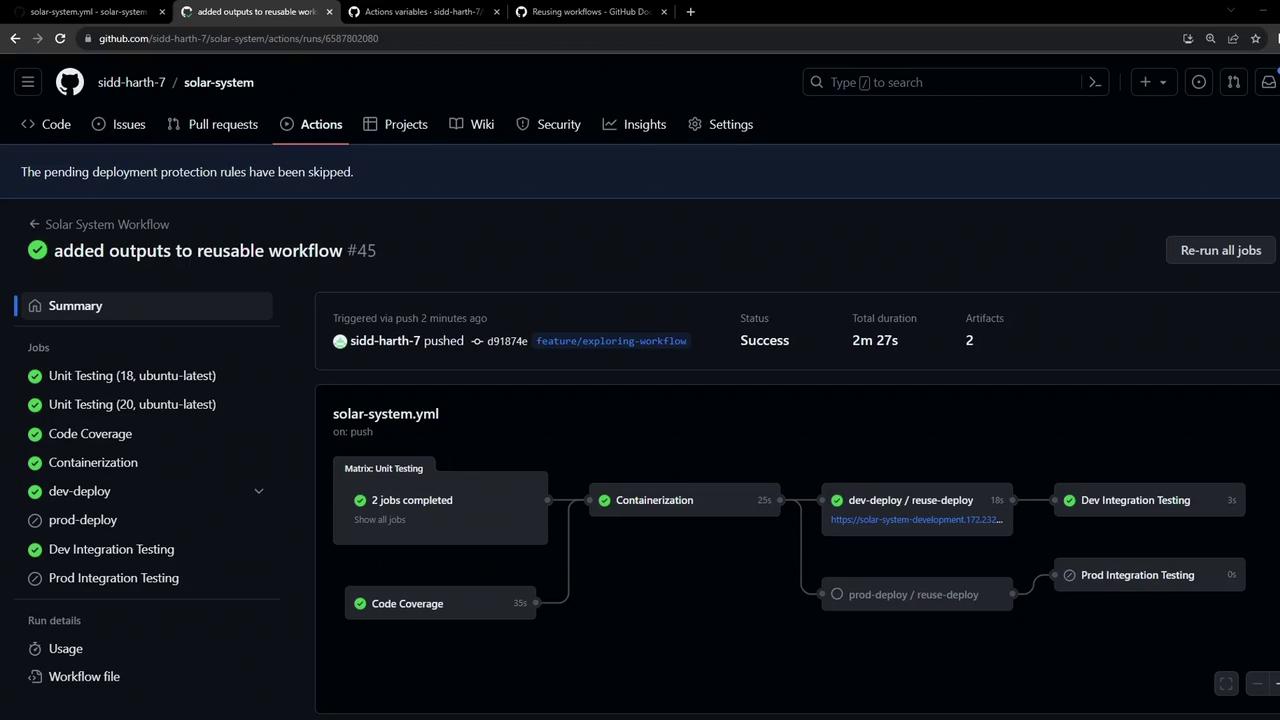
A snippet from dev-integration-testing logs confirms the URL is passed correctly:
# env: URL: solar-system-development.172.232.87.200.nip.io
# Testing solar-system-development.172.232.87.200.nip.io
curl -s -k https://solar-system-development.172.232.87.200.nip.io/live | jq -r '.status'…
With this setup, your workflows remain modular, DRY, and easy to manage by:
Defining inputs, secrets, and outputs in a reusable workflow.
Mapping job-level outputs to workflow-level outputs.
Accessing those outputs in downstream jobs.
Links and References