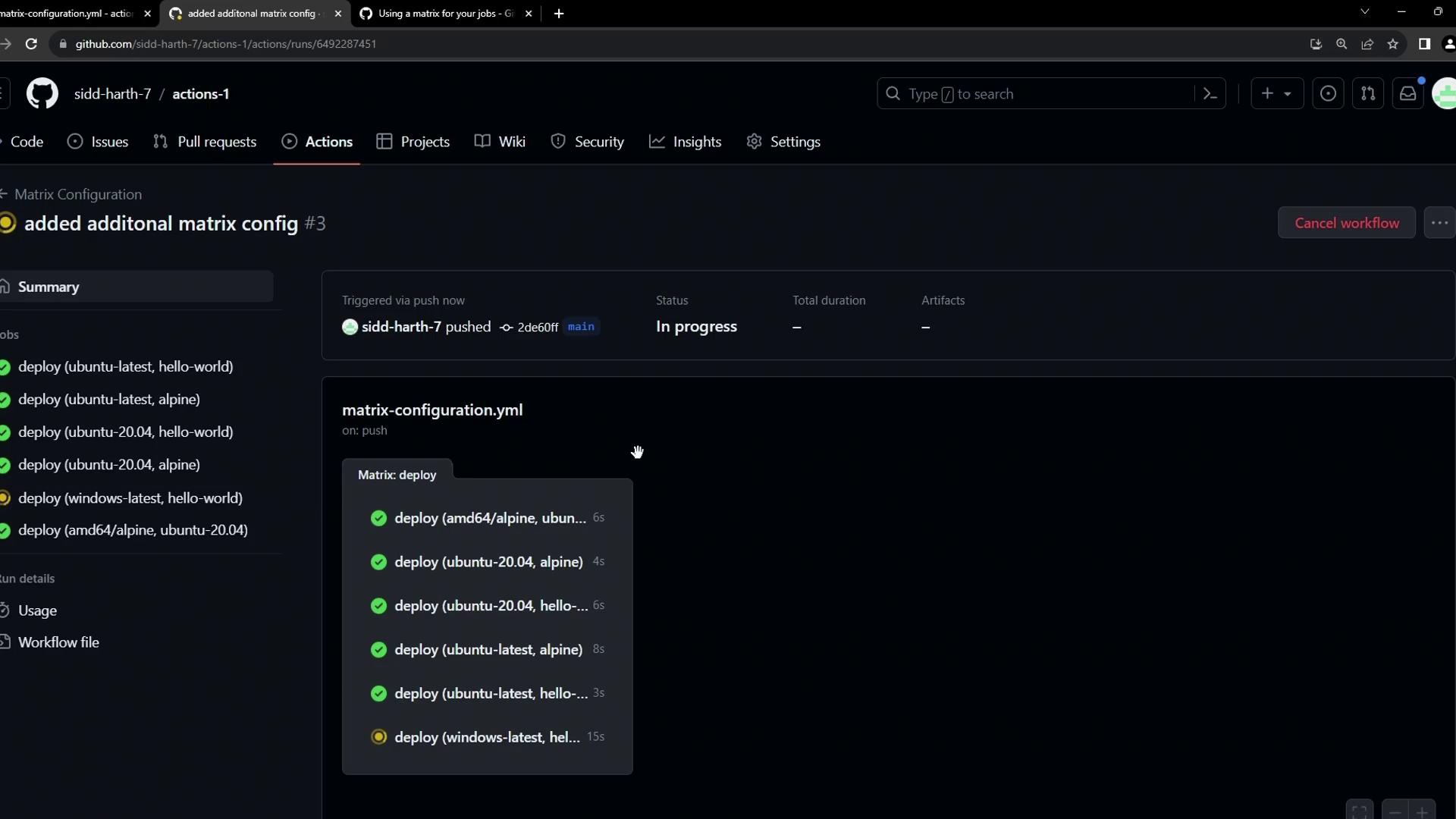
In this guide, you’ll learn how to leverage advanced matrix features in GitHub Actions to:
Exclude specific job combinations
Include custom job combinations
Control failure propagation (fail-fast)
Limit concurrent executions (max-parallel)
These techniques help you optimize CI/CD workflows for Docker images, operating systems, and more. For full details, see the GitHub Actions workflow syntax for strategy.matrix .
1. Base Matrix Example
The simplest matrix runs two Docker images (hello-world, alpine) across three operating systems (ubuntu-latest, ubuntu-20.04, windows-latest):
on :
workflow_dispatch :
jobs :
deploy :
strategy :
matrix :
os : [ ubuntu-latest , ubuntu-20.04 , windows-latest ]
images : [ hello-world , alpine ]
runs-on : ${{ matrix.os }}
steps :
- name : Show Docker Info
run : docker info
- name : Run ${{ matrix.images }} on ${{ matrix.os }}
run : docker run ${{ matrix.images }}
This configuration produces 3 × 2 = 6 jobs, all running in parallel. By default, if one job fails, the remaining jobs are canceled (the fail-fast behavior).
2. Excluding Specific Combinations
If a particular image isn’t compatible with an OS, you can remove that pair using exclude:
on :
workflow_dispatch :
jobs :
deploy :
strategy :
matrix :
os : [ ubuntu-latest , ubuntu-20.04 , windows-latest ]
images : [ hello-world , alpine ]
exclude :
- os : windows-latest
images : alpine
runs-on : ${{ matrix.os }}
steps :
- name : Show Docker Info
run : docker info
- name : Run ${{ matrix.images }} on ${{ matrix.os }}
run : docker run ${{ matrix.images }}
Now you’ll get only 5 jobs—omitting the windows-latest + alpine combination.
3. Including Custom Combinations
To add specialized pairings not covered by the default lists, use include. For example, run the amd64/alpine image on Ubuntu 20.04:
on :
workflow_dispatch :
jobs :
deploy :
strategy :
matrix :
os : [ ubuntu-latest , ubuntu-20.04 , windows-latest ]
images : [ hello-world , alpine ]
exclude :
- os : windows-latest
images : alpine
include :
- os : ubuntu-20.04
images : amd64/alpine
runs-on : ${{ matrix.os }}
steps :
- name : Show Docker Info
run : docker info
- name : Run ${{ matrix.images }} on ${{ matrix.os }}
run : docker run ${{ matrix.images }}
This adds one more job—Ubuntu 20.04 + amd64/alpine—for a total of 6 jobs.
4. Controlling Failure and Concurrency
Fine-tune your workflow execution with these two settings:
Setting Description Default fail-fast Cancel in-progress or queued jobs when one fails truemax-parallel Maximum number of matrix jobs running at the same time unlimited
Use fail-fast: false to let other jobs complete even if one fails, and set max-parallel to control resource usage in large matrices.
Example—the same matrix as before, with explicit failure and concurrency control:
on :
workflow_dispatch :
jobs :
deploy :
strategy :
fail-fast : false
max-parallel : 2
matrix :
os : [ ubuntu-latest , ubuntu-20.04 , windows-latest ]
images : [ hello-world , alpine ]
exclude :
- os : windows-latest
images : alpine
include :
- os : ubuntu-20.04
images : amd64/alpine
runs-on : ${{ matrix.os }}
steps :
- name : Show Docker Info
run : docker info
- name : Run ${{ matrix.images }} on ${{ matrix.os }}
run : docker run ${{ matrix.images }}
With fail-fast: false, failures don’t cancel other jobs.
With max-parallel: 2, only two jobs run concurrently; queued jobs start as others finish.
By mastering exclude , include , fail-fast , and max-parallel , you gain precise control over matrix workflows in GitHub Actions.