This lesson explains how different personas interact with the SageMaker Model Registry, shows example code for programmatic model registration, and outlines governance and integration options to turn ad-hoc artifacts into versioned, deployable models. Who uses the model registry?
  • Data scientist (code-first): Trains models, registers versions programmatically via SDKs/CLI, and links artifacts and container images for inference.
  • Governance officer (UI-first): Reviews explainability, bias reports, metadata, and audit trails in SageMaker Studio, then approves or rejects models for production.
Persona comparison
PersonaPrimary interfaceMain actions
Data scientistSDKs / Boto3 / Notebooks / CITrain models, create model package groups, register model packages, attach metrics and artifacts
Governance officerSageMaker Studio UIInspect explainability & bias reports, review metadata & lineage, set approval state for production
Code-based persona (data scientist)
  • Typical tools: SageMaker Python SDK, Boto3, CI/CD pipelines.
  • Common workflow: create a Model Package Group, register model packages (versions), attach metadata/metrics, and set an initial approval state.
Create a Model Package Group (Boto3 example) This logical grouping helps organize related model versions for a project or product.
# python
import boto3

# Define your Model Package Group Name
model_package_group_name = "kodekloud-model-package-group"

# Initialize the SageMaker client
sagemaker_client = boto3.client("sagemaker")

# Create the Model Package Group
response = sagemaker_client.create_model_package_group(
    ModelPackageGroupName=model_package_group_name,
    ModelPackageGroupDescription="A description of the model package group.",
)

print("Model Package Group ARN:", response["ModelPackageGroupArn"])
I am using Boto3 here because older codebases (before the SageMaker SDK added native model registry support around 2021–2022) often used Boto3 for model registry operations. If you are starting fresh today, you can use the SageMaker Python SDK which now includes first-class model registry support.
Registering a model package (create a version) A model package ties together the model artifact (S3 tarball), a container image to serve the model, supported content/response MIME types, and an initial approval status (PendingManualApproval, Approved, or Rejected).
# python
import boto3
from sagemaker import Session, image_uris

# Initialize clients/sessions
sagemaker_client = boto3.client("sagemaker")
sagemaker_session = Session()  # uses current boto3 credentials

bucket = sagemaker_session.default_bucket()
prefix = "house-price-linearlearner"

# S3 location of your model artifact
model_artifact = (
    f"s3://{bucket}/{prefix}/output/linear-learner-2025-01-15-10-20-05-283/output/model.tar.gz"
)

# Retrieve an inference container image URI for the framework
inference_image_uri = image_uris.retrieve(framework="linear-learner", region="us-east-01")

# Create the model package (version)
model_package_response = sagemaker_client.create_model_package(
    ModelPackageGroupName=model_package_group_name,
    ModelPackageDescription="House price linear learner model",
    InferenceSpecification={
        "Containers": [
            {
                "Image": inference_image_uri,
                "ModelDataUrl": model_artifact,
            }
        ],
        "SupportedContentTypes": ["text/csv"],
        "SupportedResponseMIMETypes": ["text/csv"],
    },
    ModelApprovalStatus="PendingManualApproval",
)

print("Model Package ARN:", model_package_response["ModelPackageArn"])
Approval workflow and CI/CD integration
  • After creating a model package with ModelApprovalStatus=“PendingManualApproval”, a governance reviewer inspects the model in SageMaker Studio (explainability, bias, metrics, lineage).
  • If approved, Studio can change the approval state to “Approved”, which you can wire into CI/CD (for example, a pipeline triggered on approval to deploy the approved model).
  • If rejected, the version can be blocked from deployment, or a rollback/alternative version can be selected.
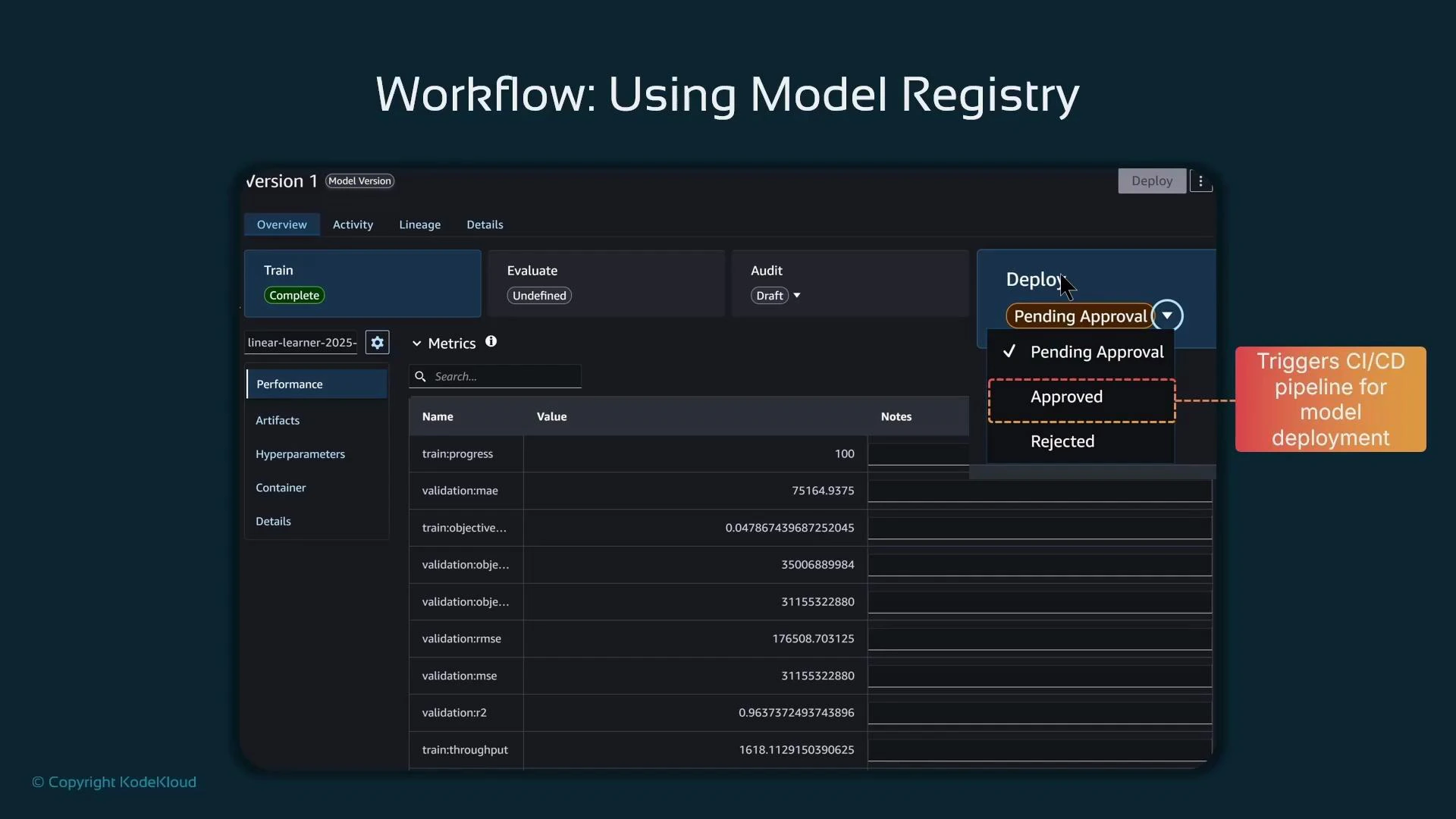
A screenshot of a "Workflow: Using Model Registry" interface showing a model version page with Train/Evaluate/Audit sections and a metrics table of performance values. A Deploy dropdown marked "Pending Approval" is highlighted, with a note that changing to "Approved" triggers the CI/CD pipeline for deployment.
Why use model package groups?
  • Organization: Group related models by function, project, or product to reduce clutter.
  • Versioning: Keep each model version with its artifacts, metrics, and metadata for traceability.
  • Governance: Separate development and review responsibilities; reviewers can validate explainability and bias before approval.
  • Integration: Use approval-state events to trigger CI/CD pipelines for automated rollout or controlled deployment.
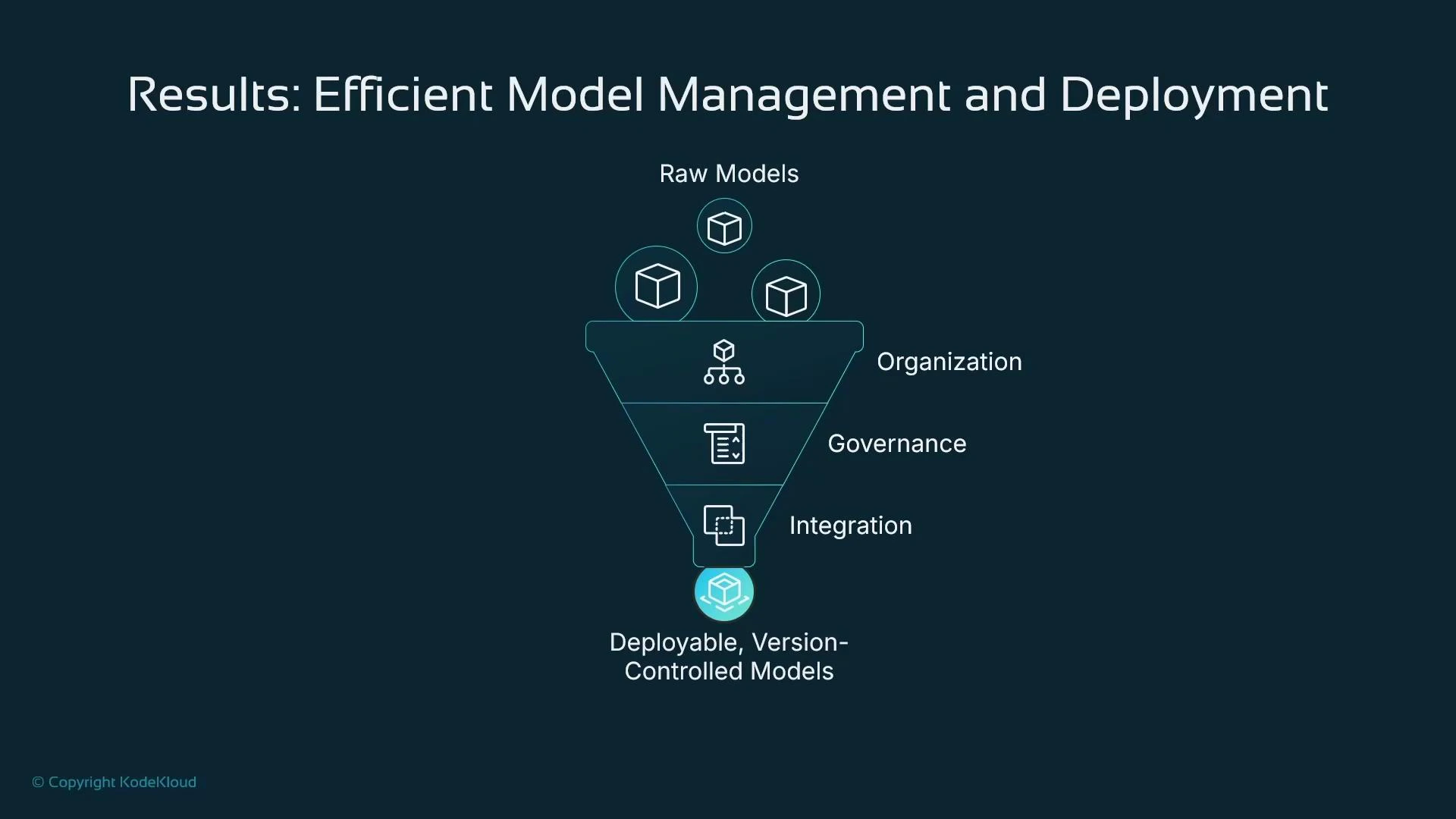
A model registry converts scattered artifacts into a structured, auditable, and deployable catalog of models.
A funnel diagram titled "Results: Efficient Model Management and Deployment" showing raw model icons entering the funnel and passing through layers labeled Organization, Governance, and Integration to produce a deployable, version-controlled model at the bottom. The graphic illustrates the process of refining raw models into production-ready, managed models.
Alternatives and integration options
  • Self-managed registries: Build a tracking/catalog solution with AWS DynamoDB or a relational database.
  • MLflow: Open-source experiment tracking and model registry (mlflow.org).
  • SageMaker Model Registry: Built into SageMaker and integrates with AWS IAM, Studio, SDKs, and CI/CD pipelines — ideal for AWS-centric workflows.
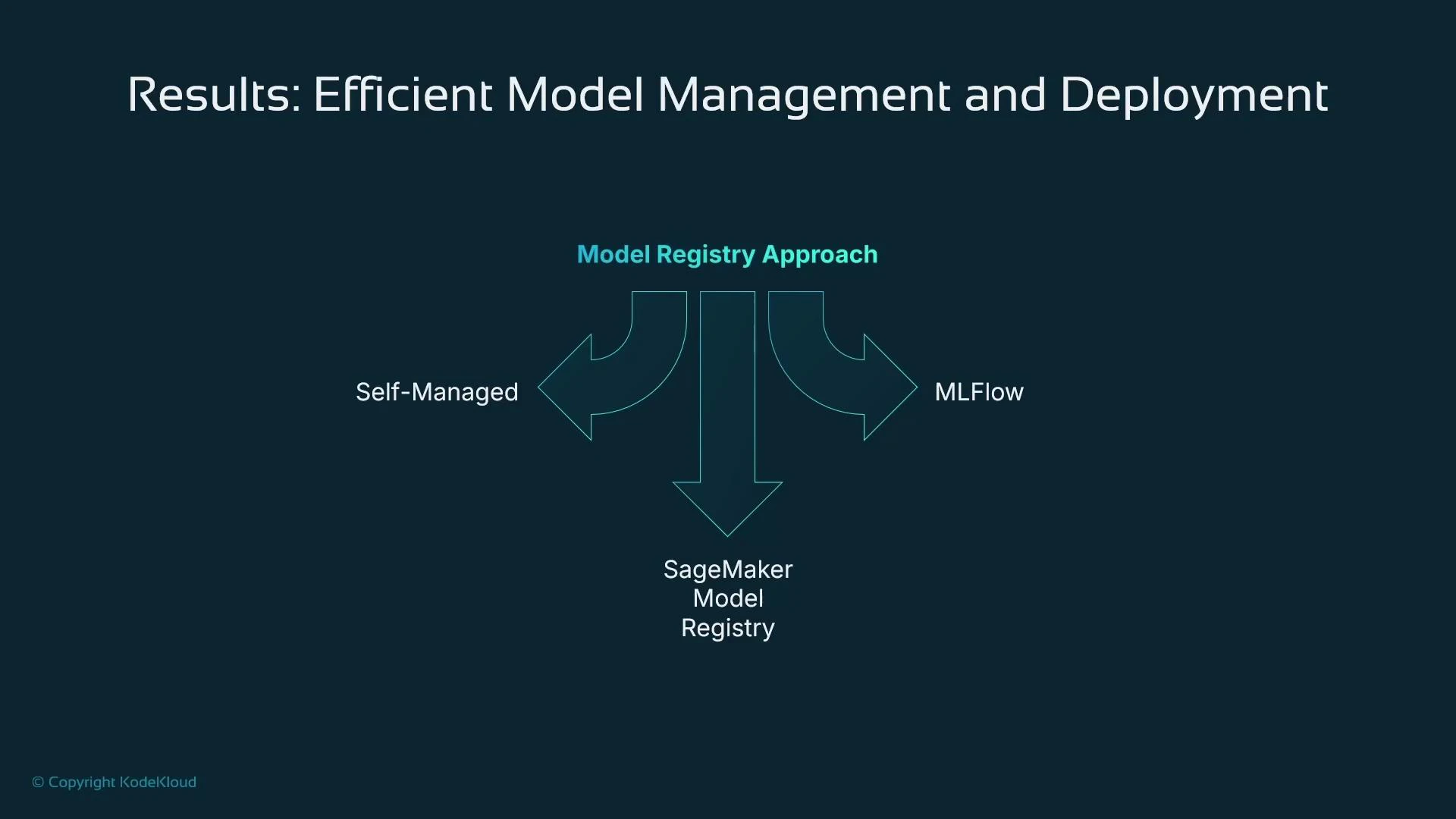
Choose and standardize on an approach to avoid losing model lineage and to enforce governance and deployment patterns.
A slide titled "Results: Efficient Model Management and Deployment" showing a "Model Registry Approach" where arrows from "Self-Managed" and "MLFlow" flow into the "SageMaker Model Registry."
Summary of benefits
  • Faster deployment via approval-triggered pipelines and automation.
  • Robust version control and better artifact management.
  • Clear collaboration between data scientists and governance teams.
  • Seamless rollback or replacement using versioned model packages.
  • Improved governance and compliance through audit trails and access controls.
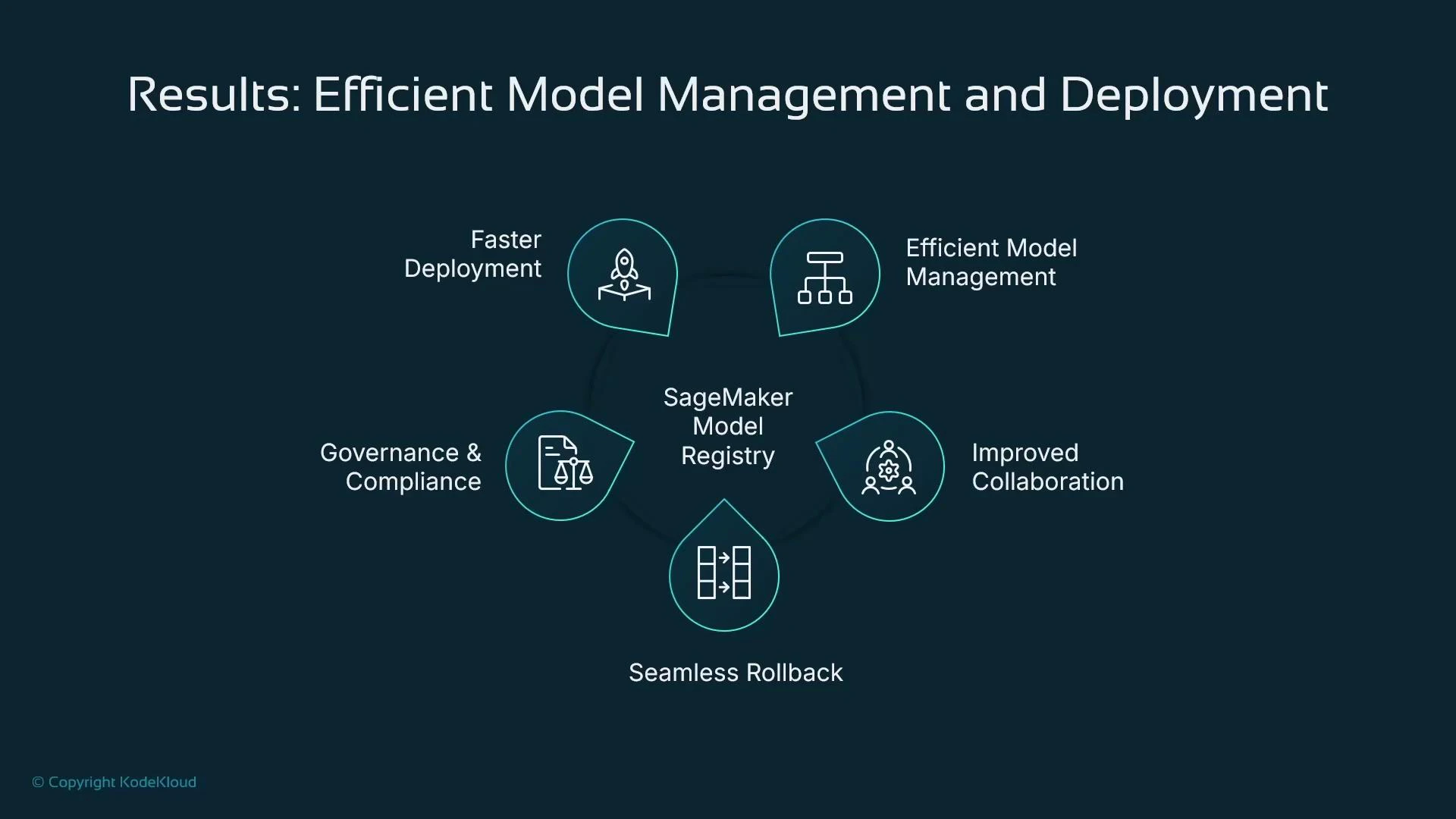
A slide titled "Results: Efficient Model Management and Deployment" showing SageMaker Model Registry in the center with five surrounding benefits: Faster Deployment, Efficient Model Management, Improved Collaboration, Seamless Rollback, and Governance & Compliance.
What we covered in this lesson
  • The distinct roles and interfaces for interacting with a model registry (data scientist vs governance officer).
  • How to create a Model Package Group and register a Model Package programmatically.
  • How SageMaker Model Registry supports approvals, audit trails, explainability/bias artifacts, and integration with CI/CD.
  • Alternatives such as MLflow or custom registries, and reasons to choose the built-in SageMaker Model Registry if you operate primarily in AWS.
Further reading and references A follow-up lesson will demonstrate a full end-to-end example: registering a model, running a governance review, and triggering a deployment pipeline after approval.

Watch Video