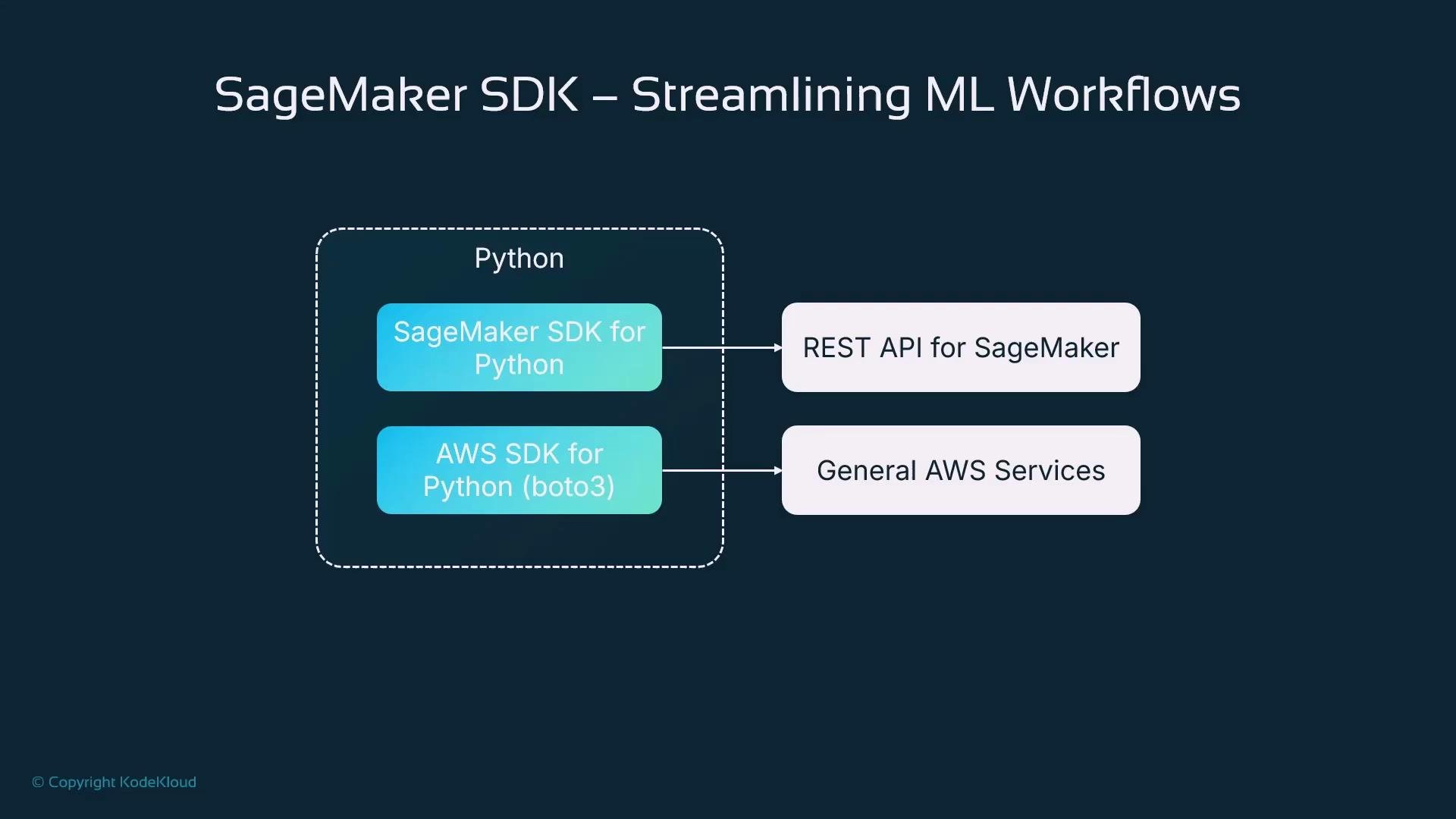
Explains why the SageMaker Python SDK simplifies ML workflows compared to boto3 by offering higher level abstractions, notebook ergonomics, integrations, and recommends hybrid use for non-ML AWS services
In this lesson we introduce the Amazon SageMaker SDK for Python and explain why you might prefer it over the general-purpose AWS SDK for Python (Boto3). We’ll cover which SDKs are available to automate AWS, why Boto3 can become verbose for ML workflows, what the SageMaker SDK provides, how it maps to notebook-driven development, and real-world benefits and customer examples.Why choose a higher-level ML SDK? In short: productivity, readability, and reproducibility. The SageMaker SDK provides purpose-built abstractions for common ML operations (processing, training, tuning, and deployment) so you write less boilerplate and focus on model development.Why Boto3 can be suboptimal for ML workflowsBoto3 is a powerful, general-purpose SDK that exposes the complete REST API surface of AWS services: EC2, S3, DynamoDB, SageMaker, and more. It converts Python function calls into REST API requests targeted at service endpoints. That flexibility makes Boto3 ideal for general automation, but for iterative ML development the raw API surface often means verbose, nested request payloads and more boilerplate.
Creating a Boto3 client is simple and exposes every API method for the service. This generality is useful, but it means you often need to construct full, nested request payloads for ML operations.
Quick example: upload a file to S3 using Boto3
import boto3s3_client = boto3.client('s3')bucket_name = 'your-bucket-name'upload_file_path = 'local_file.txt' # Local file to uploadupload_key = 'uploaded_file.txt' # Name to save in S3s3_client.upload_file(Filename=upload_file_path, Bucket=bucket_name, Key=upload_key)
This S3 example is concise and readable. But ML tasks such as starting a SageMaker training job require many nested parameters in the API payload, which increases code verbosity and reduces clarity when experimenting.Example: creating a SageMaker training job with Boto3 (explicit, nested payload)
Because Boto3 reflects the raw service API, it forces you to handle details (nested dictionaries, JSON shapes, and required fields) that are irrelevant to the core ML experiment you’re iterating on.SageMaker SDK for Python: purpose-built, higher-level abstractionsThe SageMaker SDK for Python is a separate, ML-focused library. It still issues REST API calls under the hood, but provides high-level constructs (Estimator, Model, Processor, Pipeline) and sensible defaults that match common data-science activities. This design reduces boilerplate, improves readability in notebooks, and speeds up experimentation.
Key benefits of the SageMaker SDK:
High-level constructs that map to ML activities: Estimator, Model, Processor, Pipeline.
Sensible defaults and helpers so you don’t supply every low-level API field.
Cleaner, more readable notebook code that’s easier to reproduce and share.
Built-in helpers for S3 paths, IAM role detection, CloudWatch logging, Feature Store and Model Registry integration.
Native integration with SageMaker Pipelines for end-to-end automation.
Comparison: Boto3 vs SageMaker SDK
Capability
Boto3
SageMaker SDK
Surface area
Full AWS REST API
SageMaker-centric + select integrations
Verbosity for ML jobs
High (nested payloads)
Low (Estimator/Model abstractions)
Good for notebooks
Mixed
Excellent (notebook-first ergonomics)
Use case
All AWS services
Training, processing, inference, pipelines
When to combine
Yes (Boto3 for non-ML services)
Yes (SageMaker SDK for ML tasks)
Example: creating and starting a training job using the SageMaker Python SDK
import sagemaker# Create a SageMaker session (handles S3 bucket defaults and boto3 session)session = sagemaker.Session()role = "arn:aws:iam::123456789012:role/SageMakerExecutionRole"estimator = sagemaker.estimator.Estimator( image_uri="683313688378.dkr.ecr.us-east-1.amazonaws.com/linear-learner:latest", role=role, instance_count=1, instance_type="ml.m5.large", volume_size=10, max_run=3600, output_path="s3://your-bucket/path/to/output/", sagemaker_session=session)# Set hyperparameters via a dedicated method (clear separation of concerns)estimator.set_hyperparameters(feature_dim=10, mini_batch_size=32, predictor_type="regressor")# Start training; fit() mirrors scikit-learn's API for familiarity# By default fit() blocks until completion; pass wait=False to run asynchronously.estimator.fit({"train": "s3://your-bucket/path/to/training-data.csv"})
This approach separates configuration (Estimator construction), hyperparameters (set_hyperparameters), and inputs (fit). Small changes—like swapping datasets or hyperparameters—become single-line edits in iterative experiments.SageMaker SDK integrations with AWS servicesThe SageMaker SDK wraps and integrates with common ML services and patterns to simplify workflows:
Amazon S3: dataset storage, model artifact destinations, and checkpointing.
IAM: execution roles for training, processing, and inference.
AWS Step Functions: orchestration of multi-step pipelines integrating SageMaker and other services.
Other integrations include:
Feature Store: consistent feature ingestion, storage, and retrieval.
CloudWatch: automatic logging, metrics, and monitoring for jobs and endpoints.
Model Registry: versioning, approvals, and controlled deployment workflows.
Hybrid approach: use the right SDK for the right taskThe SageMaker SDK focuses on SageMaker and a curated set of ML-relevant services. For other AWS needs—messaging (SNS), email (SES), custom databases (DynamoDB), or custom infra—you should continue to use Boto3. In practice, Jupyter notebooks commonly use both: SageMaker SDK for ML operations, and Boto3 for peripheral services.
Hybrid example: start training with SageMaker SDK and send an SNS notification via Boto3
import boto3import sagemakersession = sagemaker.Session()role = "arn:aws:iam::123456789012:role/SageMakerExecutionRole"# Construct an Estimator (same pattern as before)estimator = sagemaker.estimator.Estimator( image_uri="683313688378.dkr.ecr.us-east-1.amazonaws.com/linear-learner:latest", role=role, instance_count=1, instance_type="ml.m5.large", output_path="s3://your-bucket/path/to/output/", sagemaker_session=session)estimator.set_hyperparameters(feature_dim=10, mini_batch_size=32, predictor_type="regressor")# Start training asynchronously so the notebook can continuejob_name = "linear-learner-house-prices-001"estimator.fit({"train": "s3://your-bucket/path/to/training-data.csv"}, job_name=job_name, wait=False)# Use boto3 for notifications or peripheral servicessns = boto3.client("sns", region_name="us-east-1")sns.publish( TopicArn="arn:aws:sns:us-east-1:123456789012:training-job-notifications", Message=f"Training job {job_name} started.", Subject="SageMaker Training Job Notification")
This pattern highlights a practical separation: SageMaker SDK handles ML operations and artifacts; Boto3 handles general AWS integrations (notifications, custom DB writes, etc.). Supplying a deterministic training job name helps downstream systems reference the job reliably.
Use the SageMaker SDK for ML-centric operations in notebooks and combine it with Boto3 for services the SDK doesn’t cover. This hybrid approach keeps ML code concise while retaining full access to AWS features.
Security and permissions (important)Always ensure the IAM role used by SageMaker (and any boto3 clients) has least-privilege permissions for S3, CloudWatch, SNS, and other resources your workflow touches. Misconfigured roles can cause training or deployment failures.
Make sure the SageMaker execution role grants access to S3 paths, logging destinations, and any other AWS resources the job requires. If using boto3 clients in your notebook, confirm your local AWS credentials and region configuration are correct.
Business results and adoptionAdopting the SageMaker SDK typically accelerates model development and simplifies maintenance by shifting focus away from low-level API plumbing to modeling. Organizations report faster time-to-value since data scientists can iterate on experiments rather than service payloads.
Real examples:
AstraZeneca: used SageMaker and the SDK to spin up ML environments quickly so scientists could focus on modeling rather than infrastructure.
NatWest Bank: built 30+ ML use cases in four months using SageMaker tooling to accelerate personalized marketing and fraud detection initiatives.
Summary
Two primary Python SDK choices:
Boto3: general-purpose AWS SDK exposing the full REST API surface.
SageMaker SDK: ML-focused, higher-level abstractions optimized for training, processing, inference, pipelines, and common ML integrations.
Use the SageMaker SDK for ML tasks in notebooks to reduce boilerplate and improve reproducibility.
Use Boto3 for services the SageMaker SDK does not cover (SNS, DynamoDB, SES, custom infra).
Combine both in practice: SageMaker SDK for ML, Boto3 for peripheral AWS operations.
A hands-on, end-to-end training job example using the SageMaker SDK is available in a separate article to walk you through a complete notebook workflow.