In this lesson you’ll learn how to evaluate adoption of GitHub Advanced Security and optimize license allocation across your enterprise to control costs and ensure entitlements are used by active contributors.

Review enterprise licensing and billing

As an enterprise administrator, start in the enterprise settings to review billing and license consumption. The licensing view displays how many seats are consumed and provides an estimated monthly cost. In the example environment, two licenses are currently consumed (down from three after removing “dev2” in a prior task), with an estimated monthly charge of about $42. The Advanced Security section shows how many Advanced Security entitlements are assigned for features such as secret scanning and CodeQL code scanning. In this example, one license is used for secret protection and one for code security. To validate entitlements, download the CSV reports that enumerate enterprise users and their license details. These exports are the primary data source for auditing who holds Advanced Security access.

Inspect the enterprise users CSV

The enterprise users CSV lists everyone associated with the enterprise and includes columns such as GitHub.com login, enterprise role, license type, and organization-level roles. Use this file to confirm which accounts currently hold Advanced Security entitlements.
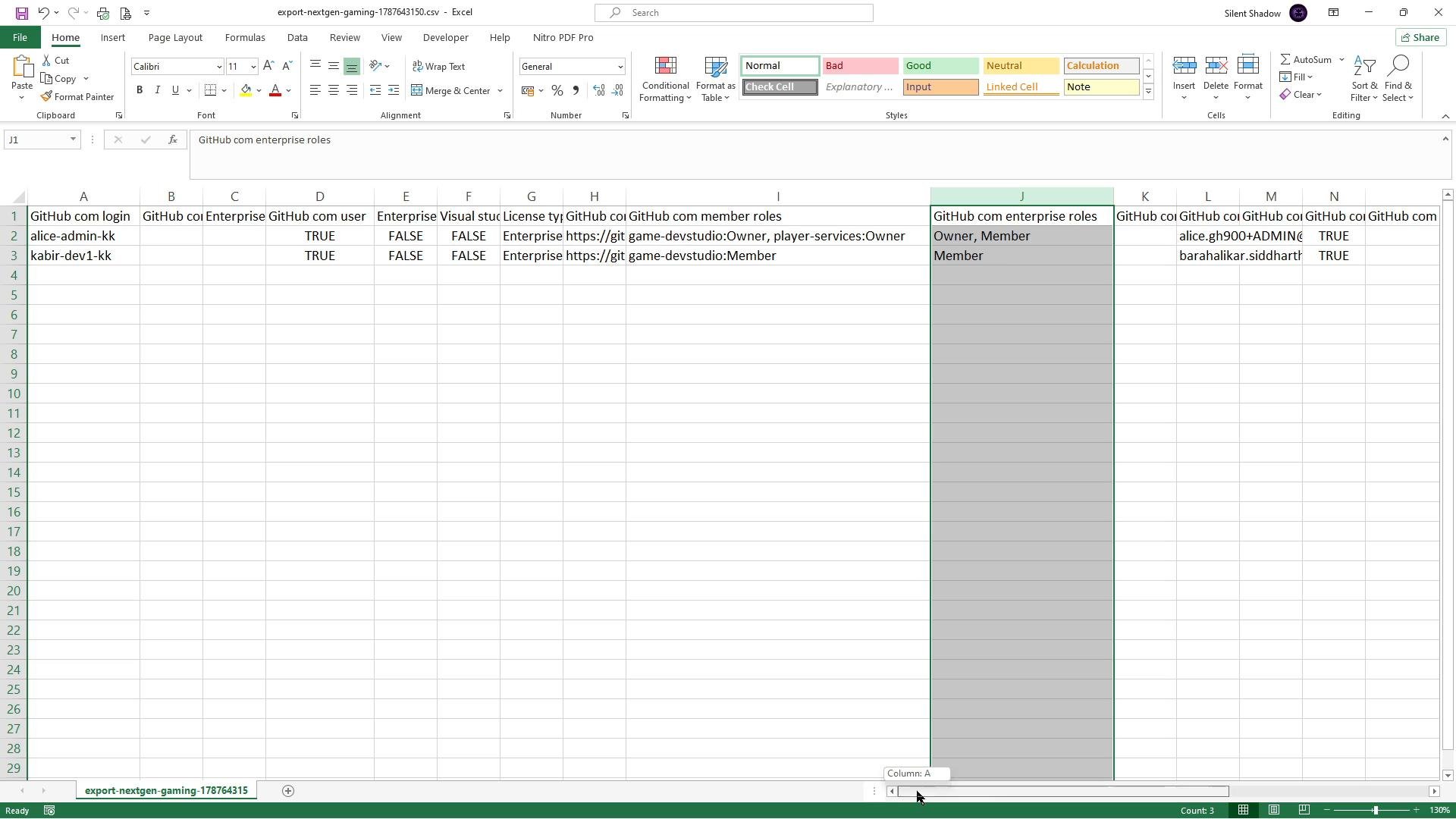
A screenshot of an Excel spreadsheet showing a CSV export of GitHub user and enterprise data with columns like "GitHub.com login", "Enterprise", "License type" and "GitHub.com enterprise roles." Two user rows (alice-admin-kk and kabir-dev1-kk) are visible and a column is selected/highlighted.
This CSV also indicates whether a user has Advanced Security entitlements (for example, code security or secret protection). In the screenshot above, you can confirm developer 2 does not have those licenses—consistent with that user having been removed in a previous step.

Export and analyze Advanced Security reports

Download the Advanced Security exports. Typically these are split into two reports:
  • Secret protection (secret scanning) usage
  • Code security (CodeQL) usage
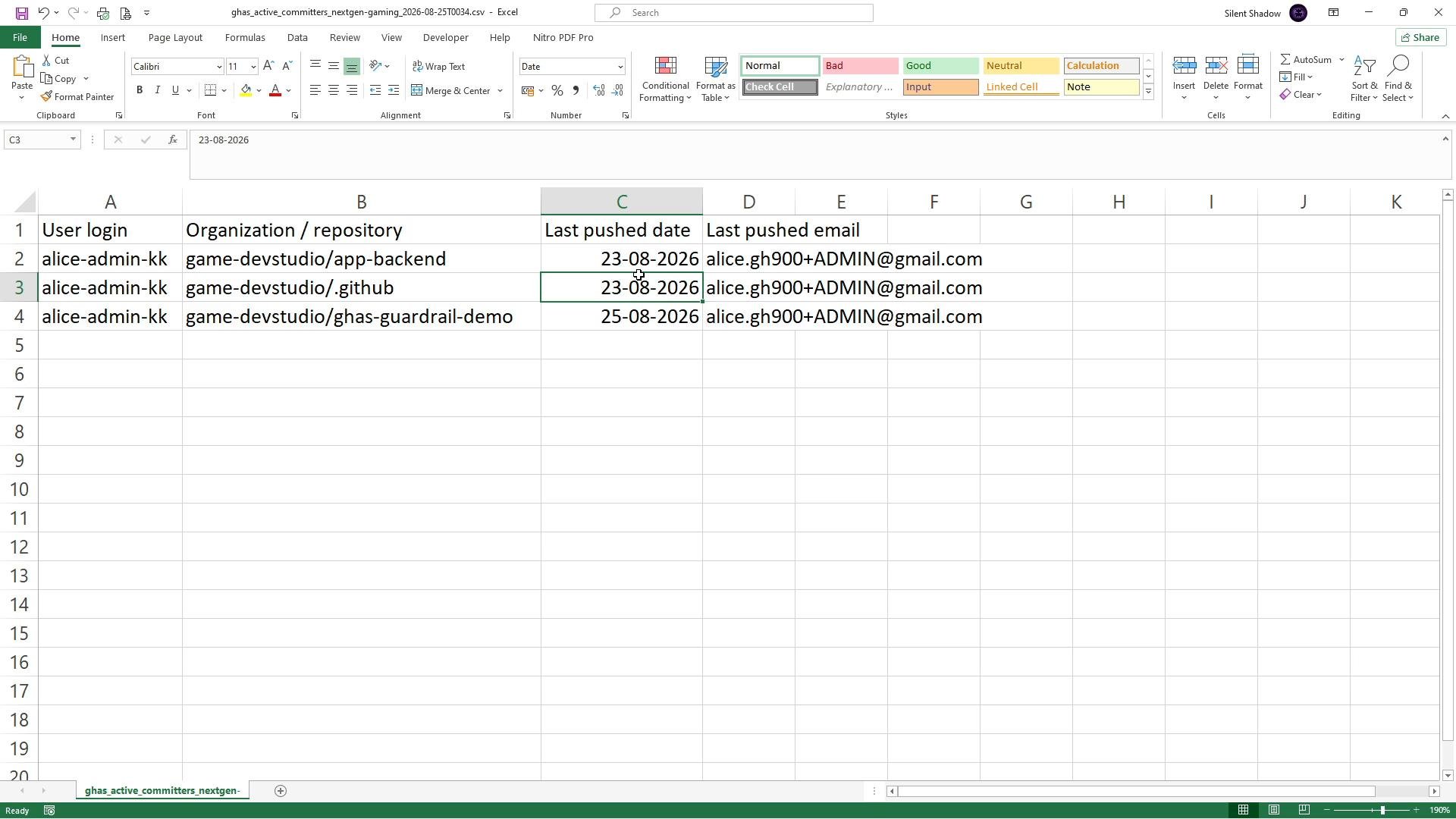
The secret protection report shows which accounts have triggered secret scanning, the organization and repository where the events occurred, and timestamps (for example, last-push dates). Use these timestamps together with other activity indicators (commit pushes, Dependabot activity, scheduled scans, or review/CI activity) to determine whether an entitlement is being actively used.
A Microsoft Excel sheet showing user logins, organization/repository names, last pushed dates, and last-pushed email addresses. The rows list "alice-admin-kk" with repos like game-devstudio/app-backend and dates such as 23-08-2026 and 25-08-2026.
In the example, Alice (alice-admin-kk) has recent last-push dates (for example, 23-08-2026 and 25-08-2026), indicating recent repository activity. Verify each Advanced Security entry to determine whether the activity corresponds to Dependabot, secret scanning events, or CodeQL analyses as relevant. If a last-push or activity timestamp is months old, that signals a license may be unused and can potentially be reclaimed. Before removing entitlements, confirm whether non-push activity (CI, scheduled scans, or automation) could justify keeping the license. Follow these steps to audit and reclaim unused Advanced Security licenses safely:

Best practices and governance

  • Establish an inactivity policy (for example, reclaim Advanced Security licenses after 60 or 90 days of no activity).
  • Automate periodic exports and reporting to keep license utilization under continuous review.
  • Maintain an audit log of entitlement changes and a communication process to notify affected users.
Consider automating periodic exports and reports so license utilization is reviewed on a regular cadence. This helps catch stale entitlements early and reduces license costs.
Before removing Advanced Security access, confirm the user is not performing required security tasks via automation (e.g., Dependabot or scheduled scans) that might not show as recent pushes. Notify the user or their team to avoid disrupting essential workflows.

Conclusion

Using the enterprise users CSV together with Advanced Security exports (secret protection and code security) makes it straightforward to identify active versus inactive entitlements. Regular audits, clear inactivity thresholds, and good communication ensure licenses are optimized and costs are controlled while preserving security coverage.

Watch Video