

Initial repository state (app.js)
Below is the sampleapp.js used in the demo. It contains several mock high-entropy secrets (AWS keys, a public PAT) and an internal ACME token that GitHub Secret Scanning will not detect until a custom pattern is added.
main branch, GitHub will flag known secrets (like the AWS keys and public PAT). The acme_token above will not be flagged because its format is proprietary and not included in GitHub’s built-in detectors.
Create organization-level custom patterns when you want consistent detection rules across many repositories. Use repository-level patterns only for repository-specific cases or short-lived exceptions.
Repository-level vs Organization-level custom patterns
You can create custom secret-scanning patterns either per-repository or for the whole organization. The organization-level option is recommended when you need a single policy applied across your repositories.Creating a custom pattern (example)
Navigate to your organization settings: Settings → Advanced Security → Global settings → Custom patterns For the ACME token in this demo, create a new custom pattern with these values:- Name:
Acme - Regular expression:
ACME-[A-Z0-9]{7} - Optionally: provide before/after context and a test string to validate the regex
Never commit or store real production secrets in source control for testing. Use mock secrets or redacted values when experimenting with secret-scanning features.
Dry run: initial result
Before publishing a pattern, run a dry run against up to 10 repositories from the UI to find existing matches. This helps you confirm detection without immediately creating alerts. Example dry run output from the demo (initial run):acme_token in the repository was originally much longer than seven characters after the ACME- prefix, so it did not match the ACME-[A-Z0-9]{7} pattern.
Update the token to match the regex
Edit the repository file so that theacme_token value conforms to the pattern. Only the updated line is shown here:
Dry run result (after updating token)
After updating the token value so it matches the custom regex, the dry run finds the match:Publish the pattern
Once you have validated the pattern with dry runs and are confident it matches the intended token format, publish the pattern at the organization level. Published organization-level patterns become active and will raise secret-scanning alerts across the organization’s selected repositories when matches are found during new pushes or scans.Repository Secret scanning alerts
After publishing the pattern and pushing the updated token to the repository, go to: Repository → Security → Secret scanning alerts You should see alerts for matches found by the published ACME pattern along with any other detected secrets (like AWS keys or PATs). Each alert includes file and commit/branch details and provides actions such as viewing details, marking a false positive, or closing the alert.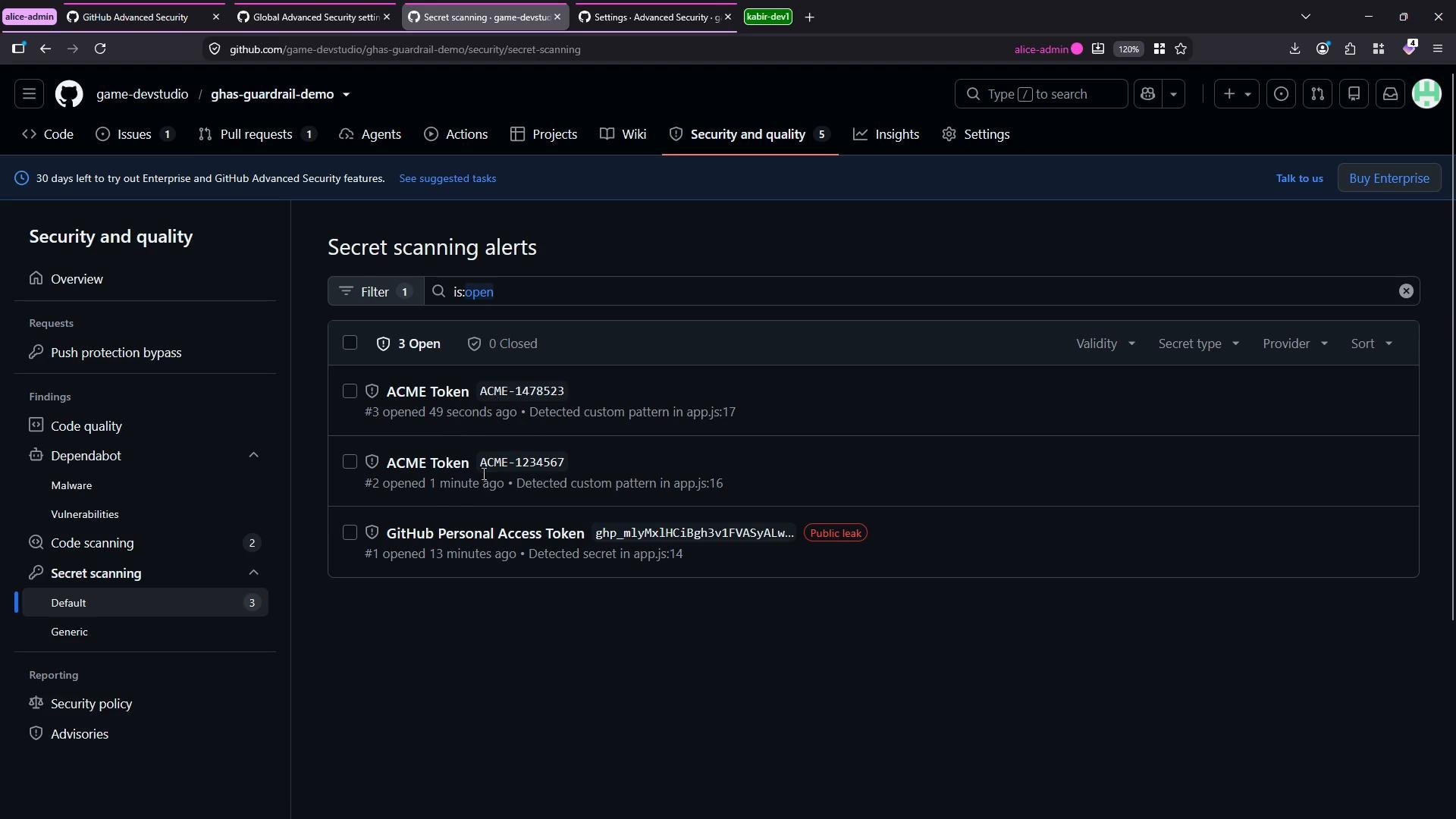
Summary
- GitHub Secret Scanning detects many built-in secret formats automatically.
- For proprietary or organization-specific tokens, create custom patterns (regex) at the repository or organization level.
- Use the dry run feature to validate patterns against existing repositories before publishing.
- Published organization-level patterns apply across selected repositories and will generate Secret scanning alerts when matches occur.
- Always avoid committing real secrets; use safe mock values for testing.
Links and references
- GitHub Secret Scanning documentation
- Configuring custom patterns for secret scanning
- GitHub Advanced Security (GHAS) overview