

- EMU lets organizations fully manage identities and access for GitHub accounts using an external identity provider (IdP).
- Data residency ensures that code, metadata, and other enterprise data are stored in a specific geographic region (for example, Europe or Japan).
- Use EMU with data residency when you require strict identity provisioning, regional data controls, or need to prevent use of personal GitHub accounts.
- You need centralized identity provisioning (SAML/OIDC with SCIM).
- You must ensure enterprise data is stored in a specific country or region.
- You want to disable use of personal GitHub accounts for employees and contractors.
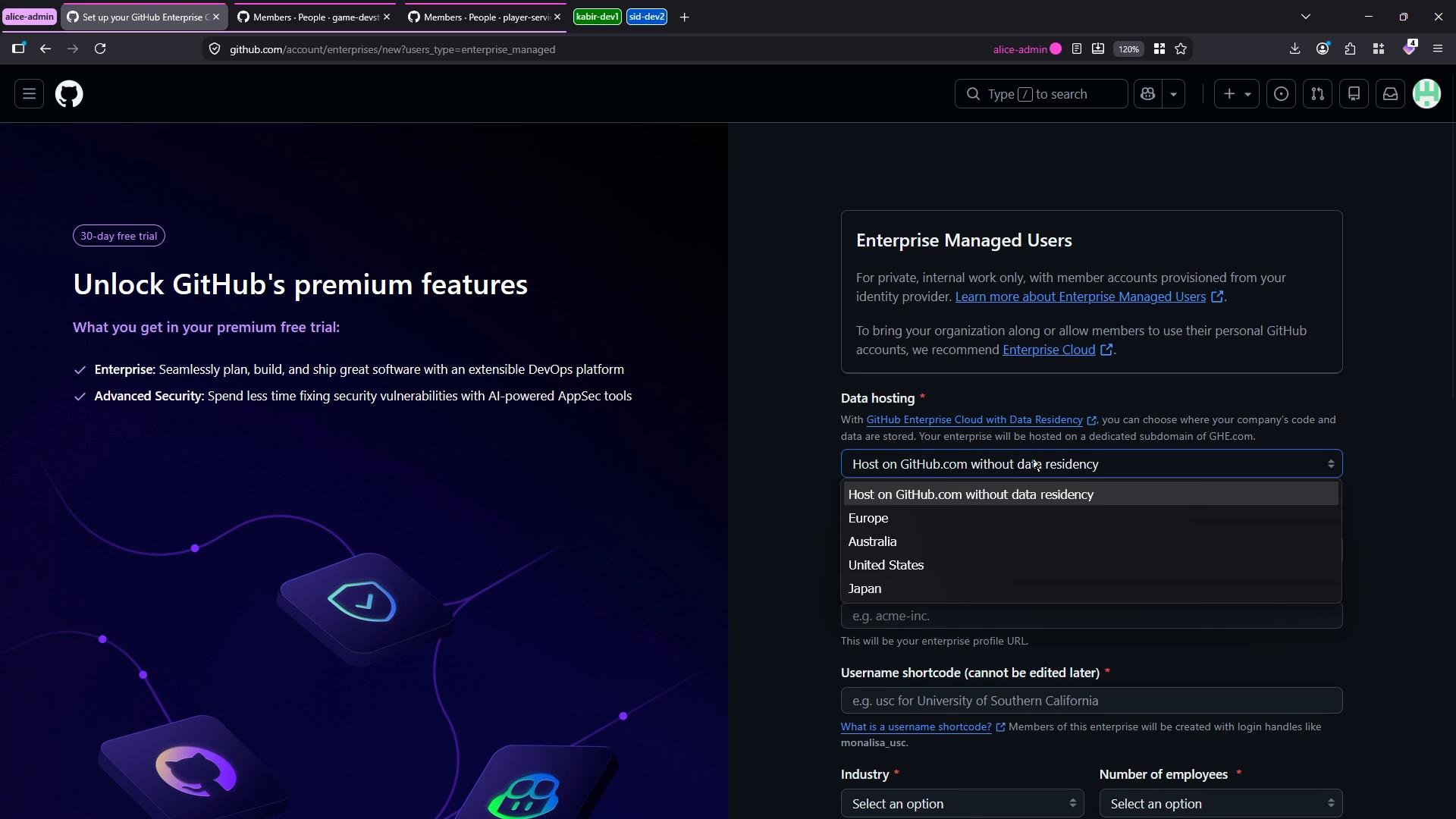
- Create a new enterprise and select the “Enterprise with Managed Users” option.
- Choose a data hosting region during enterprise creation.
- Configure an external IdP for provisioning and SSO.
- Onboard admins and users via the IdP — personal GitHub accounts are not allowed for EMU-managed users.
- Navigate to GitHub Enterprise Cloud enterprise creation.
- Choose “Enterprise with Managed Users.”
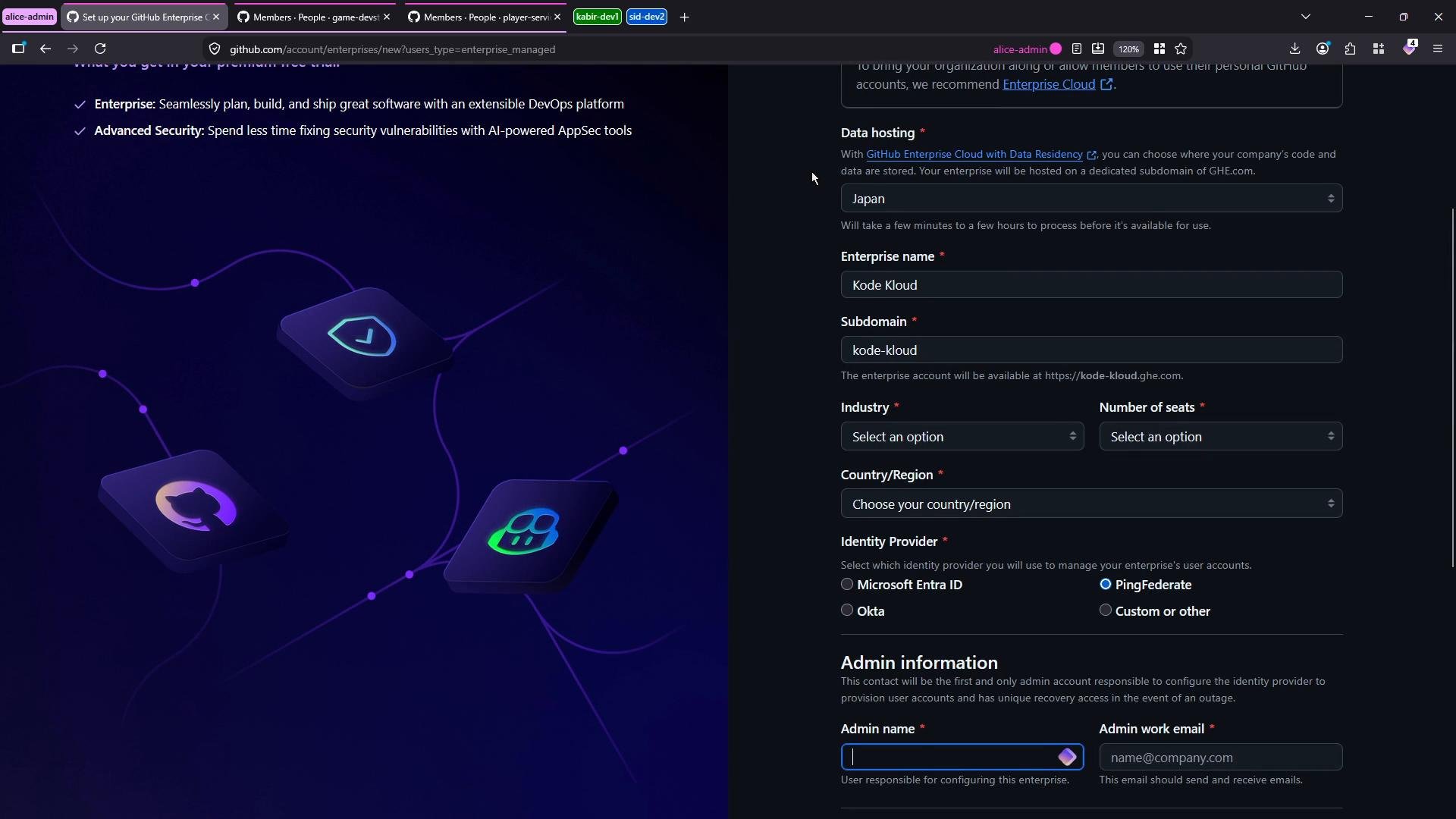
- Under Data hosting, select the geographic region where you want enterprise data stored.
- Enter an enterprise name (example: “Kode Kloud”). GitHub will suggest a subdomain; you can customize it (for example,
kode-kloud). - Select your external identity provider (SAML/OIDC with SCIM is required for provisioning).
- Complete the admin contact and enterprise configuration details.
- Create the enterprise. After creation, all admin and user provisioning must happen through the configured IdP.
Identity provider and provisioning
- EMU enforces that all managed users are provisioned and authenticated through your IdP.
- Supported patterns: SAML or OIDC for single sign-on plus SCIM for automated provisioning/deprovisioning.
- Personal GitHub accounts cannot be used as EMU-managed accounts — users must be created or federated from the configured IdP.
Enterprise Managed Users requires an external identity provider for provisioning and single sign-on (for example, SAML/OIDC with SCIM provisioning). Personal GitHub accounts are not permitted for EMU-managed users.
If you need to allow personal GitHub accounts or prefer not to configure an external IdP, create a standard (non-EMU) GitHub Enterprise Cloud organization instead. EMU enforces IdP-based account management and blocks personal account use.
- Admins and regular users must be onboarded via the IdP (SCIM provisioning or manual provisioning through your IdP).
- Use IdP group mappings and SCIM attributes to control user roles and team membership.
- Configure SSO enforcement and test login flows before migrating sensitive repositories.
- GitHub Enterprise Cloud: https://docs.github.com/en/enterprise-cloud
- Data residency for GitHub Enterprise Cloud: https://docs.github.com/en/enterprise-cloud@latest/admin/guides/data-residency
- SCIM provisioning guide: https://docs.github.com/en/enterprise-cloud@latest/admin/identity-and-access-management/connecting-your-identity-provider-to-github-using-scim