Explains Argo Events sensor trigger conditions, boolean expressions for dependencies, examples using MinIO and webhook, and RBAC considerations for workflow triggers.
OverviewTrigger conditions let you control which trigger templates execute based on the status of a sensor’s dependencies in Argo Events. A sensor can declare multiple dependencies and multiple triggers; each trigger may include a boolean expression that references dependency names to determine when it should run.This guide explains how condition expressions work, shows examples, and walks through a practical sensor that uses a MinIO event and a webhook to drive two triggers: one that submits an Argo Workflow and another that sends an HTTP request.Relevant links and references
conditions: "dep02" — trigger runs when dependency dep02 is satisfied.
conditions: "dep02 && dep03" — trigger runs when both dep02 and dep03 are satisfied.
conditions: "(dep01 || dep02) && dep03" — trigger runs when dep03 is satisfied and at least one of dep01 or dep02 is satisfied.
Practical multi-dependency sensor (MinIO + webhook)Below is a real-world sensor manifest that demonstrates two dependencies and two triggers:
hello-workflow-trigger submits an Argo Workflow and only fires when the MinIO dependency is satisfied.
http-trigger posts to an external HTTP endpoint and fires when either dependency is satisfied.
Copy
apiVersion: argoproj.io/v1alpha1kind: Sensormetadata: name: multi-dependency-sensor-2 namespace: argo-eventsspec: dependencies: - name: test-dep eventSourceName: minio eventName: example - name: my-webhook-dep eventSourceName: webhook eventName: my-webhook triggers: - template: name: hello-workflow-trigger # Use a service account that has permission to create Workflows in the 'argo' namespace serviceAccountName: workflow-trigger-sa conditions: "test-dep" argoWorkflow: source: resource: apiVersion: argoproj.io/v1alpha1 kind: Workflow metadata: generateName: hello-kodekloud- namespace: argo spec: entrypoint: whalesay templates: - name: whalesay container: image: rancher/cowsay command: ["cowsay"] args: ["Triggering workflow from Argo Events"] - template: name: http-trigger conditions: "test-dep || my-webhook-dep" http: url: https://httpdump.app/inspect/ee487aa0-994f-4b9f-83dd-a65e668ccfc8 method: POST payload: | { "bucket": "{{dependency.test-dep.data.notification.0.s3.bucket.name}}", "type": "{{dependency.test-dep.context.type}}" } retryStrategy: steps: 3 duration: 3s
Notes about the workflow trigger and RBAC
The workflow trigger sets serviceAccountName: workflow-trigger-sa. That service account must have RBAC permissions (Role/ClusterRole and corresponding RoleBinding/ClusterRoleBinding) that allow creating Workflows in the argo namespace.
If the trigger uses the default service account (or a service account lacking permissions), the Workflow creation will fail with a permission error.
Testing the configuration
Expose the webhook event source locally (port-forward) and send a test event:
Copy
kubectl -n argo-events port-forward svc/webhook-eventsource-svc 13000:13000# In another terminal:curl -d '{"message":"hello"}' -H "Content-Type: application/json" -X POST http://localhost:13000/push# Expected response:# success
Create a MinIO credentials secret in the argo-events namespace:
RBAC/permission error for Workflow trigger (example):
Copy
time="2025-10-25T11:43:28.979Z" level=error msg="Create request failed" error="workflows.argoproj.io is forbidden: User \"system:serviceaccount:argo-events:default\" cannot create resource \"workflows\" in API group \"argoproj.io\" in the namespace \"argo\""Error: Failed to submit workflow: rpc error: code = PermissionDenied desc = "workflows.argoproj.io is forbidden: User \"system:serviceaccount:argo-events:default\" cannot create resource \"workflows\" in API group \"argoproj.io\" in the namespace \"argo\""
Fixes:
Ensure the trigger template includes serviceAccountName (as shown in the sensor YAML).
Grant that service account the necessary RBAC roles to create Workflows in the target namespace.
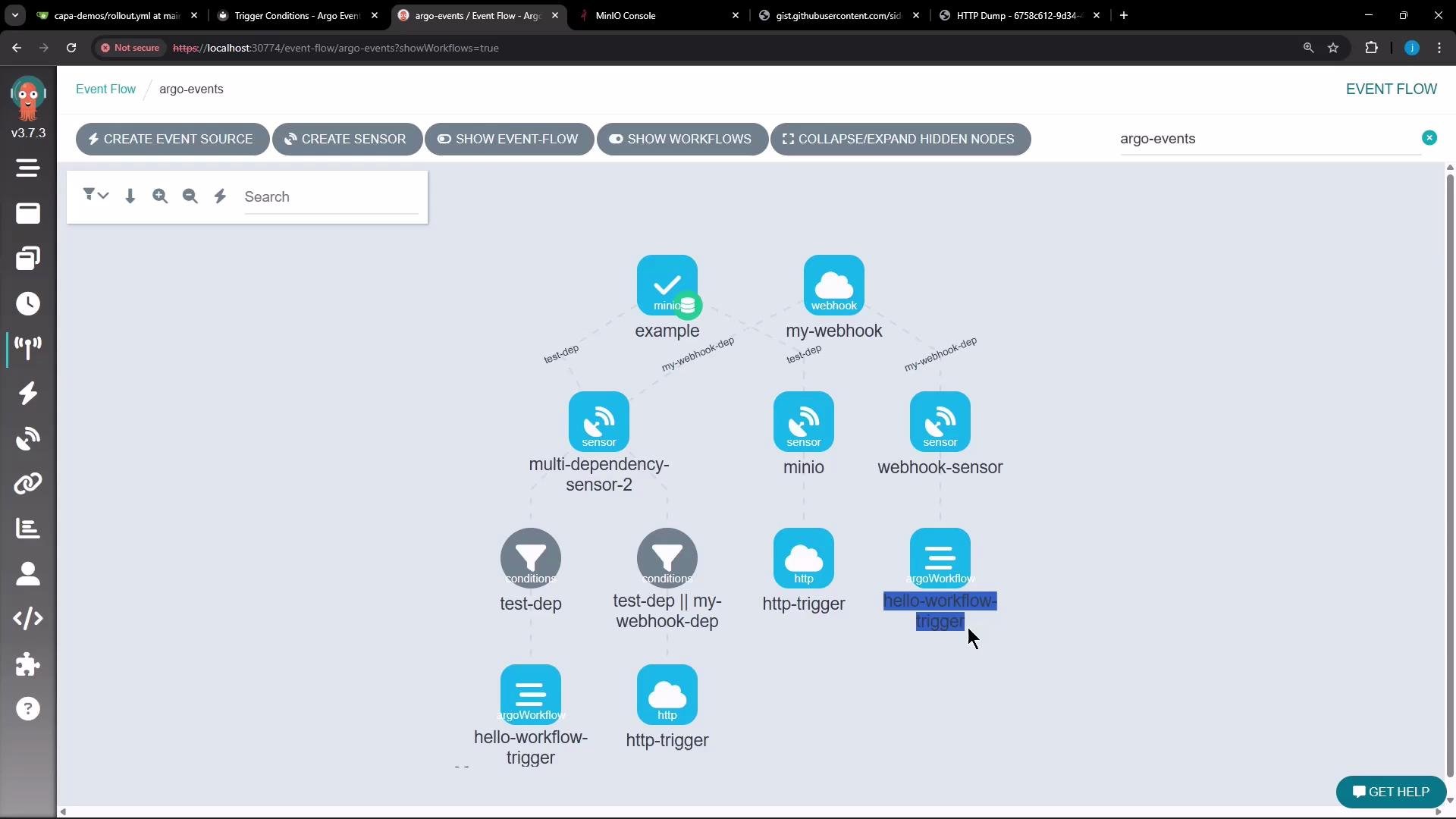
Event flow and UIA visual graph helps map how event sources, sensors, dependencies, conditions, and triggers relate. The UI shows nodes for event sources, sensors, each dependency, and the triggers that fire when conditions are met.
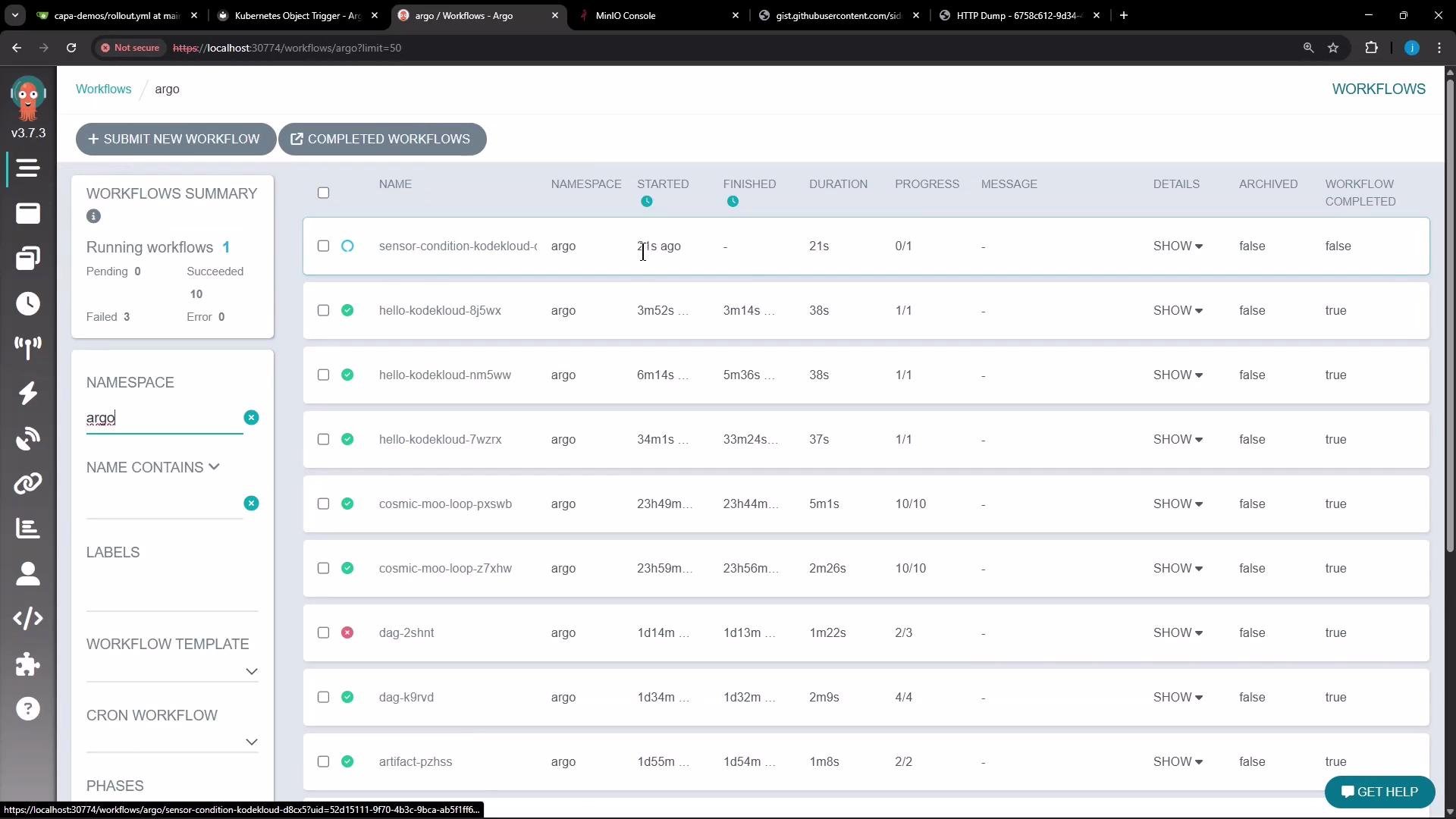
When everything is configured and RBAC is correct, triggers will execute and generate expected outputs — for example, HTTP dumps and Argo Workflows. After updating the sensor to include the proper service account, a new workflow should appear in the Argo Workflows list.
Summary
Use dependency names inside conditions expressions to control trigger execution.
Use && and || to combine dependency conditions; parentheses support grouping.
If conditions is omitted, all sensor dependencies must be satisfied (implicit AND).
For Argo Workflow triggers, set serviceAccountName and ensure the service account has RBAC permissions to create Workflows in the target namespace.
Tip: When testing triggers, inspect sensor logs (kubectl -n <ns> logs <sensor-pod>) to see why a trigger did or didn’t execute. Permission errors and missing dependency events are common causes for trigger failures.