

1. Continuous (Reconciliation)
In GitOps the reconciliation process is continuous — it runs constantly rather than executing once. Continuous reconciliation ensures the running system continuously converges toward the desired state declared in Git. This always-on loop detects deviations (e.g., a pod crash or a manual change) and automatically attempts to correct them. Think of it like a thermostat: it continuously checks the temperature and adjusts heating or cooling to maintain the setpoint.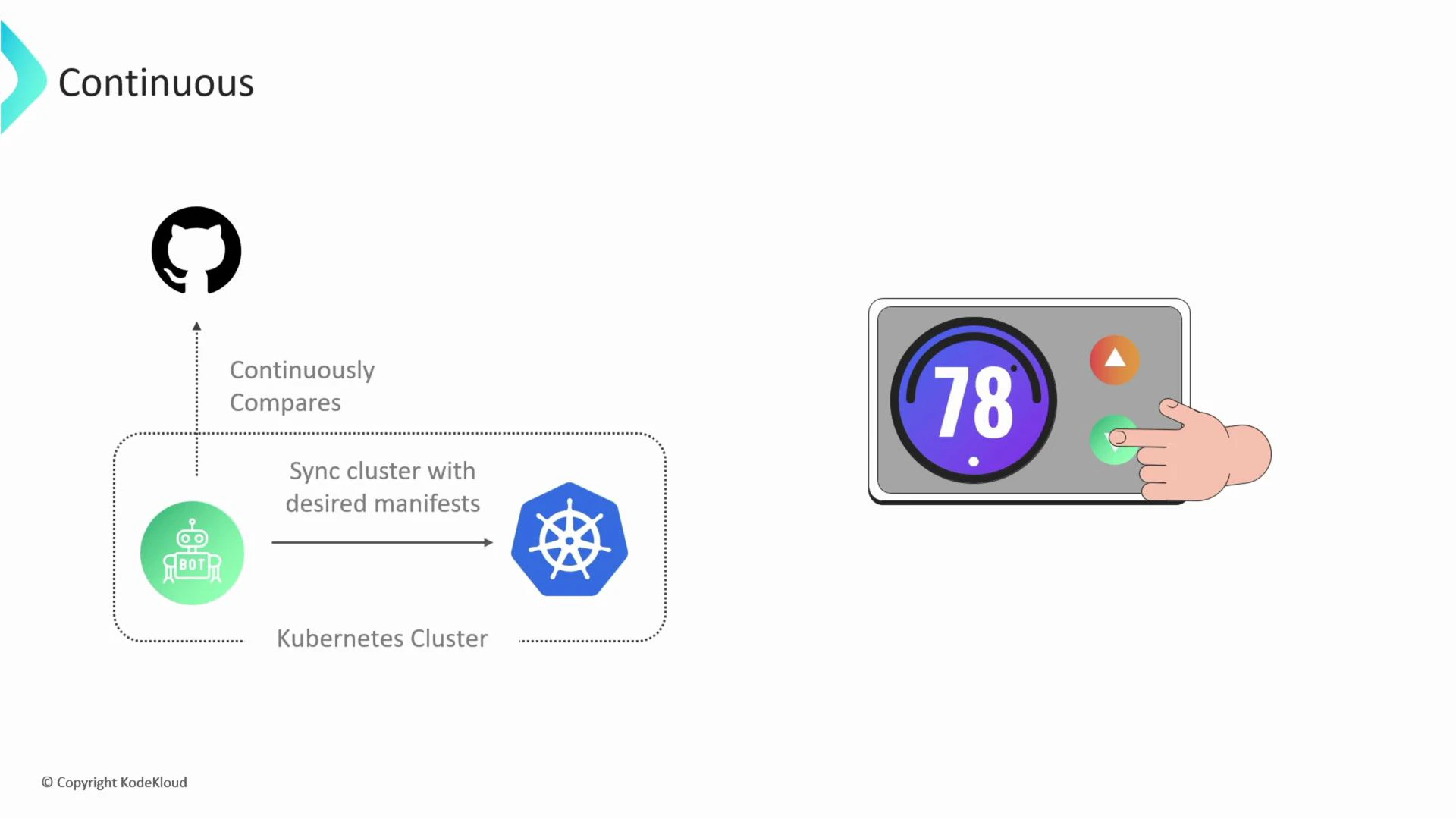
Continuous reconciliation reduces manual toil and improves reliability by keeping the actual system in sync with the state declared in Git.
2. Declarative
Declarative configuration describes the end state you want, not the exact sequence of commands to reach it. In imperative workflows you run kubectl commands directly; in declarative workflows you store YAML manifests in Git and let the GitOps operator apply them. Imperative example (creating resources via kubectl):- Easier to understand the system intent.
- The operator chooses how to apply changes and adapt to the environment.
- Git provides versioning and an audit trail for every change.
3. Desired State
Desired state is the canonical configuration stored in your state store (typically Git). It is the plan GitOps aims to realize in the running system. Example repository layout:- .k8s/manifests/service.yaml
- .k8s/manifests/deployment.yaml
- .k8s/manifests/configmap.yaml
- .k8s/manifests/ingress.yaml
4. State Drift
State drift occurs when the actual system state diverges from the desired state declared in Git. Drift can be caused by manual kubectl edits, failed deployments, or unauthorized changes. Why state drift is a problem:- Causes unexpected behavior and instability.
- Makes troubleshooting harder if there’s no single source of truth.
- Can introduce untracked or insecure configurations.
- Desired state (Git): deployment with 5 replicas.
- Actual state (cluster): someone ran kubectl scale to reduce replicas to 3 — this is drift.
5. State Reconciliation
State reconciliation is the automated process of detecting drift and bringing the actual state back into alignment with the desired state. GitOps operators (observe → diff → act) implement reconciliation continuously. Reconcile loop diagram: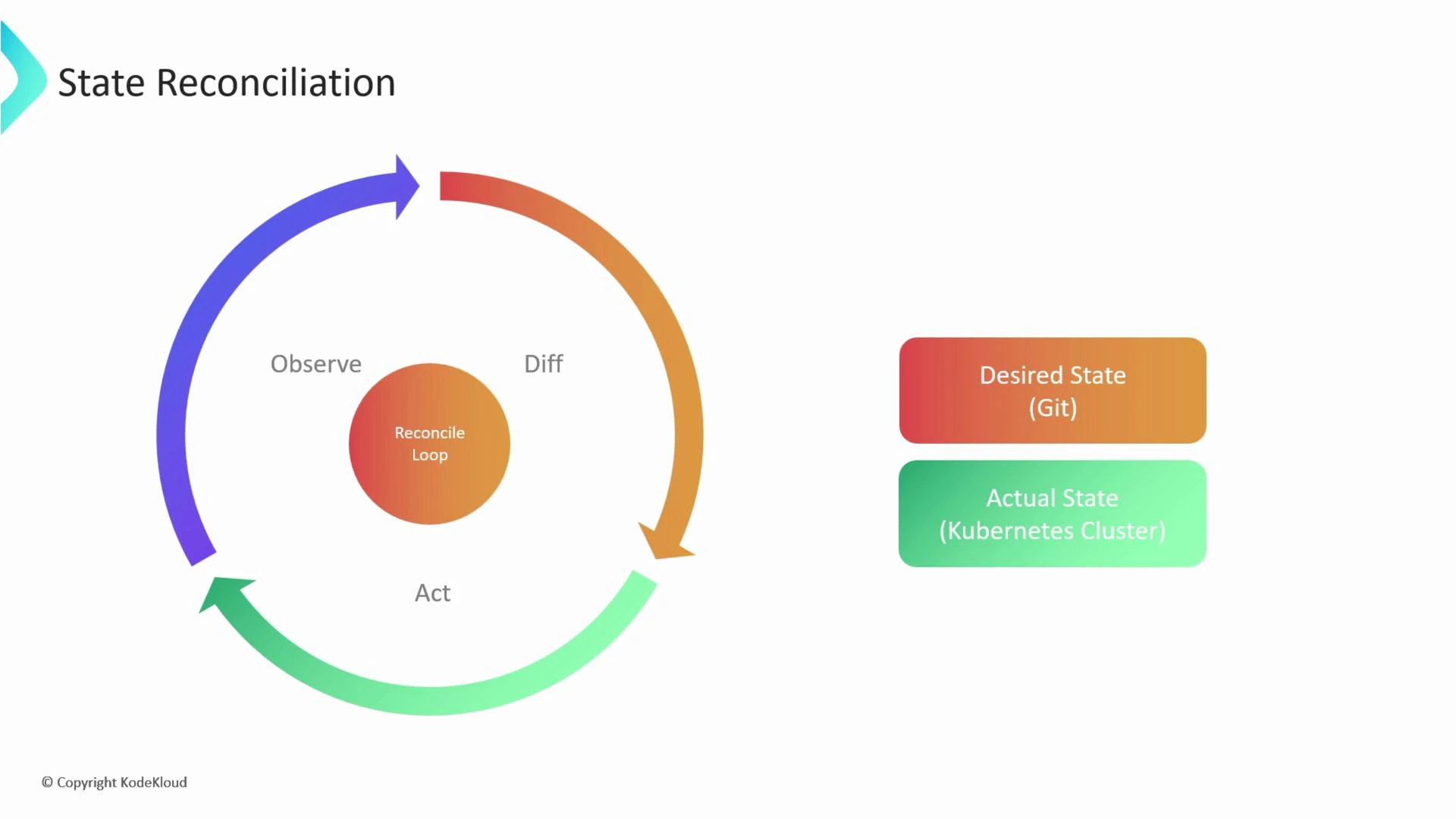
- Provides self-healing and resilience.
- Guarantees consistency with declared configuration.
- Reduces manual intervention and operational risk.
6. GitOps Managed Systems
A GitOps-managed system is any application or infrastructure component controlled via GitOps — most commonly Kubernetes clusters, but also cloud resources via tools like Terraform stored in Git. Everything needed to run and manage the system lives in the Git repository: namespaces, RBAC, deployments, services, monitoring stacks, etc.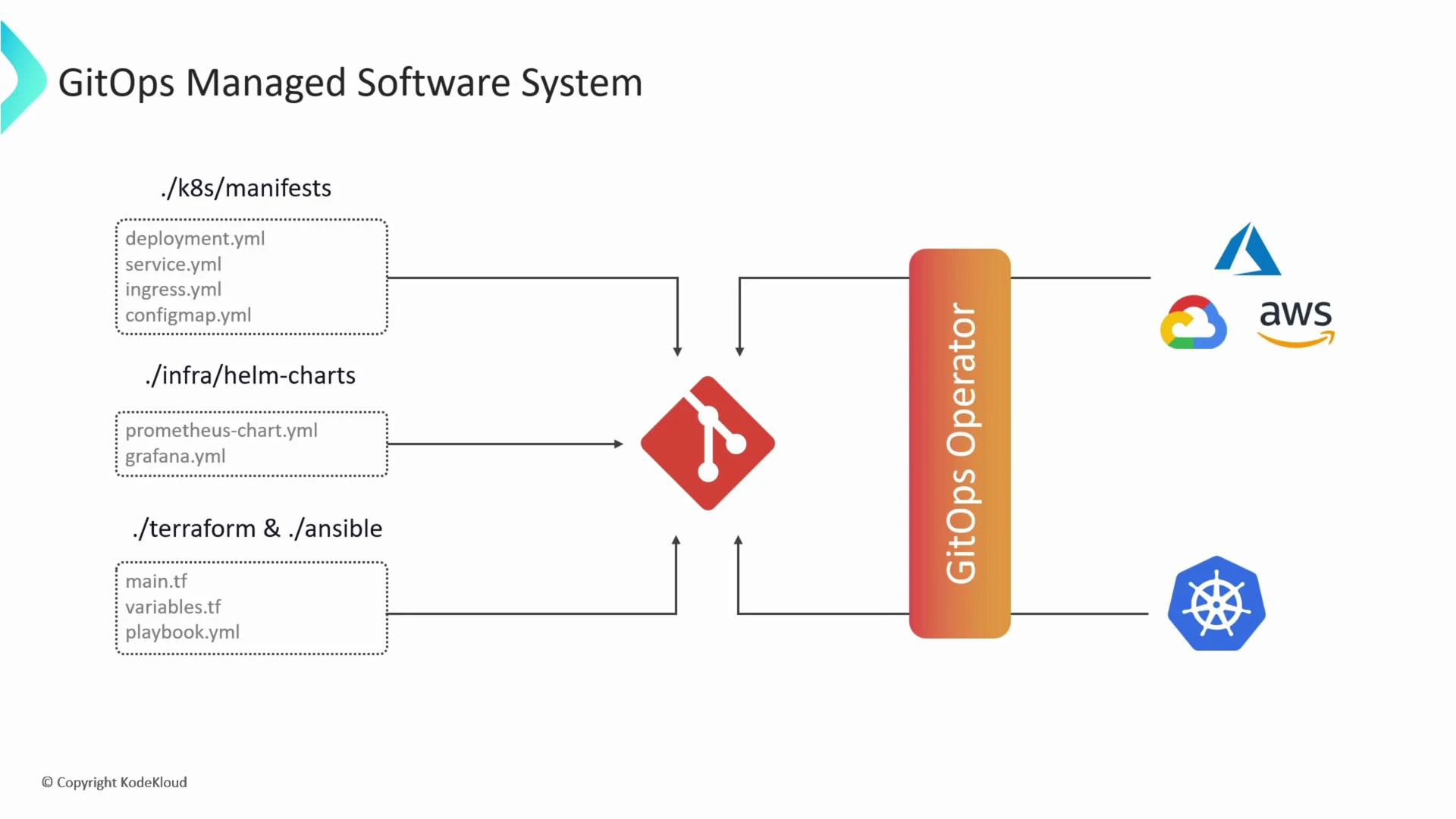
7. State Store
The state store is the centralized repository holding the desired state. Git is the most common state store because it provides:- A single source of truth
- Immutable history and audit trails
- Branching, pull requests, and code review workflows for collaboration
8. Feedback Loop
A feedback loop closes the cycle between deployment and operation: metrics, logs, and alerts inform adjustments to the desired state and reconciliation behavior. Monitoring and alerting tools detect problems in the running system and feed that information back to teams to trigger fixes or rollbacks. Example workflow:- GitOps operator deploys a new version.
- Prometheus detects increased error rates.
- Grafana dashboards visualize the issue; Alertmanager notifies the on-call team.
- Team reverts or patches the manifest in Git → reconciliation applies the fix.
- Prometheus: https://prometheus.io/
- Grafana: https://grafana.com/
- Alertmanager: https://prometheus.io/docs/alerting/alertmanager/
- Detect issues early in production.
- Improve desired-state definitions based on real-world behavior.
- Allow iterative improvements driven by telemetry.
9. Rollback
Rollbacks are fast recovery mechanisms to revert problematic changes. In GitOps, rollbacks are typically done by reverting commits in Git or by letting GitOps tools perform automatic rollbacks when they detect failures. Methods:- Git revert: create a new commit that undoes a previous change (preserves history).
- Operator-driven rollback: ArgoCD and similar tools can be configured to revert to a known-good state automatically if health checks fail.
- Speeds recovery after bad deployments.
- Minimizes downtime and risk.
- Gives teams confidence to ship changes more frequently.
Quick Reference Table
Tools & Further Reading
- ArgoCD: https://argo-cd.readthedocs.io/
- FluxCD: https://fluxcd.io/
- Kubernetes concepts: https://kubernetes.io/docs/concepts/
- Git basics: https://git-scm.com/docs
While GitOps automates reconciliation, ensure you have proper observability and guardrails (health checks, alerts, RBAC) in place—automation without visibility can amplify issues.