

-
Manual vs Automatic sync
- Automatic sync: Argo CD applies new or changed manifests from Git to the cluster as soon as it detects them (for example via a webhook).
- Manual sync: Argo CD detects the change but waits for a user or operator to trigger the sync operation.
-
Auto-pruning
- With pruning enabled, resources removed from Git are deleted from the target cluster during the next sync.
- With pruning disabled, deleting manifests from Git does not remove the corresponding resources from the cluster.
-
Self-heal (automatic reconciliation of out-of-band changes)
- With self-heal enabled, Argo CD automatically reverts manual or out-of-band changes made directly to the cluster (for example via kubectl), restoring the state defined in Git.
- With self-heal disabled, Argo CD does not automatically revert such manual changes.
Key points about the Argo CD syncPolicy automated block:
- Presence of the
automatedblock enables automatic sync; there is noenabledboolean—omittingautomatedleaves sync manual. automated.prune: trueenables automatic deletion of resources removed from Git.automated.selfHeal: trueenables automatic reconciliation of out-of-band cluster changes.
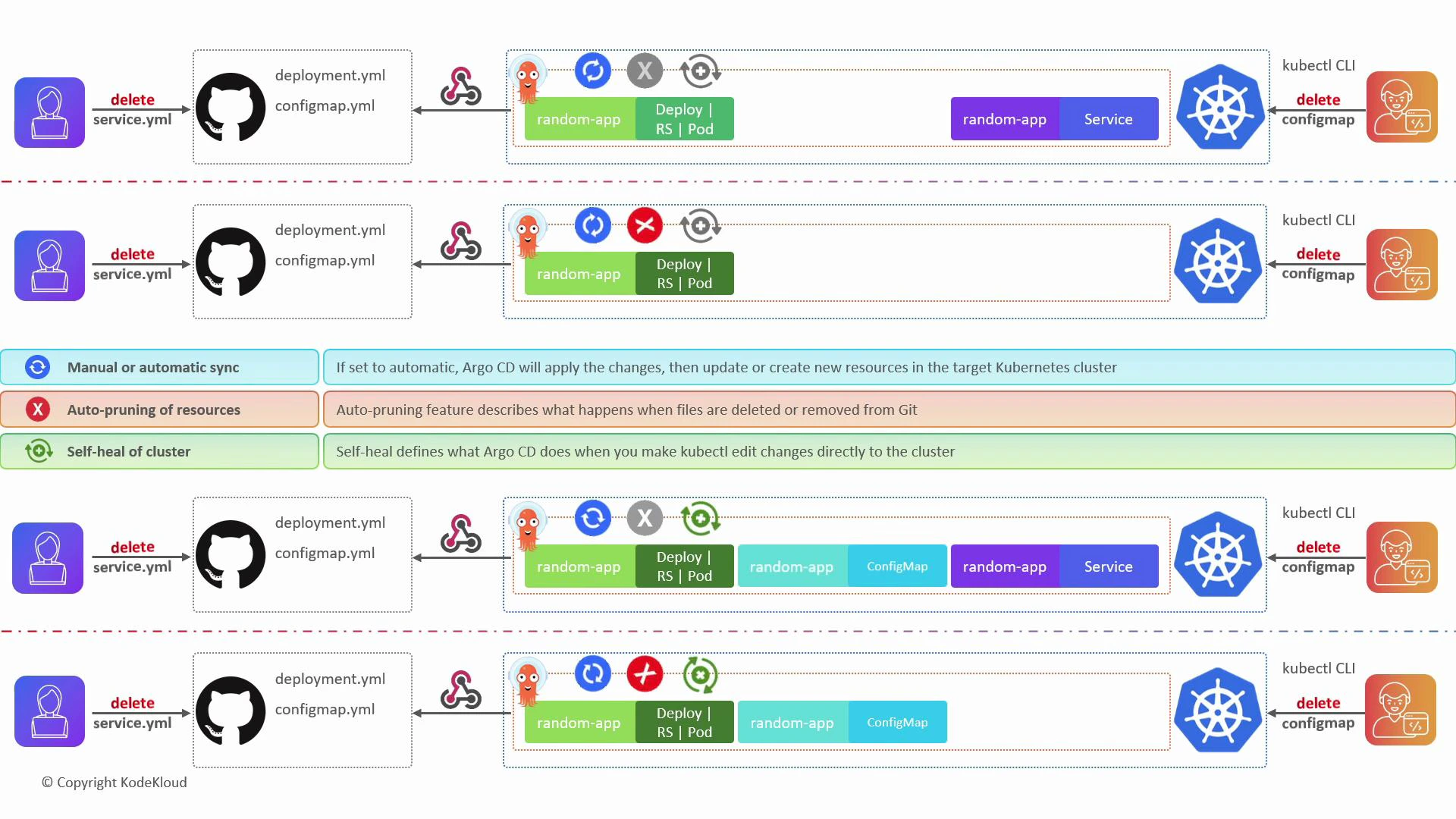
deployment.yaml and configmap.yaml. A webhook is set up so Argo CD learns about Git changes immediately. Below are four common combinations of flags and their effects.
- Automatic sync only (prune = false, selfHeal = false)
- Adding
service.yamlto Git: Argo CD applies it automatically to the cluster. - Deleting
service.yamlfrom Git: Argo CD does not remove the service from the cluster (no auto-prune). - Manually deleting the
configmapin the cluster via kubectl: Argo CD will not recreate it (self-heal disabled).
- Automatic sync + Auto-pruning (prune = true, selfHeal = false)
- Adding
service.yamlto Git: applied automatically. - Deleting
service.yamlfrom Git: Argo CD removes that resource from the cluster on the next sync (auto-prune enabled). - Manually deleting the
configmapin the cluster: Argo CD does not restore it (self-heal disabled).
- Automatic sync + Self-heal (prune = false, selfHeal = true)
- Adding
service.yamlto Git: applied automatically. - Deleting
service.yamlfrom Git: resource remains in cluster (prune disabled). - Manually deleting the
configmapin the cluster: Argo CD detects drift and recreates the resource from Git (self-heal enabled).
- Automatic sync + Auto-prune + Self-heal (prune = true, selfHeal = true)
- Adding
service.yamlto Git: applied automatically. - Deleting
service.yamlfrom Git: resource is removed from the cluster (auto-prune enabled). - Manually deleting the
configmapin the cluster: Argo CD recreates it from Git (self-heal enabled).
The following diagram visualizes these GitOps flows (initial Git repo:
deployment.yml, configmap.yml) and shows what happens when service.yml or configmap resources are deleted under different sync options.
- Use automatic sync to apply Git changes immediately and reduce manual steps.
- Enable prune to ensure the cluster mirrors deletions made in Git.
- Enable self-heal to automatically reconcile manual or out-of-band changes so the cluster continuously matches the Git-defined state.
- Argo CD documentation: https://argo-cd.readthedocs.io/en/stable/
- Git: https://git-scm.com/
- Kubernetes: https://kubernetes.io/
- GitHub webhooks: https://docs.github.com/en/developers/webhooks-and-events/about-webhooks