This guide demonstrates how to perform a manual synchronization in the Argo CD web UI. It walks through:
  • What happens when an application is configured with manual sync mode.
  • Creating cluster resources from Git via the Argo CD UI.
  • How Argo CD detects drift when live resources are edited directly.
  • Reconciling the application back to Git’s desired state.
Argo CD was configured with synchronization mode set to manual. That means Argo CD reads the manifests from the Git repository (the desired state) but will not apply changes to the cluster until you explicitly trigger a sync.

Desired manifests discovered by Argo CD

Argo CD inspects the Git repo and shows the desired manifests. For example, the Service manifest discovered by Argo CD:
apiVersion: v1
kind: Service
metadata:
  annotations:
    argocd.argoproj.io/tracking-id: highway-animation:/Service:highway-animation/highway-animation-service
  name: highway-animation-service
  namespace: highway-animation
spec:
  ports:
    - nodePort: 32000
      port: 3000
      protocol: TCP
      targetPort: 3000
  selector:
    app: highway-animation
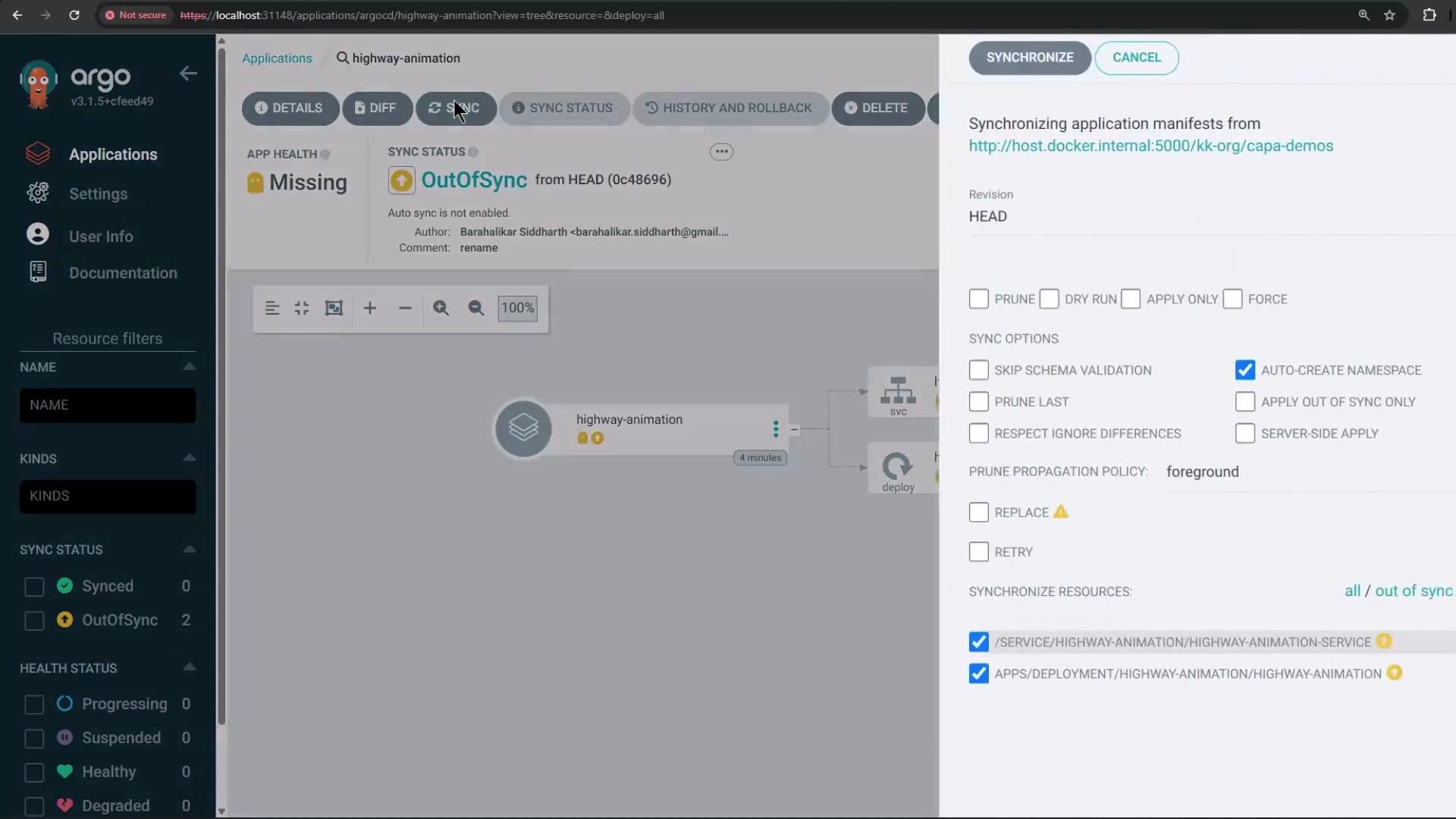
Because the application has not yet been applied to the cluster, there is no “live” manifest for these resources. To create them, use the Argo CD UI’s Synchronize action.
A screenshot of the Argo CD web UI showing the "highway-animation" application marked OutOfSync, with a Synchronize dialog open on the right and options like "Auto-create namespace" checked. The left sidebar shows navigation items (Applications, Settings) and resource filters.
When you click Synchronize, choose relevant options (for example, check “Auto-create namespace” if the namespace does not exist), then confirm the sync. Argo CD will pull the manifests from Git and apply them to the cluster: creating Namespace, Deployment, Service, ReplicaSet, and Pods.

Verify resources with kubectl

Use kubectl to confirm the namespace and resources were created:
# List namespaces
kubectl get ns
Example output after synchronization:
NAME                 STATUS   AGE
argocd               Active   169m
default              Active   14h
highway-animation    Active   32s
kube-node-lease      Active   14h
kube-public          Active   14h
kube-system          Active   14h
# List resources in the highway-animation namespace
kubectl -n highway-animation get all
Example output:
NAME                                         READY   STATUS    RESTARTS   AGE
pod/highway-animation-56456787df-h69n7      1/1     Running   0          39s

NAME                               TYPE       CLUSTER-IP      EXTERNAL-IP   PORT(S)           AGE
service/highway-animation-service  NodePort   10.103.55.242   <none>        3000:32000/TCP    42s

NAME                               READY   UP-TO-DATE   AVAILABLE   AGE
deployment.apps/highway-animation  1/1     1            1           41s

NAME                                             DESIRED   CURRENT   READY   AGE
replicaset.apps/highway-animation-56456787df     1         1         1       41s
The application in this example renders vehicles on a highway. The Deployment in Git uses image tag blue, so the running app shows blue vehicles.

Deployment (desired state in Git)

Deployment manifest stored in Git (replicas: 1, POD_COUNT env = “1”):
apiVersion: apps/v1
kind: Deployment
metadata:
  name: highway-animation
  namespace: highway-animation
spec:
  replicas: 1
  selector:
    matchLabels:
      app: highway-animation
  template:
    metadata:
      labels:
        app: highway-animation
    spec:
      containers:
      - name: highway-animation
        image: siddharth67/highway-animation:blue
        ports:
        - containerPort: 3000
        env:
        - name: POD_COUNT
          value: "1"

Manual change on the cluster (drift)

If a developer edits the live Deployment directly (for example using kubectl edit) and increases replicas to 5 and updates POD_COUNT to “5”, the live cluster will diverge from Git:
spec:
  replicas: 5
  template:
    spec:
      containers:
      - name: highway-animation
        image: siddharth67/highway-animation:blue
        env:
        - name: POD_COUNT
          value: "5"
After saving the edit, kubectl confirms the change:
kubectl -n highway-animation get deployments.apps highway-animation
# or the edit response
deployment.apps/highway-animation edited
The cluster will begin creating the additional pods:
kubectl -n highway-animation get pods
Example output while scaling up:
NAME                                      READY   STATUS              RESTARTS   AGE
highway-animation-56456787df-fks89        0/1     Pending             0          2s
highway-animation-56456787df-flqxp        0/1     ContainerCreating   0          3s
highway-animation-56456787df-h69n7        1/1     Running             0        118s
highway-animation-56456787df-wfh6d        0/1     Pending             0          3s
highway-animation-56456787df-zspp8        0/1     Pending             0          3s
highway-animation-7fd646d45c-j29tb        0/1     Pending             0          2s
highway-animation-7fd646d45c-q9sss        0/1     Pending             0          2s
Because the live Deployment now has replicas: 5 but Git defines replicas: 1, Argo CD detects drift and marks the application OutOfSync. Argo CD shows the live and desired values for the resource and highlights the difference.

Reconcile by syncing from Git

To restore the cluster to the Git-defined desired state, click Synchronize in the Argo CD UI. Argo CD will fetch manifests from Git and apply them to the cluster — scaling the Deployment back to 1 replica and updating POD_COUNT back to “1”. Extra pods created by the manual edit will be terminated. After a successful sync, the resource tree displays resources as Synced and Healthy:
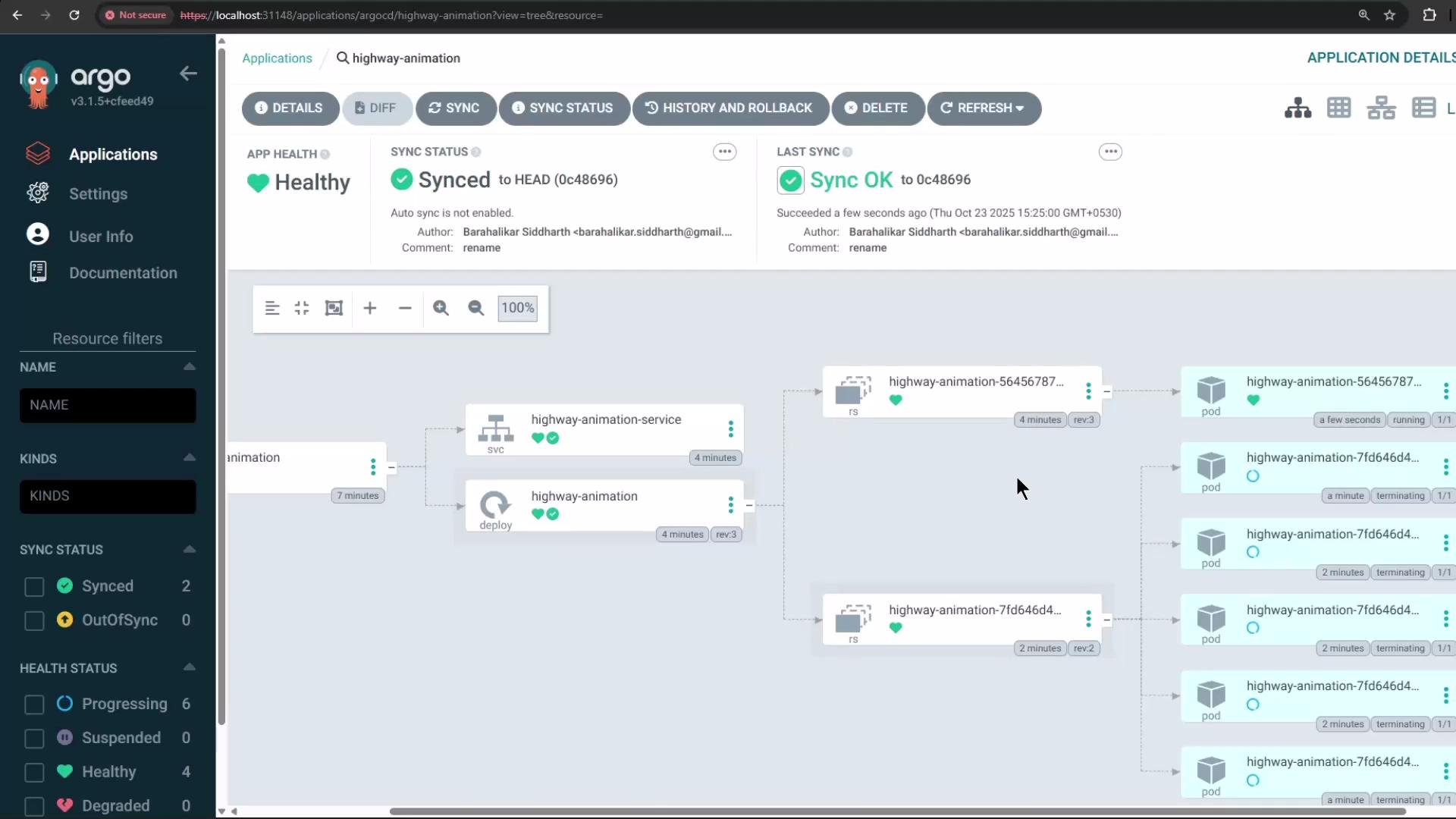
A screenshot of the Argo CD web UI for the "highway-animation" application showing App Health as Healthy and Sync status as Synced. The main area displays a resource tree diagram with service, deployment, replica sets and multiple pods, with a left sidebar for filters.
You can observe pods terminating while reconciliation proceeds:
kubectl -n highway-animation get pods
Example output during sync:
NAME                                    READY   STATUS      RESTARTS   AGE
highway-animation-56456787df-n9gf2      1/1     Running     0          20s
highway-animation-7fd646d45c-2tmg6      1/1     Terminating 0          75s
highway-animation-7fd646d45c-j29tb      1/1     Terminating 0          110s
highway-animation-7fd646d45c-p5c5x      1/1     Terminating 0          105s
highway-animation-7fd646d45c-qgsss      1/1     Terminating 0          110s
highway-animation-7fd646d45c-rwqff      1/1     Terminating 0          81s
Once the sync completes, only the single pod defined in Git remains and the Argo CD application reports Synced and Healthy.

Quick reference — kubectl commands used

CommandPurposeExample output
kubectl get nsVerify namespacesShows highway-animation namespace
kubectl -n highway-animation get allList resources created by the appPods, Services, Deployments, ReplicaSets
kubectl edit deployment <name> -n <ns>Edit a live resource (creates drift if managed by Git)deployment.apps/<name> edited
kubectl -n highway-animation get podsWatch pod creation/termination during scaling or syncPod status lines (Running, Pending, Terminating)

Further reading

Argo CD treats Git as the source of truth. Manual edits to live cluster resources cause drift (OutOfSync). To make a permanent change, update the manifests in the Git repository and then let Argo CD apply those changes (or use Argo CD’s UI to sync Git into the cluster). Avoid modifying cluster-managed resources directly unless you intentionally want to bypass Git.
That’s all for this demo.

Watch Video