In this lesson you’ll:
  • Create a namespace.
  • Deploy an Argo Rollout with a blue/green strategy.
  • Verify the application’s /health endpoint — suitable for use in an AnalysisTemplate and AnalysisRun to gate promotion.
The Rollout below (save as rollout-initial.yaml) runs five replicas of the “highway-animation” app (blue variant), sets a POD_COUNT environment variable, and configures blue/green with manual promotion (autoPromotionEnabled: false) so promotion can be done manually or via an analysis.
# rollout-initial.yaml
apiVersion: argoproj.io/v1alpha1
kind: Rollout
metadata:
  name: highway-bluegreen
  namespace: argo-analysis-lab
spec:
  replicas: 5
  selector:
    matchLabels:
      app: highway-bluegreen
  template:
    metadata:
      labels:
        app: highway-bluegreen
    spec:
      containers:
      - name: highway-bluegreen
        image: siddharth67/highway-animation:blue
        ports:
        - containerPort: 3000
        env:
        - name: POD_COUNT
          value: "5"
  strategy:
    blueGreen:
      activeService: highway-bluegreen-active
      previewService: highway-bluegreen-preview
      autoPromotionEnabled: false
---
apiVersion: v1
kind: Service
metadata:
  name: highway-bluegreen-active
  namespace: argo-analysis-lab
spec:
  type: NodePort
  selector:
    app: highway-bluegreen
  ports:
    - port: 80
      targetPort: 3000
      nodePort: 32079
---
apiVersion: v1
kind: Service
metadata:
  name: highway-bluegreen-preview
  namespace: argo-analysis-lab
spec:
  type: NodePort
  selector:
    app: highway-bluegreen
  ports:
    - port: 80
      targetPort: 3000
      nodePort: 31058
Create the namespace and apply the manifest:
# create namespace
kubectl create namespace argo-analysis-lab

# apply the rollout and services
kubectl -n argo-analysis-lab apply -f rollout-initial.yaml
Expected output after applying:
rollout.argoproj.io/highway-bluegreen created
service/highway-bluegreen-active created
service/highway-bluegreen-preview created
Verify pods and services in the namespace:
kubectl -n argo-analysis-lab get pods,svc
Example output (NodePort mappings shown):
NAME                                            READY   STATUS    RESTARTS   AGE
pod/highway-bluegreen-xxxxx                     1/1     Running   0          30s

NAME                                    TYPE       CLUSTER-IP      EXTERNAL-IP   PORT(S)            AGE
service/highway-bluegreen-active        NodePort   10.110.85.145   <none>        80:32079/TCP       30s
service/highway-bluegreen-preview       NodePort   10.108.197.140  <none>        80:31058/TCP       30s
Open the Argo Rollouts UI and switch to the argo-analysis-lab namespace to confirm the Rollout and blue/green details.
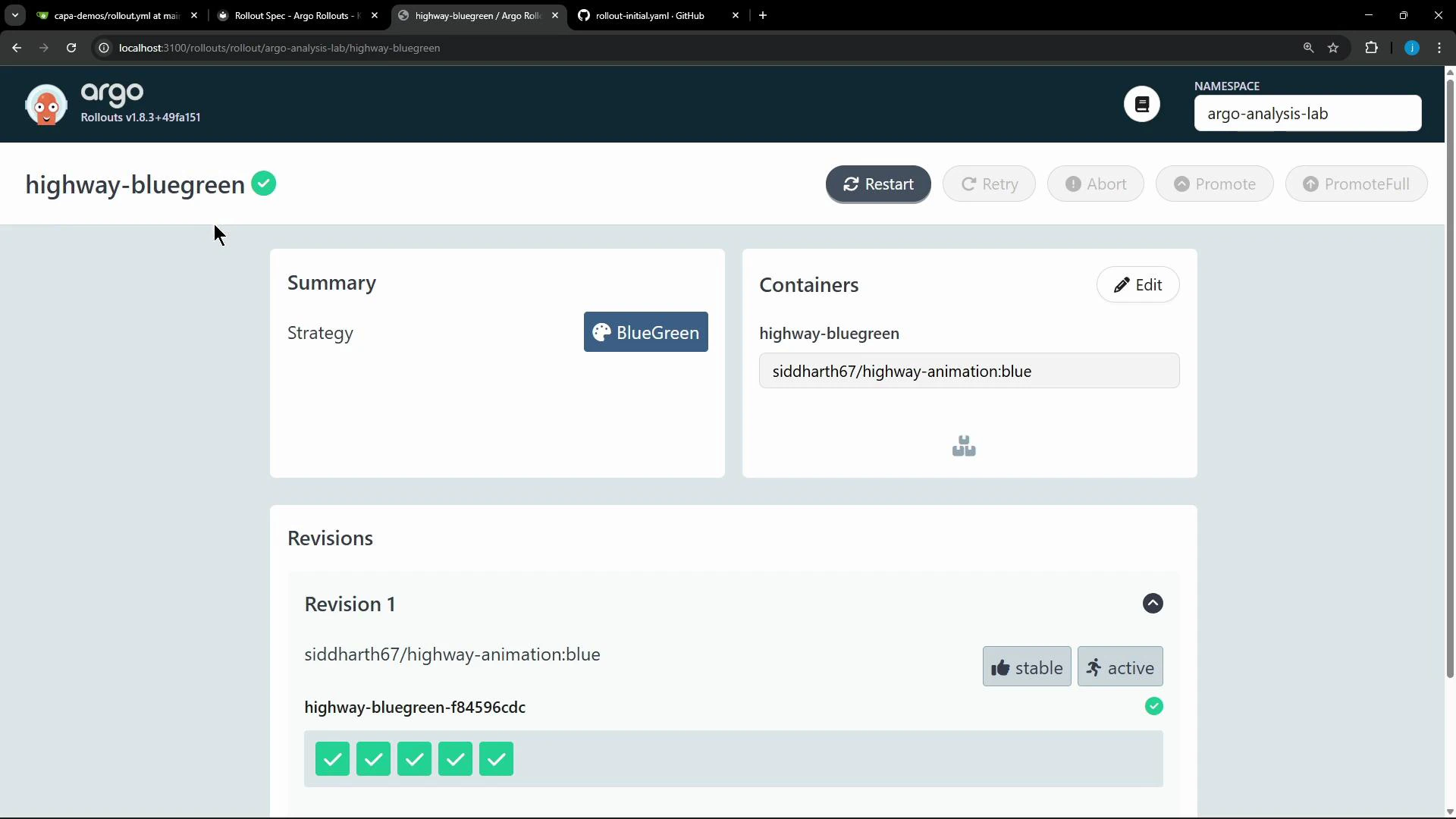
A screenshot of the Argo Rollouts web UI for the "highway-bluegreen" rollout showing a BlueGreen strategy, container image "siddharth67/highway-animation:blue", and a Revision 1 marked stable and active with green checkmarks. The top-right shows the namespace "argo-analysis-lab" and control buttons like Restart, Retry, Abort, and Promote.
Access the app via the active service NodePort on any cluster node: http://<node-ip>:32079 The application exposes a /health endpoint that returns a simple JSON payload:
{
  "status": "OK",
  "message": "Highway Animation Server is running"
}
This /health endpoint is a good target for an Argo Rollouts AnalysisTemplate. An AnalysisRun can query the endpoint and assert that "status" == "OK" before promoting the preview to active.
The Rollout is configured with autoPromotionEnabled: false. Promotion must be performed manually via the Argo Rollouts UI/CLI or gated using an AnalysisRun. Also be cautious exposing NodePorts in production clusters — prefer Ingress or LoadBalancer for controlled external access.
Resources at a glance:
Resource TypePurpose
RolloutManages blue/green deployment of highway-bluegreen with 5 replicas and manual promotion.
Service (active)NodePort service routed to the active replica set (port 32079).
Service (preview)NodePort service routed to the preview replica set (port 31058).
Links and references: That’s the health-check setup for this Rollout. You can now author an AnalysisTemplate that probes /health, run an AnalysisRun during promotion, and use its result to gate the transition from preview to active.

Watch Video