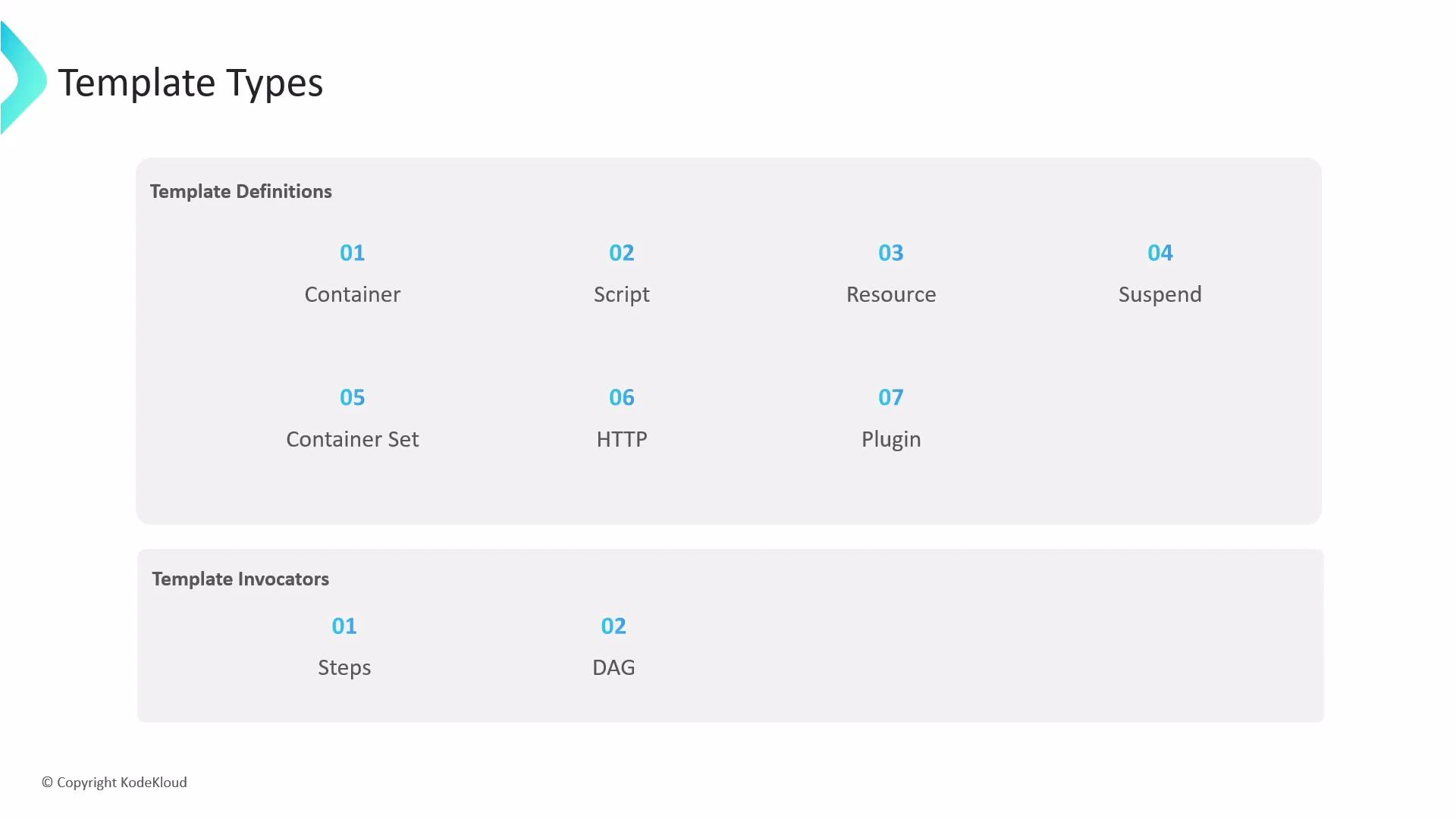
In this lesson/article we will learn about template types in Argo Workflows. Templates can be thought of like functions: they define the instructions to execute. The spec of a workflow includes an entrypoint field that specifies the “main” template — the template executed first. There are nine template types in total, split into two categories: template definitions and template invokers. Below is a brief overview of each.
A presentation slide titled "Template Types" showing two sections: "Template Definitions" (01 Container, 02 Script, 03 Resource, 04 Suspend, 05 Container Set, 06 HTTP, 07 Plugin) and "Template Invokers" (01 Steps, 02 DAG). The slide has a KodeKloud copyright at the bottom.
Container template (definition)
  • The container template is the most common template type. It schedules a Kubernetes container and its spec follows the same container fields as a Kubernetes Pod container (image, command, args, env, resources, volume mounts, etc.). Use it whenever you want to run a container image directly.
Script template (definition)
  • The script template is a convenience wrapper around a container. It provides the same container fields (image, command) and adds a source field where you can embed a script directly. Argo writes the source into a file inside the container and executes it using the provided command.
When using a script template, make sure the command you provide runs the interpreter (for example, python) and that the image includes that interpreter. The script content is placed into a file and executed inside the container.
Example script template:
apiVersion: argoproj.io/v1alpha1
kind: Workflow
metadata:
  generateName: random-number-
spec:
  entrypoint: random-number
  templates:
  - name: random-number
    script:
      image: python:3.6-alpine
      command: [python]
      source: |
        import random
        i = random.randint(100, 2000)
        print(i)
Resource template (definition)
  • Use resource templates to create, apply, delete, or patch Kubernetes resources from within an Argo workflow. The manifest to manage is provided inline in the manifest field.
Example that creates a ConfigMap:
apiVersion: argoproj.io/v1alpha1
kind: Workflow
metadata:
  generateName: k8s-resource-
spec:
  entrypoint: k8s-resource
  templates:
  - name: k8s-resource
    resource:
      action: create
      manifest: |
        apiVersion: v1
        kind: ConfigMap
        metadata:
          generateName: dev-env-
        data:
          key: value
Suspend template (definition)
  • A suspend template pauses workflow execution. You can suspend for a duration (using the duration field) or indefinitely until a manual resume. Resuming can be done via the CLI, the API, or the UI.
Example suspend template and resume command:
apiVersion: argoproj.io/v1alpha1
kind: Workflow
metadata:
  generateName: delay-
spec:
  entrypoint: delay
  templates:
  - name: delay
    suspend:
      duration: "20s"
CLI resume (example):
argo -n argo resume delay-xyzb
ContainerSet template (definition)
  • The containerSet template runs multiple containers in the same pod (useful when you want sidecars or co-located containers that share volumes and localhost networking). The field is containerSet and contains an array of containers.
Example:
apiVersion: argoproj.io/v1alpha1
kind: Workflow
metadata:
  generateName: container-set-template-
spec:
  entrypoint: main
  templates:
  - name: main
    containerSet:
      containers:
      - name: a
        image: rancher/cowsay
        command: [cowsay]
        args: ["Container A!!!!"]
      - name: b
        image: rancher/cowsay
        command: [cowsay]
        args: ["Container B!!!!"]
HTTP template (definition)
  • An HTTP template performs HTTP(S) requests. The response body is automatically exported into the template’s result output parameter. You can specify the URL, method (defaults to GET), headers, and body.
Example:
apiVersion: argoproj.io/v1alpha1
kind: Workflow
metadata:
  generateName: http-template-example-
spec:
  entrypoint: fetch-todo-item
  templates:
  - name: fetch-todo-item
    http:
      url: "https://x.y.com/todos/1"
      method: "GET"
      headers:
      - name: "Content-Type"
        value: "application/json"
Plugin template (definition)
  • Plugin templates let Argo workflows use executor plugins, extending behavior without modifying Argo core. Built-in and third-party plugins are supported. In the example below, the ArgoCD plugin is used to trigger a sync of applications, so no container is executed; Argo connects to an ArgoCD server and performs the action.
Example using the ArgoCD plugin:
apiVersion: argoproj.io/v1alpha1
kind: Workflow
metadata:
  generateName: argocd-example-
spec:
  entrypoint: main
  templates:
  - name: main
    plugin:
      argocd:
        serverUrl: https://my-argocd.com/
        actions:
        - sync:
            project: highway-animation
            apps:
            - highway-animation
            - health-check-app
Template invokers
  • Steps and DAG templates are the two invoker types. They don’t execute work themselves but define how other templates (definitions) are invoked and composed into a workflow. Use Steps for sequential/parallel step-based flows and DAG for dependency-based execution graphs.
With these template types you can express a wide variety of orchestration patterns — from simple container tasks to complex multi-resource automation and integrations with other systems.

Watch Video